"I would like to check the request, but an error occurs on the login screen." Such inquiries might seem to be pulled by the word "request." First, I want to know the error that occurred during login. On the other hand, if it's a refund request due to double deductions, it would be better to forward it to the person handling the process.
Last time, I used scikit-jev to prioritize inquiries. This time, I will start by letting the local model choose one of the following instructions. Based on the misclassifications found in this process, I will build an evaluation method for Gemma's official documentation and Ollama/vLLM. I used AI to create this article, and the local execution results published are confirmed by me. Previous Qiita article
| inquiry | expected guidance | label returned by local execution |
|---|---|---|
| I want to check the request but can't log in | access (error confirmation) | access |
| I want a refund because of double deductions | other (forward to handler) | clarify (recheck information) |
Scope of confirmation on November 12, 2026 I could not confirm the official announcement of Gemma 5, the distributed weights, or the official benchmarks. The generation comparison graph uses the values from Google's published Gemma 3 and 4. For the inquiry execution logs, I used the local Qwen3.5 to verify the comparison procedure.
To confirm the measurement method first, I used a Mac (Apple M2 Max, 64 GB, macOS 26.3.1) with Ollama 0.18.0 and qwen3.5:4b (Q4_K_M, local ID 2a654d98e6fb). I sent 16 synthetic items one by one, and excluded one warm-up item from each method in the aggregation. The temperature was set to 0, think: false, and non-streaming. The time measured was from when the Python client started the request to when the response was read and processed. Ollama's Qwen3.5 model page · Ollama Chat API
Output method Number of measurements Correct answer JSON format violation Median response completion time Select from 4 candidates in JSON 16 15 0 629.9 ms Free Japanese text 16 Not graded Not applicable 1,260.5 ms

Drawn from the local execution log. Points represent each request, and the orange line represents the median. The two methods have different lengths for prompts and outputs.
The only case that was excluded by the selected method was the request for a refund with double deductions. The desire to get a refund was clear, and "other" to pass it to the responsible person was the correct answer among the four candidates. The "clarify" returned by the model is a permitted value, so it passes the JSON Schema validation. Below are two entries from the execution log, narrowed down to the required items.
[ { "id" : "A02" , "expected" : "access" , "action" : "access" , "ms" : 632.7 } {"id":"O01","expected":"other","action":"clarify","ms":670.4} ] 自由文では「契約を今日で解約したい」に対し、「契約解約の手続きは、請求明細を確認した上で請求履歴から対応可能です」と返しました。プロンプトに書いたのは請求明細の確認方法だけです。候補選択の誤答と、自由文で根拠のない手順を案内する誤りは、別々に記録すると修正箇所を見つけやすくなります。この結果をどう見るか。 JSON選択の応答時間は今回の測定で約0.63秒、自由文は約1.26秒でした。指示も出力の長さも違うので、速度差をJSON Schemaの効果とは言えません。私なら、振り分けだけが必要な段階では候補選択を先に試します。案内文まで必要なら、まず選んだラベルを確認し、確認済みの文面を対応付けると、存在しない手順をその場で作る余地を減らせます。
手元で2件を、スキーマあり・なしで試す
起動済みのOllamaで ollama list を実行し、qwen3.5:4b がなければ ollama pull qwen3.5:4b で取得します。以下をPython 3で実行すると、今回の16件から抜き出した2件を、それぞれスキーマあり・なしで送れます。前回のscikit-jev記事のサンプルは推論応答を合成していました。ここでは実際にOllamaのローカルAPIを呼び、同じリクエストを基に format の有無だけを切り替えます。タグは配布時期によって別の重みを指すことがあるので、再計測では ollama list のIDか /api/tags の digest も記録します。OllamaのStructured Outputs · Ollamaのモデル一覧API
import json from urllib.request import Request, urlopen invoice : 請求履歴から対象月の明細をご確認ください。 , access : ログイン画面に表示されるエラーメッセージをお知らせください。 , clarify : どの画面で、何をしようとしたときに問題が起きましたか? , other : 状況は明確だが、上の案内はどれも適切でない。担当者に回す。 , } instructions = ( 問い合わせへの次の案内を一つ選んでください。 情報不足で案内を決められない場合は clarify、 要望は明確だが対応する案内がない場合は other を選んでください。 \n + json . dumps ( choices , ensure_ascii = False ) + ' JSON object { " action ": " candidate ID ", } ' ) schema = { " type ": " object ", , " properties ": { " action ": { " type ": " string ", , " enum ": " list (" choices ")} " required ": " [" action "]", , " additionalProperties ": " False ", } cases = { object } , + ' JSON object { " action ": " candidate ID ", } ' ) schema = { " type ": " object ", , " properties ": " "{ " action ": " "{ " type ": " "string "", " ", " "enum "": " "list "(" "choices "")} " "required "": " "[" "action ""]", " ", " " "additionalProperties "": " "False "", " } cases " "= "{ "object "} " ", " ("A02", "I want to confirm the request, but first I can't log in because of an error.", "access"), ("O01", "The same amount was charged twice. Please refund one of them.", "other"), ] for case_id, ticket, expected in cases: payload = { "model": "qwen3.5:4b", "stream": False, "think": False, " options " : { " temperature " " : 0 , " num_predict " ": 48 }, " " messages " ": [ { " "role " " "system " ", " "content " " "text " " ": ticket "}, ensure_ascii "= False ")}, ], } } for use_schema in ( "False ", True "): body = { payload , format : schema } if use_schema else payload request = Request( http://127.0.0.1:11434/api/chat , data = json.dumps(body, ensure_ascii = False ).encode() , headers = { 'Content-Type' : 'application/json' } ) with urllib.request.urlopen(request, timeout = 90) as response: raw = json.load((response))["message"]["content"] try: parsed = json.loads(raw) if isinstance(parsed, dict) else None except json.JSONDecodeError: parsed = None action = parsed.get("action") if isinstance(parsed, dict) else None and set ( parsed ) == { " action " } ) mode = " schema present " if use_schema else " schema absent " verdict = " valid " if valid and " action == expected else " invalid " print(f"{case_id} {mode} 期待={expected} 応答={raw} 形式={form} 判定={verdict}")When I ran this code, the following four lines were returned on my end.
A02 No schema 期待=access 応答={"action":"access"} 形式=有効 判定=正解 A02 With schema 期待=access 応答={"action":"access"} 形式=有効 判定=正解 O01 No schema 期待=other 応答={"action":"clarify"} 形式=有効 判定=誤答 O01 With schema 期待=other 応答={"action":"clarify"} 形式=有効 判定=誤答2. Even with JSON Schema, the error of double request remains.
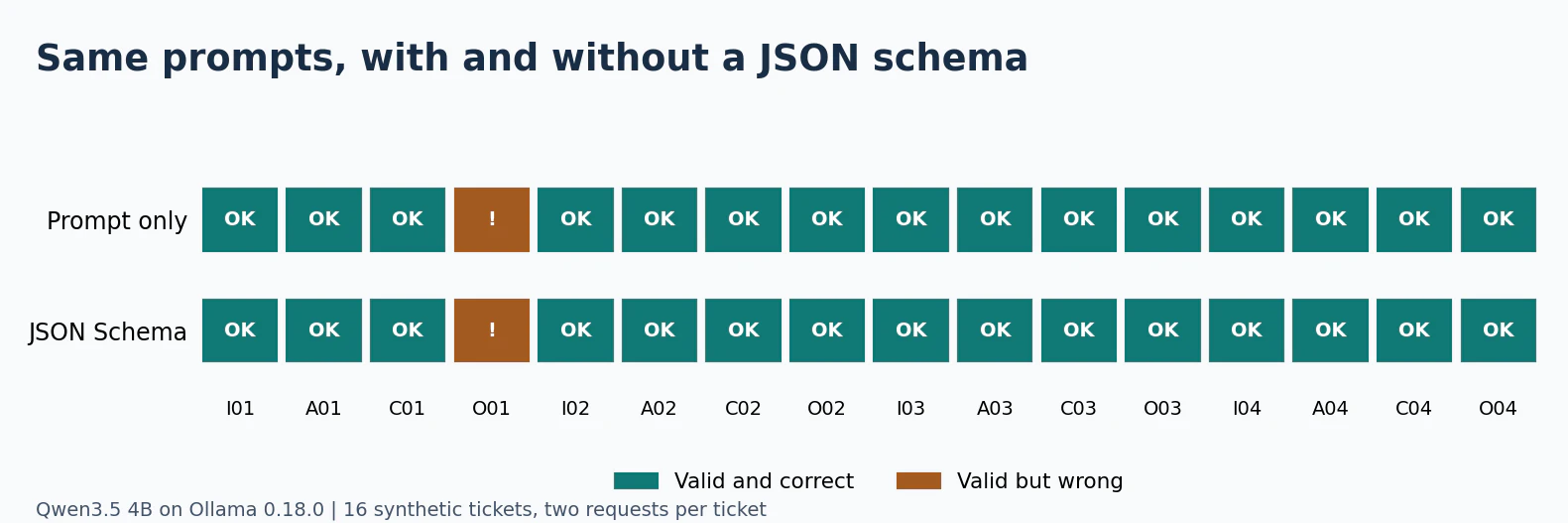
In the previous measurement, the prompts were different depending on whether JSON was selected or free text was written. So I sent the same 16 cases again,changing only the presence or absence of the format field in the request. Even without a schema, the prompt requested JSON, and I aligned the output limit, temperature, and thinking mode. I warmed up each method individually and shuffled the order of sending for each case during the measurement. Ollama's format field
Measured the same 16 cases Valid JSON and labels Correct guidance Incorrect cases Prompt requested JSON 16/16 15/16 O01 clarify Prompt and JSON Schema 16/16 15/16 O01 clarify
Drawn from the execution log. Each column represents the same query, and the orange ! indicates cases where JSON and labels were valid but the guidance was incorrect.
Both cases had O01's output as {"action":"clarify"}. Since there were no format violations even when the schema was violated in this case of 16 items, the number of format violations reduced cannot be judged from this measurement. Next, I would increase examples for "clear request but candidate excluded" and "original request unclear" separately, and count the correct answers. What caught my attention in this log was that the model chose "clarify" even though the intent to refund was clear. If I attempt to fix this, I would include examples such as "requests that require the agent's procedures, such as refunds or cancellations" in the other explanation. By separating the cases where such examples are shown from the cases where they are evaluated, it would be easier to determine whether the increase in correct answers is due to memorization of the wording.
3. Check if Gemma 5 is available, and investigate the official announcement and distribution channels
In Google's release list and model list, I confirmed that Gemma 4 is the last general-purpose model with a number. At the time of confirmation, there were no publicly available models on Hugging Face that matched gemma-5. Ollama confirmed the manifest for gemma5:latest, but returned an HTTP 404. From this 404, we can only know that the name and tag we searched for could not be retrieved at that time.Google's release list · Gemma's model list · Hugging Face's Google public model search · Ollama's library search
When making the same confirmation, in addition to the Hugging Face search, I also checked gemma4:latest that was already distributed in the same registry. At the time of confirmation, the search results were [], and the HTTP status code for the manifest was gemma4: 200, gemma5: 404.
curl -fsS 'https://huggingface.co/api/models?author=google&search=gemma-5' for family in gemma4 gemma5; do curl -sS -o /dev/null -w "$family: %{http_code}\n" \ https://registry.ollama.ai/v2/library/$family/manifests/latest" doneOn October 28th, Omar Sanseviero, who was involved in the announcement of the quantized models of Gemma 4, collected desired features for future Gemma models on X. The original post confirms the request for features, but there is no mention of the model name or release date. Omar Sanseviero's X post · Google's QAT announcement (author column)
The most recent related announcement is the EmbeddingGemma 2 released on October 6th. It is an embedding model with 740M parameters based on the architecture of Gemma 4, allowing you to search text, images, audio, and video in the same vector space. If used in a support channel, the role division could be considered as: the embedding model for searching past examples, and the generation model for selecting the current information based on the search results. Google's EmbeddingGemma 2 announcement · EmbeddingGemma 2 paper
Where would I start looking to try it out? If the needs are collected on X, it becomes clear what is expected next. The judgment for execution is based on the model ID from the official model card and the record of loading weights using the runtime. Especially, since the search embedding and the current selection of information are separate tasks, when using EmbeddingGemma 2, we would measure the search accuracy and the correct rate of distribution separately.
4. Viewing the appeal of Gemma 4 from the perspective of score, memory, and distribution

Drawing from the table in Google's Gemma 4 model card. The score for the instruction-tuned model shows "no think" for Gemma 3 27B. Official model card benchmark table · Google's benchmark diagram announcement
Evaluation Gemma 3 27B Gemma 4 12B Unified Difference MMLU Pro (problems across a wide range of fields) 67.6% 77.2% +9.6 points GPQA Diamond (problems in specialized science) 42.4% 78.8% +36.4 points LiveCodeBench v6 (Competitive Programming) 29.1% 72.0% +42.9 points What's notable is that the 12B model, with fewer parameters, outperformed the previous generation's 27B in these three items from the official table. Google introduced the 12B as a model that can run on a notebook PC and adopted a configuration that omits separate encoders for vision and audio. If similar changes occur in the next generation, in addition to the top performance of higher models, whether a model size that fits into local memory can reach a certain level would change model selection . The table above also includes differences in inference settings across generations. Google's Gemma 4 12B announcement · Gemma 4 Technical Report
The model card also publishes the MRCR results, which involve extracting multiple pieces of information from long inputs, in addition to the upper limit of supported context length. For example, the results at 128K are 43.4% for 12B and 66.4% for 31B. If the purpose is to provide a long query history at once, after checking the upper limit numbers, it might be worth trying to extract clues placed at the beginning, middle, and end of the history. When using a quantized model, the types of weights actually distributed are also recorded. Official Model Card · Google's Gemma 4 QAT announcement
How to interpret the numbers for E2B and 26B A4B
Gemma 4 Models Model Card Parameters Context Limit Audio Input E2B Effective 2.3B, embedded 5.1B 128K Supported E4B Effective 4.5B, embedded 8B 128K Supported 12B Unified Total 11.95B 256K Supported 26B A4B Total 25.2B, effective 3.8B per token 256K — 31B Total 30.7B 256K — E2B and E4B refer to embeddings per layer. 26B A4B uses MoE, employing experts selected per token. Both differ in the number of parameters used for computation and the number of parameters kept as weights. When selecting a device, in addition to the size of the distribution file, we check the memory after loading and the increased KV cache when extending input.Official Model Card Configuration Table · Gemma 4 Technical Report
Google has published the weights of QAT (Quantization-Aware Training) integrated during learning for Gemma 4. There is an example where the memory usage of E2B is reduced to approximately 1 GB in a mobile-friendly format. This is a specific publication value, so the required memory for GGUF or MLX on your own device depends on the file and runtime conditions.Google's QAT Announcement · Google's Memory Usage Diagram at Load Time
Memory Considerations. For example, if you only have the query text, you can try with a smaller model. However, if you use images or voice from calls directly, the input format becomes the initial condition. Even with the same model name, the required memory varies depending on the distribution format and context length. It seems better to narrow down candidates using the model table first, then test with input of the desired length on the actual device.
As distribution expands, the ways to test also increase.
Google announced in August 2026 that the Gemma series has reached 1 billion downloads. This represents the overall distribution scale of the series. For Gemma 4, Google distributes weights under Apache 2.0 and provides guidance on integration with Ollama and vLLM. In the next generation, the scope of testable applications will expand further once the compatibility with your own hardware format and inference engine is confirmed alongside the official model card.Google's Cumulative Download Announcement · Official Announcement of Gemma 4 · Ollama's Gemma 4 Library · vLLM's Gemma 4 Guide
Consideration of Published Values. The difference in competitive programming stands out, but the strength regarding Japanese queries cannot be inferred from these numbers. For this use case, we select candidates based on the public score, then pass in sentences containing both "request" and "login," as well as out-of-scope requests like refund. If this area improves in the new generation and fits within the same machine, it adds another reason to switch.
5. What to Compare Between Ollama and vLLM
Imagining the Comparison Process (Image Generation).
First, we test with 16 synthesized Japanese queries. We prepare four each of request details, login errors, insufficient information, and requests without corresponding candidates, then ask the user to select one of the next instructions. The correct labels are decided before sending the request.
Synthesized Queries Expected Action Where can I see the previous month's invoice? invoice I want to check the invoice, but an error occurs during sign-in access The screen does not advance clarify Please refund one of the two as it was double charged other Using the same prompt and JSON Schema, for Ollama, we specify the schema in /api/chat, and for vLLM, in /v1/chat/completions structured_outputs.json. For example, if the second response returns {"action":"invoice"}, the JSON format validation passes, but the guidance is incorrect. HTTP errors or timeouts are counted in the number of cases, and the denominator for accuracy is the total number of sent cases.Ollama's Structured Outputs · vLLM's Structured Outputs
If we can confirm the response with the first case, we record the time taken for the initial load and the response completion time after warming up. For the rounds measuring simultaneous requests, we record the time to the first output token (TTFT), the time until the response completes, and the throughput in tokens per second across all requests. As a publicly published measurement example, the vLLM project shows the number of concurrent requests and TTFT and throughput in a chart for Gemma 4 E4B.vLLM Project's Measurement Conditions · Benchmark Chart for Gemma 4 E4B
In the same public measurement, when the auxiliary model provides token candidates and the main model validates them with MTP, the output throughput increases by 20% in concurrent 1. There is almost no change in concurrent 8, and it increases by 9% in concurrent 16, while the average TTFT increases by 20%. The effect of the same setting can vary depending on whether short queries are processed one by one or simultaneously.vLLM's MTP Comparison Table · SiliconBench Paper
If the model supports Apple Silicon, we will try both Ollama and vLLM Metal on the same Mac. We record the model ID and revision, quantization, inference settings, and runtime version. If Linux GPU is required, we first confirm whether both can be compared on the same EC2 instance. When different results are observed due to different hardware or quantization, we treat them as the values observed under each configuration.vLLM Metal's Compatible Models · vLLM Installation Guide
Consideration of speed. If people use the service one by one at the counter, the time until the response starts and the time until the guidance is confirmed are important. In bulk processing, the number of cases that can be completed simultaneously is more impactful for operations. Since the effect of MTP changes with the number of concurrent requests in the public measurement of vLLM, we also verify the results for concurrent 1 in our own setup, without directly applying them to the measurement under congestion.vLLM's Measurement Method and Comparison Table
When you get Gemma 5, the first comparison should include the following items:
- check the quality with the same input. First, confirm the loading and response format with the top two items, then expand to 16 items. Record the number of correct answers and the number of cases where information insufficiency and cases mistakenly sent to the agent are mixed.
- measure the speed under the same conditions. Align the model and quantization, input and output limits, thinking mode, and concurrency count. The first load time is recorded separately. The Ollama eval_duration refers to the generation time inside the server, so it's distinguished from the response completion time from the client's perspective. Ollama Chat API response fields
- keep the range of what can be introduced. Record the distribution size, peak memory after loading and during long input, and the usable input formats. If you cross between Mac and EC2, treat the results as per each device.
If I were to do the first trial, in addition to one case of double billing, I would also include a refund request with a different phrasing and an inquiry where the information is truly insufficient. If you can distinguish between requests that should be forwarded to the agent and those that need to be rephrased, you can then increase the number of cases and the concurrency count. If the double billing error remains, there's also an option to review the candidate explanations and the conditions for passing on to a person before changing the model.
For those who are routing the same inquiry through a local LLM, if you can redirect requests that don't fit the candidates to 'pending', and also mention the model and quantization used, it can be reflected in the next evaluation cases.
5Go to list of users who liked
30Go to list of comments
Register as a new user and use Qiita more conveniently
What you can do with signing up
- You get articles that match your needs
- You can efficiently read back useful information
- You can use dark theme
Sign up Login