© OpenAI
OpenAI unveiled ChatGPT Work. Based on its latest model, this AI agent can access your apps and files to create documents and slides and perform repetitive tasks.
OpenAI unveiled ChatGPT Work. This AI agent has one goal: “turn a goal into completed work”. In particular, it can access your apps and files to create presentations, spreadsheets, or documents. ChatGPT Work can also perform repetitive tasks on your behalf.Features, details, availability: here’s everything you need to know.
ChatGPT Work will help you with your work
OpenAI unveiled ChatGPT Work, an AI work agent powered by GPT-5.6 and Codex, its coding tool. As its name suggests, ChatGPT Work is designed for the world of work and aims to help you successfully complete your professional tasks. As OpenAI explains, its goal is to “turn a goal into completed work.”
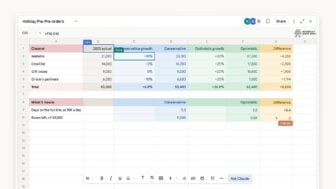
This is about agentic AI, since this AI assistant can complete tasks on your behalf, particularly by acting on your files and applications (Slack, Microsoft Teams, Google Drive, etc.) through plugins. It can be deployed on a mobile device, a computer, or the web using ChatGPT Atlas, OpenAI’s search engine. The company explains that ChatGPT Work will: “gather information from your applications and workflows to create finished deliverables such as spreadsheets, presentations, documents, and web apps, and dedicate itself for hours to complex projects by breaking them down into smaller steps and completing them autonomously.
On a computer, ChatGPT Work will be able to use your local files and applications to produce work.It can thus, in particular, create slides, spreadsheets, documents, and websites from your apps and workflows. On the user’s side, they will be able to track progress, provide further instructions, and approve—or not—important actions. ChatGPT Work can also handle repetitive tasks. The user can ask the agent to perform an action once, then repeat it according to a set schedule. OpenAI gives as an example a user who asks ChatGPT Work to automatically convert new messages from Microsoft Teams and Slack into updated documents or presentations, then share important changes with their team. Finally, this work agent can support complete workflows based on a single request.
How to access ChatGPT Work?
ChatGPT Work is available today on the web and mobile, but only for Pro, Enterprise, and Edu plans. The AI agent will be rolled out to Plus and Business users in the coming days. But the good news is that the work agent is already integrated into the ChatGPT desktop app, even for those with a free account. Users can thus switch between Codex and the GPT Work agent. In reality, the best way to discover ChatGPT Work is to try it out. It remains to be seen whether this AI agent will truly become a highly productive new colleague.
👉🏻 Follow the tech news in real time: add 01net to your sources on Google, and subscribe to our WhatsApp channel.
Source: OpenAI








- Google Play Store
- 4K Video Downloader Plus
- VLC Media Player
- Adobe Reader
- uTorrent
- WinRAR
- Xender
- Google Chrome
- CCleaner
- Mozilla Firefox
- Avast Free
- ChatGPT
- Microsoft 365
- Opera One
- Avast One










Download
- Google Play Store
- 4K Video Downloader Plus
- VLC Media Player
- Adobe Reader
- uTorrent
- WinRAR
- Xender
- Google Chrome
- CCleaner
- Mozilla Firefox
- Avast Free
- ChatGPT
- Microsoft 365
- Opera One
- Avast One