Wen Le reporting from Aofeisi
QbitAI | WeChat Official Account
Hunyuan Hy4 has officially submitted its final answer!
This time, Tencent came out swinging, making its ambition unmistakable:joining the ranks of the strongest open-source models.
With 770B total parameters and 49B active parameters, it introduces native visual capabilities for the first time and supports computer operation for the first time.
Instruction following, long-text comprehension, and long-horizon Agent capabilities have also been upgraded, pushing both computer operation and long-horizon Agent tasks into the front ranks of the open-source field.
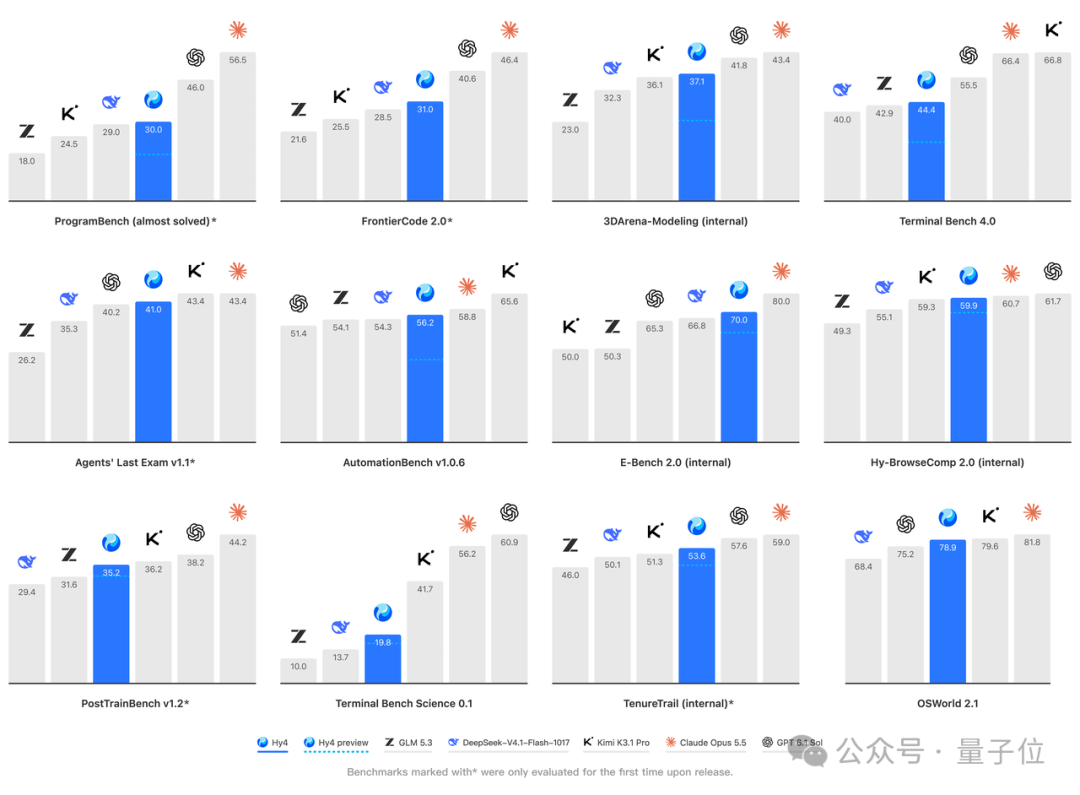
From preview to official release, Hy4 significantly expanded the data and training scale of both pretraining and post-training, and even joined forces with frontline business teams for joint “Co-Design” refinement.
The domestic and international versions of WorkBuddy have both completed their launch integrations!
First, I gave it a tough assignment in WorkBuddy: build me a fully interactive 3D mechanical keyboard.
A 75% layout with 84 keys and a six-layer structure—keycaps, switches, a plate, a PCB, a battery, and an enclosure—all taken care of.
You can drag it apart with the mouse to blow it open on the spot and inspect the internal workmanship; put it back together and you can immediately start typing, with even the physical animation of the keys depressing and the springs compressing and rebounding under load accounted for.

Looking at this, doesn't it mean there's now someone to create product showcase demos? What do you think, Hy4?
Hy4 is already live on Tencent Cloud TokenHub, WorkBuddy/CodeBuddy, Yuanbao, WeCom Smart Assistant Dayuan, ima, and other products; its API has simultaneously been integrated with platforms such as OpenRouter, Hermes, and OpenCode.
QQ, Honor of Kings, Peacekeeper Elite, WeChat Reading, Tencent News, and other Tencent products are also being integrated continuously.
The model weights will also be open-sourced soon.
Without further ado, let's put it through its paces.
Pixel-Level Visual Perception
The visual understanding first introduced by Hy4 is so fine-grained that it canlocate a rooftop component roughly 2 meters in size within a 2.8-billion-pixel aerial image.
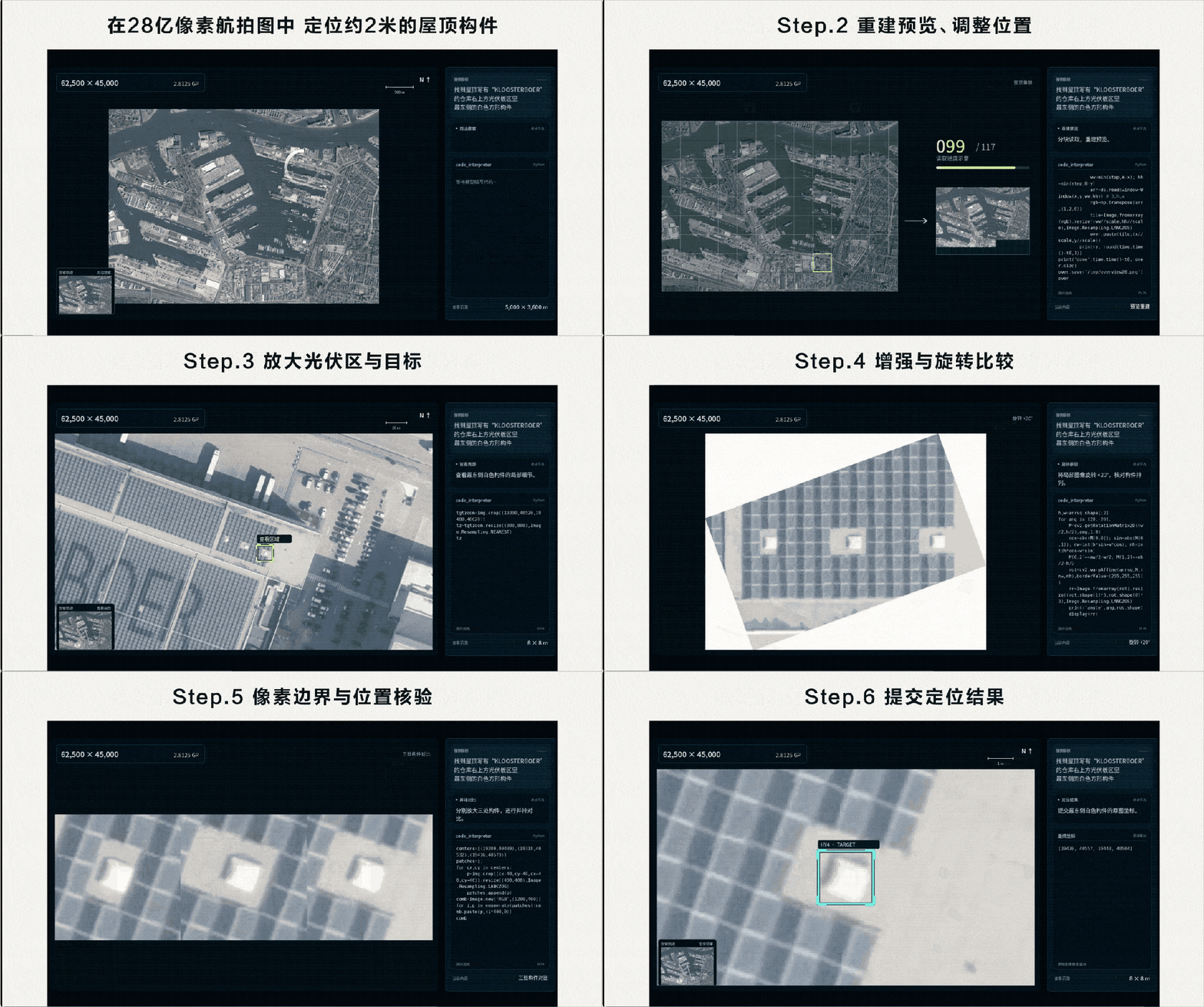
Now that's what I call sharp eyesight.
Now let's test its eyesight.
First question: Build a retro-style music player based on a design screenshot.
Setting aside the high-resolution aerial image, I just want to see whether it can truly understand the layout details.
After taking on the task, Hy4 first broke down the image's color palette, fonts, and layout one by one, even measuring the width of the left sidebar in pixels, before it began writing code and building both the page and the playback functionality.
The center-cropping tool was slightly off; it also switched tactics, directly analyzing pixels to locate lines and extract colors.
Okay, it even comes with its own ruler and color swatches.

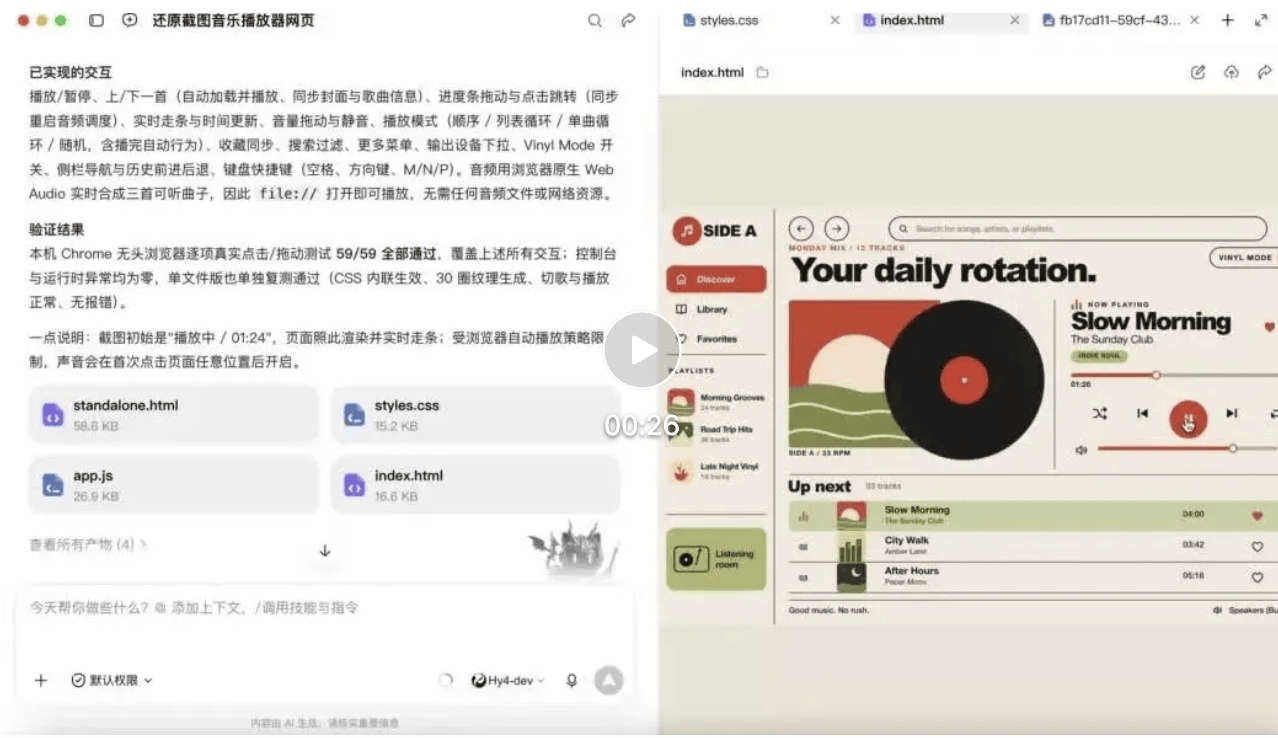
The moment I saw the finished product, I stared at the screen for a full half minute. No, er, the fidelity has to be 99.9%, right—
With beige as the base, orange-red accents, and a yellow-green palette, plus a big bold title and a vinyl record, the retro feel came through instantly.
The navigation, playlist, playback area, and up-next list were all exactly where they should be.
I put the buyer photos and seller photos side by side and spent ages trying to spot a difference. The most obvious one turned out to be the two forward/back buttons in the upper-left corner: one was round, and the other was square...
It was the sort of thing where you wouldn't know where to start nitpicking unless you used a magnifying glass.
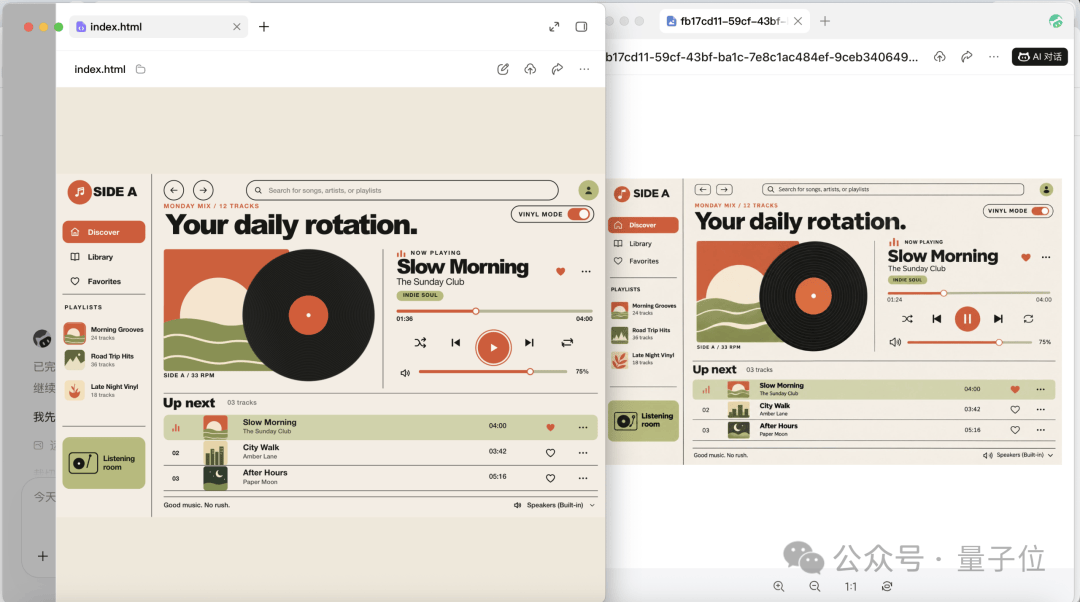
After going through Hy4's delivery notes, I saw that play/pause, previous/next track switching, progress scrubbing, and volume adjustment were all wired up, and looping, shuffle, search, and favorites syncing hadn't been left out either.
It even accounted for the possibility that you were too lazy to touch the mouse: the space bar controls playback, and the arrow keys adjust the playback position.
However, when I clicked the play button, I found out that it had even prepared three test tracks for me
.I hadn't uploaded any audio files to it!
 Video URL: https://mp.weixin.qq.com/s/OThj_29CAuHn6ioaqjkSpQ
It turned out that these tracks had been synthesized in real time using the browser's native Web Audio. I no longer had to rummage through my entire computer for audio files; I could just open the web page and listen.
Okay, okay, okay. I gave it just one image, and Hy4 not only delivered a player but also threw in a test track library, even handling the sound-testing for me.
Next, I went through its self-test process.
According to the recorded process, after Hy4 finished writing the code, it quietly launched a headless Chrome browser in the background and, in a sandboxed environment, clicked and dragged through the UI buttons one by one, taking screenshots as it went and comparing them for visual differences.
Actually, it didn't pass everything on the first try:
It passed 48 of the 51 tests. Two got stuck in the test script, and it caught the final issue itself: when the playlist had finished its last song and Next was clicked, the logic didn't handle wrapping back around.
It immediately fixed this edge case and reran the regression tests.
The final report showed that all 59 tests had passed, with zero console errors and runtime exceptions.

A 2D interface alone wasn't enough for fun, so I tossed Hy4 an amusement-park floor plan and told it to make the park “stand up.”
The locations and sizes of the attractions, and the way the paths curved, all had to match the plan. The Ferris wheel and carousel couldn't just stand there looking the part; they had to spin. And I had to be able to walk around the park.

After a series of geometry modeling, shader configuration, and camera binding, it actually made the entire “Starlight Amusement Park” rise from the ground on the spot.
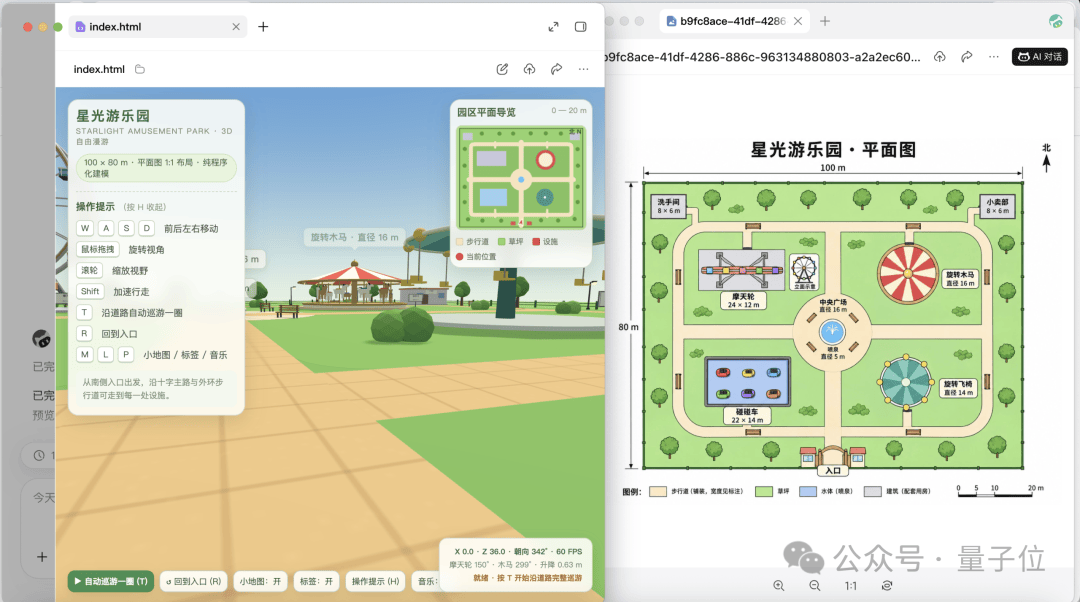
The classic red-and-white carousel canopy, the kiosks lining both sides of the main path, and the low-poly trees and turf spread along the streets were all mapped into 3D to scale.
The low-poly visual style also looked clean and crisp, like a little game you could wander around in for a bit while slacking off.
I had already prepared myself to get lost the moment I walked in, but there was even a minimap in the upper-right corner, showing the attractions, paths, lawns, and even my current location.
Once inside, use WASD to move, drag the mouse to turn, hold Shift to speed up, and toggle the labels on to see the attractions.
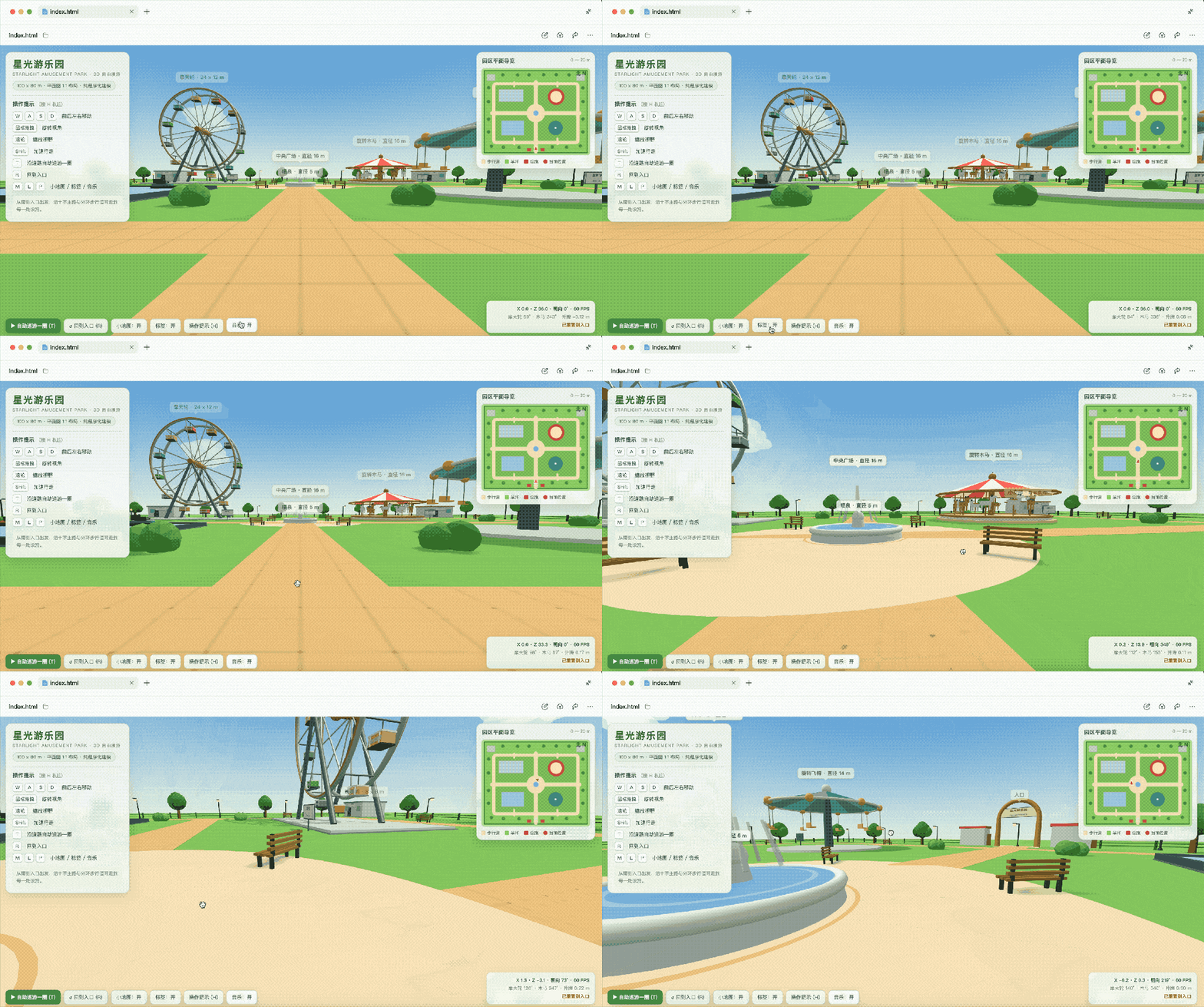
You can explore until you’re completely disoriented and still return to the entrance with one click—the whole point is that you can always find your bearings.
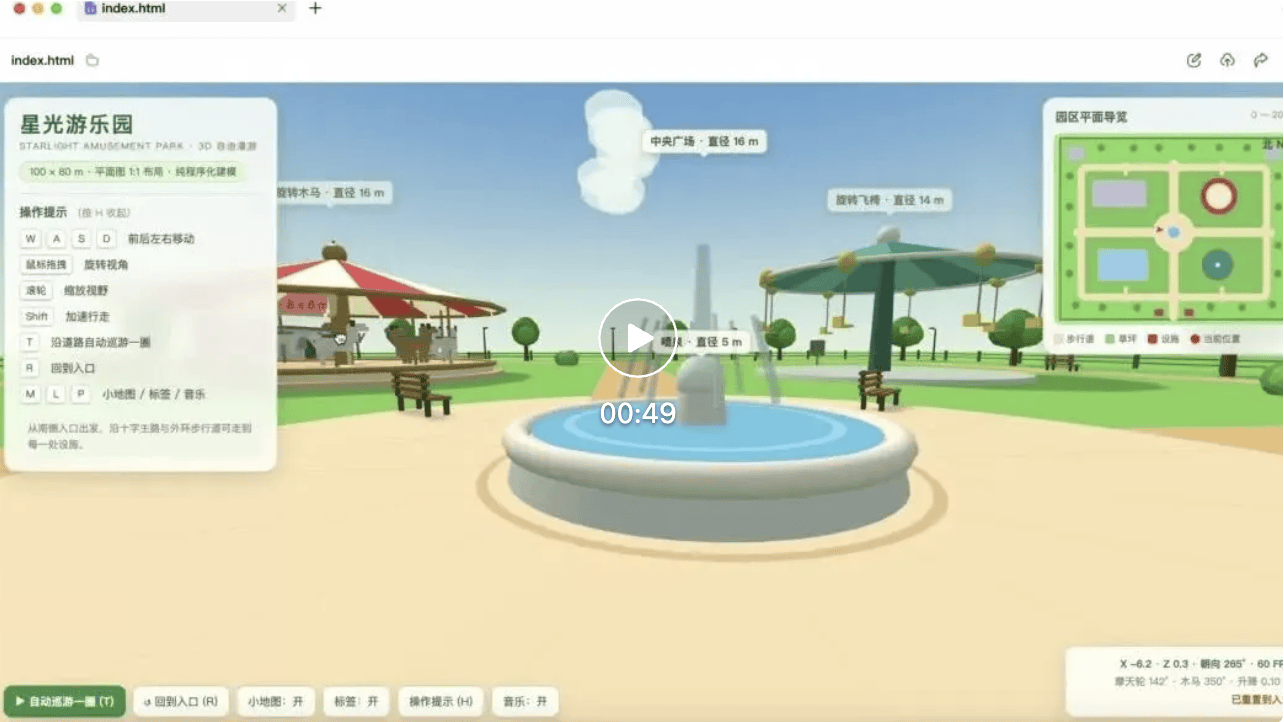
It even comes with an “automatically cruise along the road” button. Tap it, and you don’t even have to walk the route yourself.
Lo and behold, I told it to build an amusement park, and the guided-tour service launched along with it.
 Video URL: https://mp.weixin.qq.com/s/OThj_29CAuHn6ioaqjkSpQ
Agent Delivery Capabilities: Maxed Out
After touring the amusement park, let’s get back to real work and put Hy4’s enhanced Agent and long-horizon task capabilities to the test.
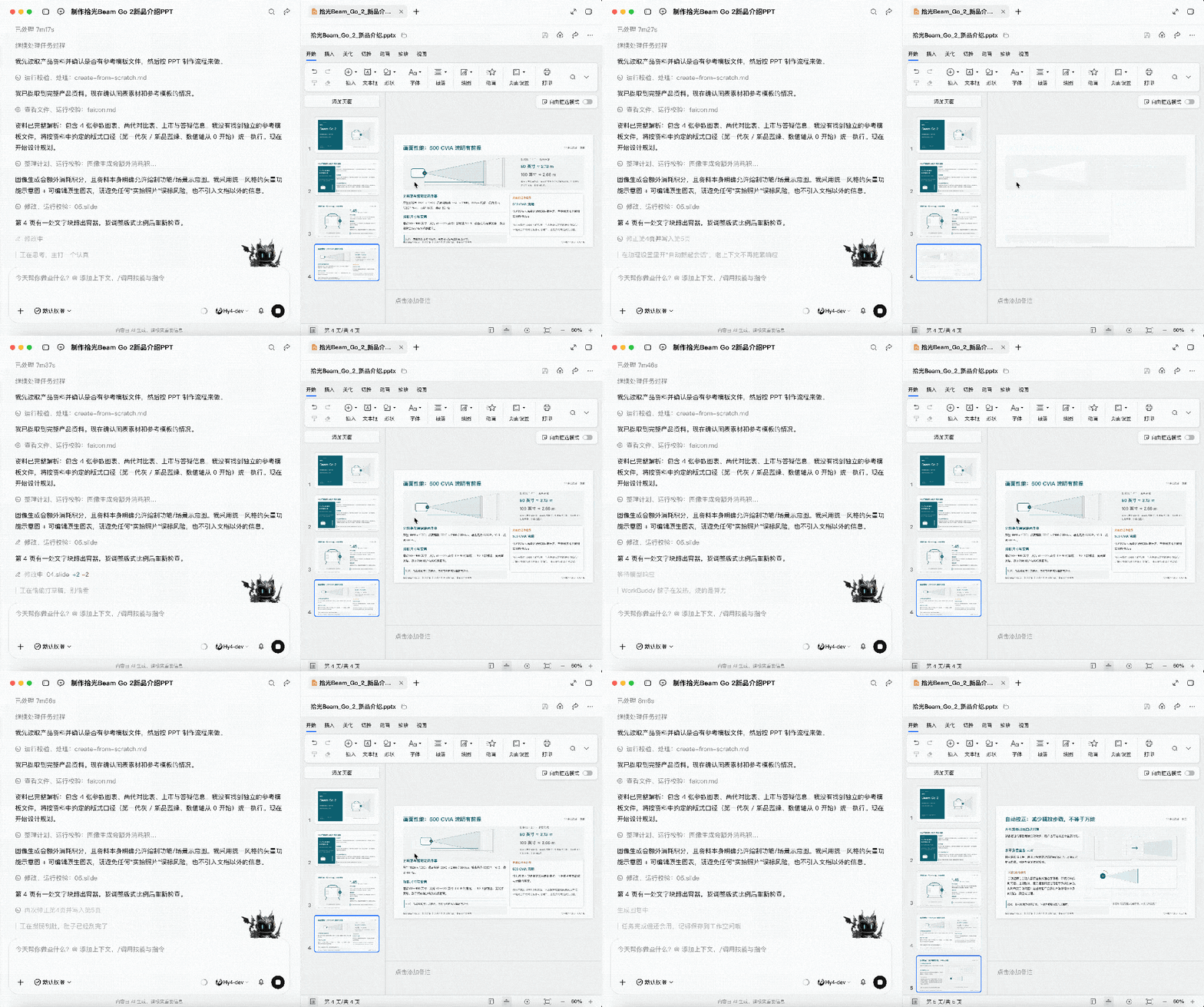
I gave it a set of product materials for the “Shiguang Beam Go 2” portable smart projector and asked it to create an approximately 15-slide new-product presentation.
Hy4 first went through the materials from start to finish. It didn’t pull random images either; instead, it used native code to draw vector illustrations with a highly consistent style, while keeping the charts editable for easy revision later.
While rendering page 4, it noticed that a block of long text was overflowing the page’s safe margin. It immediately restructured the layout in the background, breaking the single column into a card-based flow, and only continued after the second validation passed.
In the end, it delivered a 16-page presentation. Nice—it even threw in an extra page.
But every office worker knows that finishing the presentation is often where revising it begins.
I gave it a template with a completely different visual system—a dark, high-contrast look—and asked it to refresh the entire presentation in the new layout.
Hy4 didn’t rush to redo all 16 pages. It first picked one page and tried the new layout, confirmed there were no issues, then made the changes to the remaining pages in bulk.
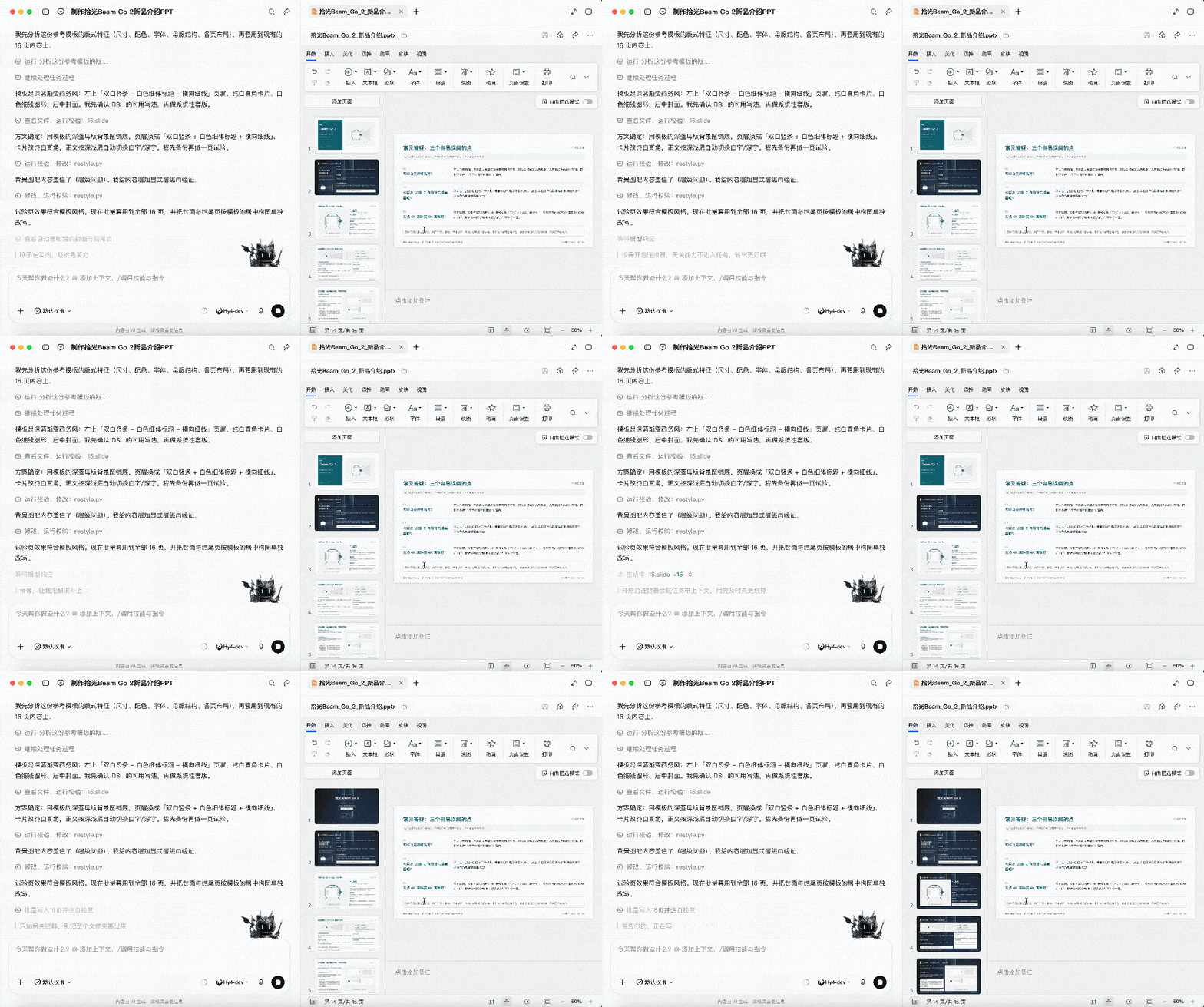
Frankly, its ability to work and validate in parallel was a particularly striking advantage this time. It doesn’t generate everything in one go and call it done; instead, it takes small steps, tests and corrects as it goes, and only proceeds after validation passes, greatly reducing rework.
Next, I gave Hy4 another assignment:
Build a highly usable image batch-processing tool.
Cropping, resizing, compressing, exporting—doing these operations a few times to a single image is fine, but working through a batch one by one leaves the mouse intact and the user numb.
This time, I just handed all the repetitive manual work over to it.
After accepting the task, Hy4 first studied the excellent designs of industry-leading open-source reference projects Squoosh and Image Workspace, drawing on their technical approaches to original-versus-compressed image comparison sliders and preset workflows.
It then quickly broke the project down into an upload flow, a processing pipeline, Web Worker–based multithreading, a Canvas graphics pipeline, and a ZIP archive module, and got straight to coding.

By the time the finished product was delivered, even the name was ready:
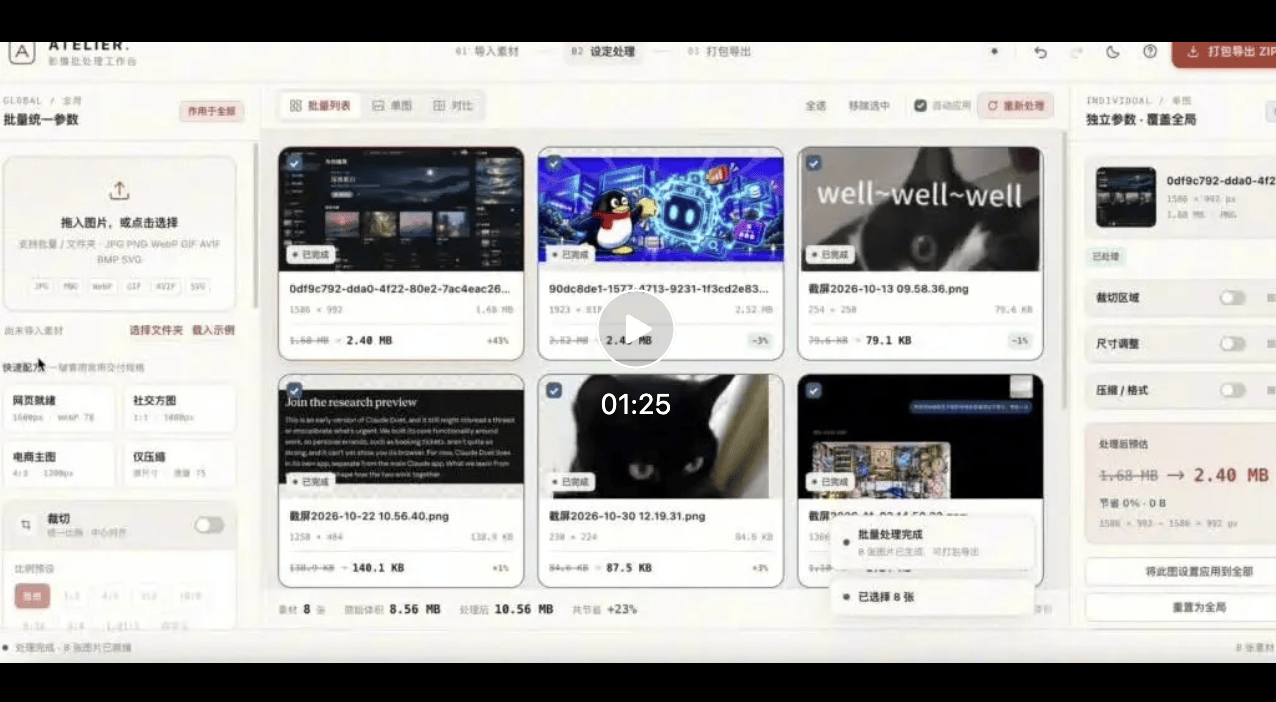
ATELIER Image Batch Processing Workbench.
With an off-white background and orange accents, it opens with a three-step onboarding guide. The slogan reads: “Let the tools handle the repetition, and leave the aesthetics to you.”
Fine: I’ll handle the aesthetics; it handles the repetition.

As delivered, you can drag in an entire batch of images or select a folder directly. Cropping, dimensions, compression, and format are all set in one place on the left, while images that need “special treatment” can be adjusted individually.
It also conveniently includes commonly used presets such as 1:1 social avatars, e-commerce hero images, and ultra-small file sizes. You can drag the slider to see image-quality loss in real time, then click once to package everything into a ZIP and send it to the browser for download.
 Video URL: https://mp.weixin.qq.com/s/OThj_29CAuHn6ioaqjkSpQ
Besides that, Hy4 can now actually take over the mouse and get to work.
Open JS Paint in Chrome, copy the Hunyuan kissing meme with the mouse, and record the entire process.
 Video URL?: https://mp.weixin.qq.com/s/OThj_29CAuHn6ioaqjkSpQ
Looking at the screen, finding tools, selecting colors, and then controlling the mouse to draw all rely on its newly supported CUA (computer use) capabilities.
Well, while other AIs are busy generating images with one click, Hy4 is here practicing mouse drawing: the reference image above tests its eyesight, while the drawing software below tests its technique (doge).
More bang for your buck
After trying it out, my biggest takeaway was that Hy4’s ability to autonomously complete long-horizon tasks had improved significantly.
When faced with multi-step tasks, it can continuously maintain the goal and task state, conduct interim self-checks during execution, identify problems based on the results, modify the approach, and validate it again until it can deliver a bug-free result.
All the earlier examples I mentioned were indeed delivered in one go after it had autonomously executed, checked, and modified the work.

This round of Hy4 training also places greater emphasis on performance in real-world productivity scenarios.
Frontend optimization has been refined down to complex interactions, business logic, state management, and front-end/back-end integration;
It has also received specialized training in professional software such as Blender and CAD, as well as long-horizon tasks spanning multiple applications, strengthening its task-planning and execution capabilities.
In office scenarios, Hy4 has also specifically optimized its search pipeline for time-sensitive retrieval, multi-source information integration, and factual consistency verification.
In internal testing, Hy4’s hallucination rate fell from 12.95% in the preview version to 7.2%, while its rate of speculative errors fell from 23.1% to 5.6%;
FinanceOn this front, Hy4 has also completed another round of specialized coursework.
The training covered areas such as fund research, securities analysis, quantitative strategies, asset allocation, corporate finance, and taxation and accounting. Based on real-world scenarios, it created thousands of workspaces and tens of thousands of high-quality tasks so the model could learn professional workflows and standards.
A total of 213 experts participated in the crowd testing, 70% of whom came from leading external financial institutions and had more than five years of experience—
These graders were not going to be easy to fool.
After testing on 579 real-world financial tasks, Hy4 ranked first among open-source models in overall performance.
Looks like this round of “further study” really wasn’t wasted.
ResearchThe scope of research tasks is also expanding.
Hy4 combines complex reasoning, scientific programming, and long-horizon execution. In the internal TenureTrail evaluation, which covers seven disciplines and 123 executable research tasks, it demonstrated research capabilities in areas such as mathematical construction and physical modeling.
Faced with a dataset containing 6.99 million single cells and 84 two-dimensional unordered mouse embryo sections with no temporal or spatial continuity annotations, mixed with noise such as the mirror-flip artifacts common in experimental sections, and under the demanding conditions of offline operation, no dedicated registration tools, and no cell-type annotations, Hy4 took 1.5 hours to autonomously complete the spatial alignment and three-dimensional mesh reconstruction of the mouse embryo sections.
With zero human intervention throughout, its final alignment precision even surpassed that achieved by the default pipeline of dedicated registration tools.

It is also beginning to integrate complex reasoning, scientific programming, and long-horizon execution.
In research conducted with Peking University’s mathematics team, Hy4 found a counterexample to the Méndez–Pinto–Villarreal conjecture, further proposed new conditions to refine the conjecture, and formally verified the related proofs in Lean.

These capabilities are now available through WorkBuddy and CodeBuddy. Enjoy alimited-time free trial until 23:59 on November 15!
If you have any tasks that you’ve been putting off for a long time because they always seem like a hassle, now’s the perfect time to put Hy4 to work on them~
One last reminder: Hy4 flash, which focuses on extremely low inference cost and is designed for on-device deployment and high-concurrency agent orchestration, is also on the way.