
blastengine MCP verified with one email. Cross-checked sending tool, delivery log, and Gmail.
- blastengine
- MCP
- AI
One email was sent. Delivery log also shows SENT. However, the number of used emails obtained from MCP was 0.
Sent one email to myself from the official blastengine MCP server and cross-checked with delivery logs and Gmail. Checked the updated_time of the usage status and found it had a value from 23:47:30, which is older than the 23:52 send time. If the AI judged it as "0 usage, not sent," it could lead to unnecessary resends.
This article records the steps to track delivery IDs from the return value of the sending tool and confirm delivery results and usage separately. The records are for one email sent on November 4, 2026. Confirmed the email body in spam folder via Gmail.
Matching delivery ID, delivery log, and reception result.
| Verification targets. | Results of this verification. | What can be inferred from this. |
|---|---|---|
| blastengine's delivery tool. | delivery_id: 1. | Obtained the delivery ID to track. |
| blastengine's delivery log. | Delivery successful, response code 250. | Recorded as successful on the delivery log. |
| Gmail. | Confirmed the email body in spam folder. | This single email was delivered, but it did not enter the inbox. |

Verification on November 4, 2026 23:52 JST. Extracted subject, status, and response code.
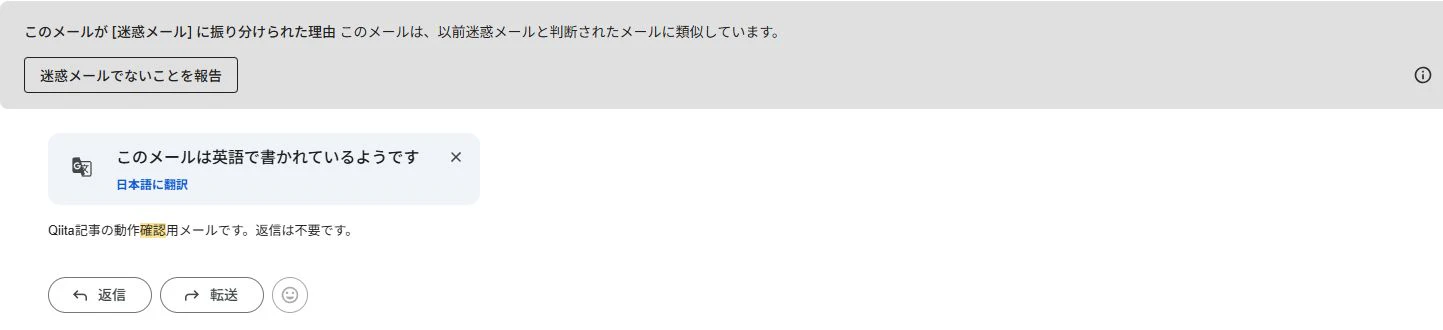
Result after opening the same subject email in Gmail. Displayed "Similar to email previously judged as spam," and confirmed the specified email body. Excluded personal address part from the photo.
This is a single test for operational confirmation. It is not an experiment to compare delivery rates or identify reasons for spam judgment. This time, I used my own Gmail address as the sender, so the conditions differ from the verified domain environment.
First, I created a 'read without sending' connection
I used the official repository introduced in the formula manual. Verified blastengine-mcp-server 0.2.2, commit 46961dc304824b60311484c6b84bde9f5967796d.official repository
This time, instead of setting up on Claude Desktop, I connected from a small Node.js MCP client to the local stdio server.This is a verification by AI agent, but it is not an example tested in the Claude Desktop chat interface.
Initially, I started with the following settings.
Login ID and API key are passed via environment variables separately. Do not include the keys in articles, source code, or screenshots.
In this state, I retrieved 15 tools from tools/list and called the following two.
| Tools | Check content | Result before sending |
|---|---|---|
| blastengine_usage_latest_get | Usage count, remaining quota, and last update time | Usage 0, remaining 10,000 |
| blastengine_mail_results_list | Delivery logs for the target period | data: [] |
'Disabled' and 'not appearing in the tool list' were not the same
Even when starting with sending disabled, blastengine_send_transaction was listed in tools/list. Just because a tool is visible does not mean it is sendable.
In this version's source, the implementation checks BLASTENGINE_ENABLE_SEND during sending operations. On November 4th's actual sending verification, the send tool itself was not called when sending was disabled. Therefore, on November 7th, I added the following retest.
Retest: When calling a send tool listed, it is rejected before reaching upstream
I started the official MCP server 0.2.2 via stdio and set sending, batch distribution, and CSV import to all false. The BLASTENGINE_BASE_URL is pointing to my local HTTP server, and the authentication information is dummy.This is not a test sending request to the actual blastengine API.
| Operation | Actual Results | Requests received by the local HTTP server |
|---|---|---|
| tools/list | The send tool is included in the list | 0 |
| blastengine_send_transaction | isError: true, code: send_disabled | 0 |
| blastengine_usage_latest_get | Retrieve mock usage status | GET /usages/latest received 1 request |
I passed a syntactically correct example address, subject, and body to the send tool. The response is as follows.
On the SDK client side, I checked isError and the code, and also asserted that the number of HTTP requests after the send call was zero. After that, a reference GET request arrived, so it can be distinguished from a connection failure. The reference response value is a fixed value from my own mock, so it is not treated as actual account usage.
What was learned from this test is that the send disable setting in this version rejects the tool execution rather than hiding it. The MCP server did not automatically judge whether the user was approved. In the process of enabling sending, separate approval for the recipient and message body is required.
AI and human decisions
In the actual sending, the human approved the destination, subject, body, and the limit of one message. The AI agent was responsible for preparing the connection settings, running the local MCP client, and matching the logs using the delivery ID. We also confirmed the reference time for the received results and usage status within the spam email. In this retest, the AI prepared a dummy upstream and matched the rejection responses and the number of requests.
We were able to cover the unconfirmed rejection actions without performing the actual sending again. The delivery confirmation to the real service and the inspection of the safety measures locally are left as different evidence.
In the trial, we first registered the sending destination
The startup guide in the management screen mentioned registering trial deliverable addresses. In this screen, it was explained that up to five addresses could be registered.
Therefore, I registered only the destination that I manage, and fixed the sending conditions for this time.
Registering the destination in the allowed list and confirming that it is acceptable to send this message are separate checks. This time, we executed the sending after obtaining human approval for the destination, subject, body, and number of messages.
Sending through MCP and receiving the delivery ID
For the sending of one message only, we set a different local process to BLASTENGINE_ENABLE_SEND=true. Bulk sending and CSV import remained false. The executed tool and the form of the arguments are as follows. The addresses are replaced with examples.
The returned value was as follows.
Here, I do not say that the recipient can read it. Next, I will check the results for this ID. The sending process has ended, and the confirmation was done again through the sending disable process.
Matching the management screen and MCP logs
For blastengine_mail_results_list, I passed the start and end times that include time zones, not the relative 'today'.
Result excerpt (excluding recipient details):
The "Delivery Success" and "250" in the management screen correspond. However, Gmail has confirmed the same subject and body in the spam folder.The success in delivery logs cannot be interpreted as a guarantee of placement in the inbox, which becomes clear when comparing the screens.
Additionally, we have not identified which of SPF, DKIM, or DMARC was the determining factor based solely on Gmail's display. Header verification and comparison with authenticated domains will be part of the next verification.
The usage status requires the update time along with the value
Another point that came to mind is that the usage status obtained after sending still returned the next value.
This transmission was at 23:52. The update time of the usage status was earlier than that. If you judge "not delivered, so resend" just because there is one entry in the delivery log but zero usage status, it is dangerous.
I cannot definitively determine the specification of the update interval from this observation. However, if we summarize the remaining count for AI, I think it would be better to also return the information of "when the data was collected".
Do not end the AI's completion report with "sent"
| What to leave | Reasons needed |
|---|---|
| Approved recipients, subject, body, and quantity | Confirm that the sent content matches the request |
| delivery_id and maillog_id | Correspond the tool's return value with the delivery result |
| Confirmed period and time difference | Do not check other days or other deliveries |
| Status, SMTP response, and observation time | Do not mix API acceptance, delivery results, and old usage status |
| Location where the recipient confirmed | Record the configuration that cannot be known from the delivery log only |
If you want to make a report that allows people to judge the result, it can be written like this. This is an example that summarizes the above observations, not the raw response from MCP.
If we implement this, we will keep "transmission request", "delivery log retrieval", and "human recipient confirmation" as separate states. We will not create a branch that returns to the transmission process based solely on the value of the usage count. Even in cases where the transmission result is unknown due to a timeout, we cannot guarantee the safety of resending based on this record alone, so we will refer it back to confirmation.
The takeaway from this is not only that the email was sent via MCP, but also that the freshness of the delivery result and the usage status were different.When asking AI to assist with operations, it was necessary to return not only the values but also "what was confirmed and when".
Go to list of users who liked
Go to list of comments
Register as a new user and use Qiita more conveniently
- You get articles that match your needs
- You can efficiently read back useful information
- You can use dark theme


