 © Anthropic
Anthropic’s AI has a browser of its own for filling out your forms and combing through the web. Your tabs, bookmarks, and passwords stay out of it—and that is precisely the selling point.
Exactly one year ago, on August 26, 2025, Anthropic launched its Claude extension for Chrome. Twelve months later, the company is changing its approach and slipping a full browser directly into Claude Cowork, its AI-assisted work application.The assistant can now browse without setting foot in the user’s browser.
What can Claude do without touching your tabs?
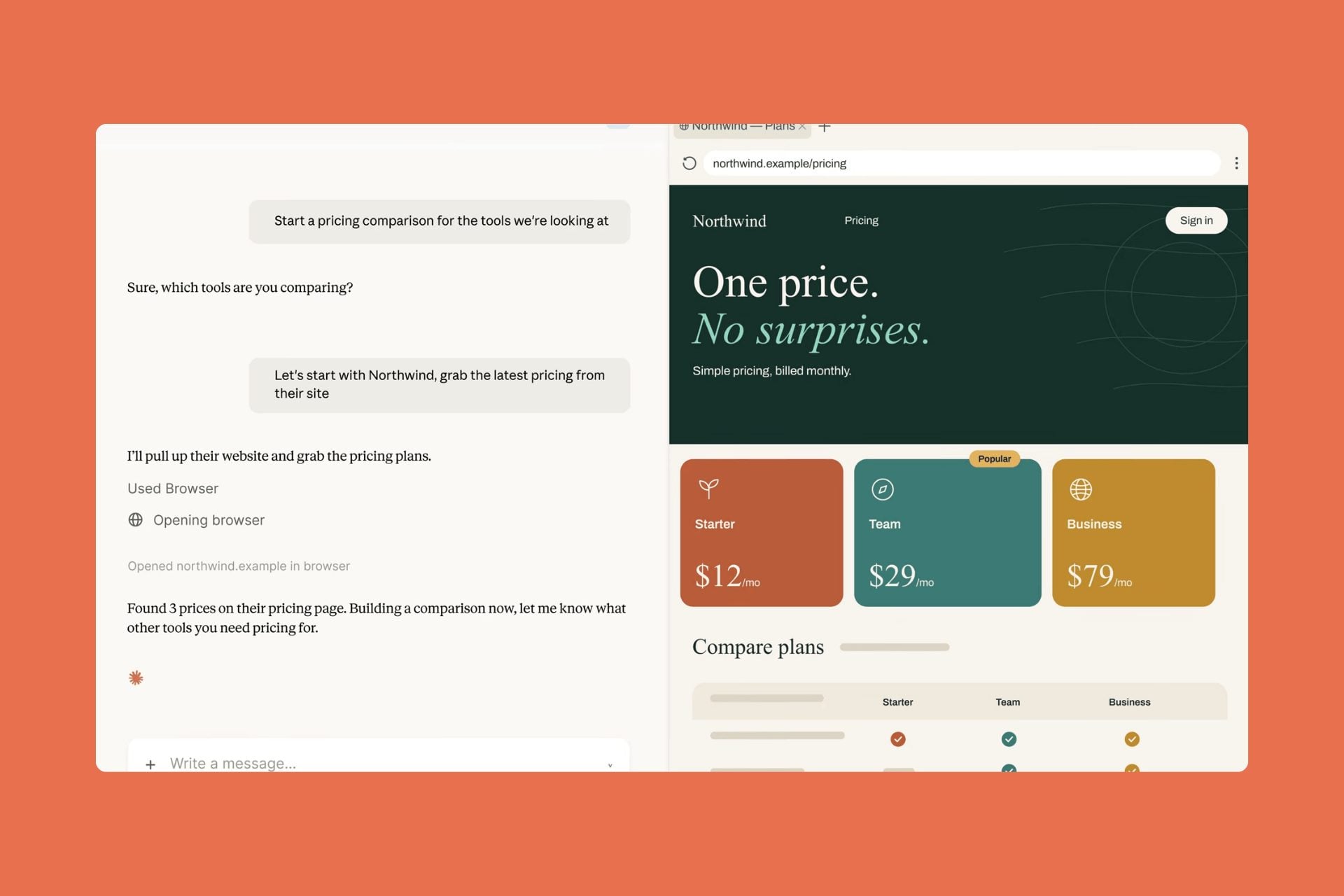
In practice, when a task entrusted to Cowork requires web access, a browser opens in a side panel of the desktop app. The AI browses, reads pages, clicks and fills in fields while the user continues working alongside it. Filling out a form, extracting figures from a dashboard, or navigating a portal with no connector: the tedious work is handed over to the machine.
No extension to install, no configuration, and nothing shared from the personal browser unless the user explicitly chooses to do so. The session runs in a separate environment, without the machine’s signed-in accounts, history, or saved passwords. A sort of reception area, furnished but devoid of anything personal.
Regular users of the Chrome extension are not left out either: it continues to work and remains the default option for those who adopted it, with a setting allowing users to switch between the two. The rollout of the integrated browser starts this week for Pro, Max, and Team subscribers on macOS, Windows, and Linux, with Linux initially in beta, while businesses can enable it now.
Why is Anthropic already talking about the risks?
The timing raises questions, because competitors are going the opposite way.OpenAI recently pulled back on Atlas, its autonomous browser project, to refocus its efforts. Anthropic, for its part, is rapidly expanding its browser footprint. Browser integrated into the coding tool in July, Chrome extension turned into a Cowork session on August 12, and now this in-house browser for everyone.
The company is nonetheless being transparent about the concept’s weak point. An agent reading web pages may encounter a prompt injection—malicious instructions hidden on a page to divert the AI from its task. The Chrome extension’s safeguards also apply here, with checks that compare Claude’s actions with the original request. The company acknowledges that these measures “significantly reduce the risk but cannot eliminate it”, and recommends starting with trusted sites.
👉🏻 Follow tech news in real time: add 01net to your sources on Google, and subscribe to our WhatsApp channel.

Source: Anthropic








- Google Play Store
- 4K Video Downloader Plus
- VLC Media Player
- Adobe Reader
- uTorrent
- WinRAR
- Xender
- Google Chrome
- CCleaner
- Mozilla Firefox
- Avast Free
- ChatGPT
- Microsoft 365
- Opera One
- Avast One










Download
- Google Play Store
- 4K Video Downloader Plus
- VLC Media Player
- Adobe Reader
- uTorrent
- WinRAR
- Xender
- Google Chrome
- CCleaner
- Mozilla Firefox
- Avast Free
- ChatGPT
- Microsoft 365
- Opera One
- Avast One