Where I started
I got a new VPS in one of the European countries where I had a bank card and chose the same one when registering in Anthropic. After getting credits in the form of a root login password and a public IP address from it, I quickly set it up using my familiar ansible playbook: I launched a netbird node (the server is on my home Mikrotik, and I connect various external devices via the pyramid), applied common settings for all my Linux systems, monitoring agents, a new user, and a public ssh key. I added the Claude agent and got a token for it.
I won't go into details about getting the SIM card, bank card, and purchasing the subscription: for this article, it's not crucial how they were obtained. An important condition my original configuration — SIM card, Visa, and VDS in the same country.
This is not an unpublished Anthropic rule «three countries must necessarily coincide». In the documentation, supported countries, phone number verification, and payment requirements are described separately. In particular, the requirements for the user's actual location are not replaced by the presence of VDS. The coincidence of the country of these three things itself does not guarantee access. But I find it interesting to test this hypothesis exactly. Everyone codes as they want, and I code as I want.. well, or as they say...
So, at this point, I have obtained:
My already somewhat old but reliable Mac M1 Pro 14 with VS Code, the Claude Code extension, and local projects
Linux VDS with installed Claude Code and working account authorization through a long-lived token embedded in /etc/environment
NetBird between machines and access via SSH key
To repeat — this is an analysis of a personal experiment, not a universal installer for Claude from scratch.
First attempt: VS Code Remote SSH
Started with the first thing I found (on the web?). VS Code already knows how to work through SSH via the VS Code Remote SSH plugin. It all looked straightforward: install the editor's server part and the Claude Code extension on VDS. The existing authorization on Linux should allow making requests to the models. And it worked! In the window, the file system, terminal, and the Linux magic of appearing words... But my regular local project with Mac didn't appear there. I somehow naively assumed that this would happen.
Yes, technically you can clone a repository on the server, set up synchronization or even fully transfer development. For another task this would be a normal solution, but I am psychologically not ready to place some files on a foreign machine far away from me, so I had to formulate the requirement more precisely:
Claude Code reads and modifies my files on Mac. Requests to the model go through Linux. Anthropic authentication remains on Linux.
After this phrase, Remote SSH took a backseat and remained as direct access for some projects, but I moved forward.
Why one proxy was not enough
The next idea was to run an HTTP proxy on Linux and direct the local Claude to it.
This solves the outgoing network address issue. However, the proxy does not pass the application's authentication from another process on another machine. If the client on Mac does not have appropriate credentials, then just one routing change will not log it into the account used by Linux.
Therefore, two different functions were needed:
Component on Linux | Its task |
|---|---|
CLIProxyAPI | To accept the local Claude Code request, validate it, and make a server-side authenticated request to Anthropic. The API gateway is shorter. |
Tinyproxy | Forward the additional HTTP(S) client traffic through the VDS network exit. Proxie. |
API gateway and HTTP proxy are different services. Both ports are exposed on our localhost Mac through an SSH tunnel.
It's clear that the neural network isn't working on my VDS, but instead computing the response in the Anthropic cloud. The VDS hosts the gateway, the Claude token, and most importantly: the network exit with the correct IP address. On my Mac, I have my local agent (with values set in the configs - more about this below), files, and execution of local tools. Schematically:
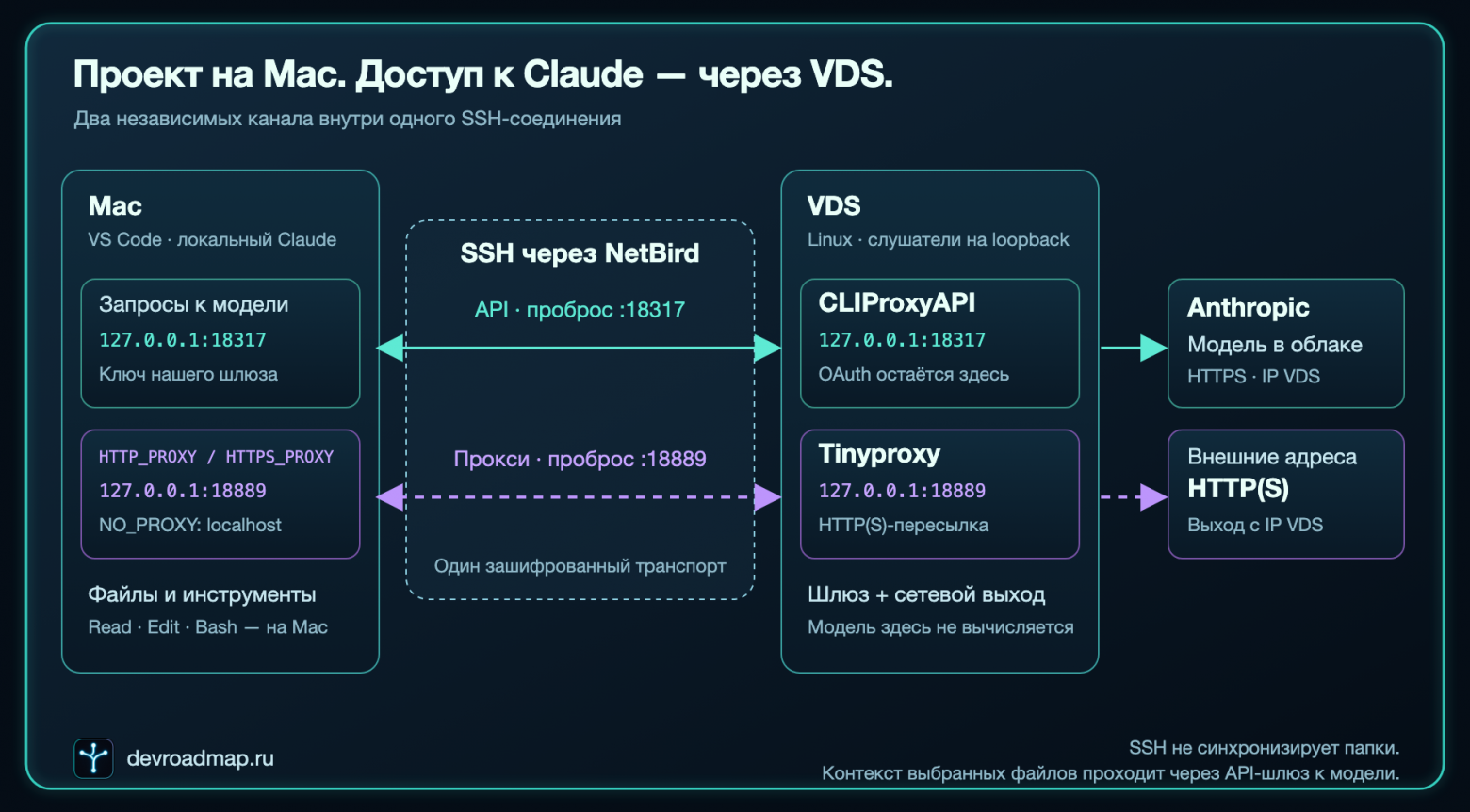
In other words, repositories on the VDS are not synchronized as files, they remain local to me. Only selected file fragments and results of local commands are sent to the model.
Step 1. Check that it's already working
By installing claude on Linux and authenticating via a magic link, I send a short query to the model to check its functionality. I confirmed that it knows about its environment and the external IP address. The response was satisfactory, everything went according to plan. The existing server-side Claude is working.
One of the iterations fixed versions in Ansible and here's what resulted:
Component | Verified version |
|---|---|
Claude Code on Linux | 2.1.293 |
Claude Code in PATH on Mac | 2.1.267 |
Claude Code extension for VS Code | 2.1.294 |
CLIProxyAPI | 8.0.20 |
Tinyproxy | 1.11.2 |
The CLI versions later played a cruel joke, once again confirming the axiom that you should always keep an eye on them and not rely on the latest.
Next, in the commands, you'll encounter claude-vds — my SSH alias for VDS, and dev — the Linux user. Ports were left as they were in the working configuration.
Step 2. Raise the API gateway on Linux
I read that there's such a thing as CLIProxyAPI. I chose version 8.0.20: the official archive for my architecture on VDS. I placed the binary in ~/.local/share/claude-gateway/, the configuration and server auth file in ~/.config/claude-gateway/. The established authorization in my environment came through CLAUDE_CODE_OAUTH_TOKEN from /etc/environment - this shares access between different users in Claude.
For this setup-token auth file, it contained the type claude, an existing access_token, and the flag is_setup_token: true. The directories with credentials were set with permissions 700, and the files with 600.
For Mac, I created a separate key for the gateway. This is not an Anthropic OAuth token, but rather the Mac's authorization on Linux. I transferred the key to the Mac via SSH.
The main part of the server configuration looked like this:
config-version: 8 server: host: "127.0.0.1" port: 18317 management: allow-remote: false secret-key: "" disable-control-panel: true access: api-keys: - "<GATEWAY_KEY>" oauth: auth-dir: "/home/dev/.config/claude-gateway/auth" upstream: claude: disable-claude-cloak-mode: true disable-cloaking-model-list: true routing: retry: request-retry: 0 observability: logs: debug: false request-log: false usage: usage-statistics-enabled: false models: catalog: "/home/dev/.config/claude-gateway/models.json"It's important to note that this is a configuration for a specific release, verified against the examples in the documentation. An empty management secret in this configuration leaves management disabled.
The models directory comes from the source of the same tag and the process is run with --local-model. Below I'll explain why the directory had to be supplemented.
To run the binary, I created a separate systemd service from an unprivileged user. Command to start:
/home/dev/.local/share/claude-gateway/cli-proxy-api \ --config /home/dev/.config/claude-gateway/config.yaml \ --local-modelSet restart on failure for the service, configured privileges, leaving only records in its working directories. Public HTTP port on VDS was not opened: the listener is strictly bound to 127.0.0.1
First error:
First, the authorization import tried to run before the service start via ExecStartPre. The script expected to get a token from the environment, but in systemd environment, the needed variable was not found. The service failed before the gateway even started.
Fixed this without a new login: imported on Linux separately, and the service started reading the ready auth-file. For subsequent server-side authorization updates, I made a separate script. Automatic infinite renewal of setup-token does not follow from this, and I do not intend to set it up intentionally - I will manually manage the credentials' lifecycle until it gets tiresome
Step 3. Network proxy
Second service - Tinyproxy from the OS repository. Its configuration:
Port 18889 Listen 127.0.0.1 Timeout 600 LogLevel Warning MaxClients 64 Allow 127.0.0.1 ConnectPort 443 DisableViaHeader YesThe service is also started separately via a systemd unit with Restart=on-failure. He also listens only to loopback.
You might ask, why have this second channel if there's already an API gateway? Because the ANTHROPIC_BASE_URL configuration directs only the requests to the models, but the local client of Claude still makes requests to other network addresses, internet search, MCP and other ways to pass an incorrect IP address and expose unnecessary information to Anthropic. Support for these variables is described in the network documentation of the Claude Code.
Tinyproxy does not receive my server OAuth, and it doesn't need it. Its task is only to forward traffic and it does this well.
Step 4. One SSH, two tunnels
On Mac, I left the regular SSH connection to the VDS through NetBird. It would have been possible to use the public address, but I already have a certain network architecture and I follow it)
Example of an entry in ~/.ssh/config:
The first 127.0.0.1 in each -L is the address of the listener binding on the Mac. Second — destination address, to which SSH will connect already from the Linux side.
Got two routes:
Mac :18317 → SSH → Linux :18317 → CLIProxyAPI → Anthropic;
Mac :18889 → SSH → Linux :18889 → Tinyproxy → external HTTP(S) address.
In summary: NetBird provides the network connectivity I need between machines. SSH authenticates the connection and transports these two channels. It does not synchronize projects and does not determine where the agent executes commands.
I left the SSH server key checking enabled. The command itself assumes that the host key has already been checked and saved in known_hosts.
And to avoid keeping the terminal with the tunnel open, I added a custom LaunchAgent on my Mac:
~/Library/LaunchAgents/ru.devroadmap.claude-gateway-tunnel.plistIn ProgramArguments — SSH arguments as separate elements of an array. For startup and restoration I use RunAtLoad=true, KeepAlive=true, ThrottleInterval=15. SSH has its own keepalive checks, while launchd handles the restart of the completed process. One process holds both ports — as long as it works conveniently. After sleep or loss of network, the connection may be restored, but it does not resume an already broken request to the model.
Step 5. Local Claude Code
I saved the gateway key on my Mac in:
~/.config/claude-gateway/client-keyFile permissions — 600. Then I entered all important settings into ~/.claude/settings.json, keeping the previous hooks, permissions, and other previous settings:
{ "env": { "ANTHROPIC_BASE_URL": "http://127.0.0.1:18317", "HTTP_PROXY": "http://127.0.0.1:18889", "HTTPS_PROXY": "http://127.0.0.1:18889", "NO_PROXY": "localhost,127.0.0.1,::1", "CLAUDE_CODE_DISABLE_NONESSENTIAL_TRAFFIC": "1", "DISABLE_TELEMETRY": "1", "DISABLE_ERROR_REPORTING": "1" }, "apiKeyHelper": "/bin/cat /Users/you/.config/claude-gateway/client-key" }Here /Users/you needs to be replaced with your absolute path. This is a fragment to be combined with an existing config, not a suggestion to delete other settings.
apiKeyHelper returns the local client the key of my gateway. ANTHROPIC_BASE_URL indicates where to send it. In the claude auth status check, the authorization method is defined as api_key_helper.
A small detail that cost me time — NO_PROXY for loopback. Without it, requests to the local API gateway first go through Tinyproxy and nothing works. Two channels start to interfere with each other.
Another important thing: in VS Code settings I added claudeCode.disableLoginPrompt=true. This setting removes the login prompt and the access is ensured through apiKeyHelper. Without it, I was redirected to my old login in a blocked account every time.
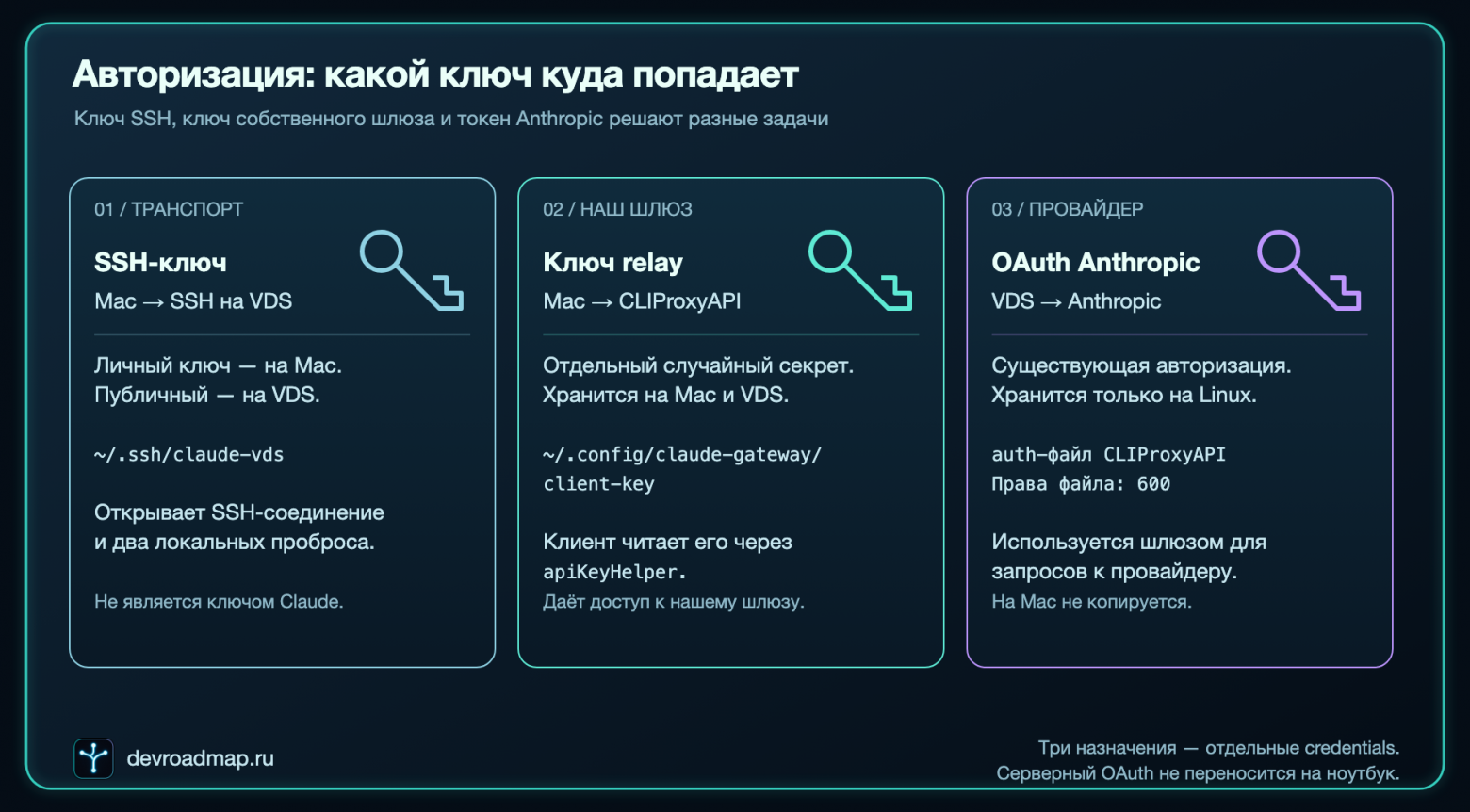
Step 6. Check
So, the response through the globally set claude on Linux, I received the response from the model. I also received it through Remote-SSH. But testing the new solution variant caused confusion: in response to the request, only errors were received. It looked like another access problem, but digging deeper I saw:
unknown provider for modelGoogle quickly provided hints and it was possible to find out that the client had referred to the auxiliary model claude-haiku-5-5, which was not present in the CLIProxyAPI 8.0.20 catalog. The problem was solved simply by adding an entry for this model to the catalog. At first, I tried redirecting Haiku requests to another model, but quickly changed my mind. After adding the entry, I repeated the real requests to different models and didn't see any more errors. I anxiously wait for the version updates)
Step 7. More checks
Understanding that a trap was waiting literally at every step, I decided to create comprehensive checks.
I divided the checks by meaning:
Check | What shows |
|---|---|
Request on Linux before installing the gateway | The original authorization could refer to the model |
Two systemd services and listeners on Linux | Both services are running, ports are bound to 127.0.0.1 |
SSH process and two listeners on Mac | Both local forwards are up |
External IP of Linux and request from Mac through --proxy | The test request through Tinyproxy has the same external IP | @@TAG368
8@@
Binary request from the VS Code extension | Verified client used by the editor |
TCP connection to local Claude | In the verified connection, the client connects to the gateway at 127.0.0.1:18317; other connections are not excluded by this check |
Creating and reading a temporary file with Claude tools | File operations are performed on Mac, and the file is deleted after the test |
Separate run with inaccessible API and proxy addresses | Connection error received, the bypass response did not come in this test |
Sharing with a colleague
We share a Claude account with our colleague. Tokens are sufficient, except for rare exceptions, but overall it's acceptable. We could work on a joint project using Remote-SSH and git, but there are personal issues that cannot be safely divided among several users with root access on the same virtual machine.
I didn't consider that we would be using them on a single VDS and that the configuration had common systemd service names and the same ports.
In addition, for OAuth he applied the Claude CLI identity profile even with cloaking disabled.
Thus, a contradiction was found in our task.
Processing OAuth, headers, and metadata remains. This is visible in the authorization logic and client identity policy.
In addition, two errors had to be separated:
403 on reading the profile may indicate the absence of the appropriate scope;
a rejection in the Messages API request indicates an issue with the actual call to the model.
On my Linux machine, system services and listeners on 127.0.0.1 were shared between both installations. When the colleague's installation used claude-api-gateway.service and ports 18317/18889, my SSH tunnel continued to connect, but the traffic was directed to another gateway instance. It was waiting for another relay key, so Claude on Mac started receiving 401 Invalid API key - such an error message is returned by CLIProxyAPI.
I restored only my own installation: created separate systemd services with their own prefixes, moved the API to port 18327, the proxy to 18899, and added a separate SSH alias devroadmap-claude-me. On the Mac, I only changed the gateway and proxy addresses. The server-side OAuth and relay key of my installation remained in place, and I didn't change the colleague's authorization. A short request through the new route returned OK again.
The conclusion from this part is no longer about OAuth: when copying the configuration to a shared machine, you need to distribute service names, ports, and SSH alias. On the shared VDS, network space and system services are common even for different Linux users. Official support for connecting to gateways does not cancel separate authorization and credentials usage conditions. I am describing a verified technical result of third-party integration, not claiming it as an officially supported way of working with subscriptions.
What does it mean that "Anthropic sees only IP VDS"
For requests sent through the described channels, the network exit is on VDS. At the same time, Anthropic receives authorization, the content of the requests, and related metadata. The IP address does not exhaust the client's information.
In addition, these settings relate to the configured Claude Code client. They do not turn Mac into a machine with forced system-wide network exit through VDS. Browsers, other applications, and individual tools that do not consider HTTP proxy may use their own routing.
Local tools remain under local permissions of Claude Code. The cloud model does not gain independent SSH access to Mac or to the entire home network as a result. If you give the agent a local terminal, network tools, and appropriate credentials, it will be able to perform authorized actions through them — this is already a separate configuration of permissions.
The result was useful for me: the working environment remained on the laptop, the server authorization remained on VDS, and the necessary network route was verified.
Conclusions:
The working configuration required separating three things: execution of tools, authorization from the provider, and network transport. After that, it became clear why each process is needed and what to check in case of the next failure.
Now, projects open as regular local folders in VS Code. VDS is responsible for access to the model. Between them — a managed SSH connection with two tunnels, which I no longer need to start manually.
I was setting up this environment for working on my project with IT roadmaps. This time, the setup process itself turned out to be useful material: intermediate architecture, systemd error, failed prompt, and a conflict of two identical configurations on one VDS.
Interesting, how do you structure such a boundary: do you move the entire working environment to the server or keep the tools locally, exporting only access to the model? And how do you generally deal with locks from Anthropic's side?