

OpenAI is launching a feature that allows users to protect ChatGPT conversations with a four-digit PIN. The tool helps hide chats from the usual history, pinned conversations, and search results.
Protection also supports biometric authentication on compatible devices, but it does not offer end-to-end encryption or automatically change the rules for storing and using data.
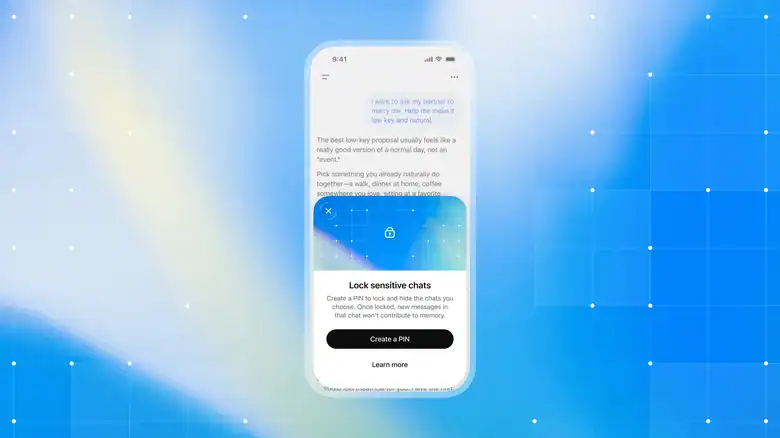 OpenAI is gradually rolling out locked chats for free accounts and compatible paid plans. – Image: Courtesy/OpenAI
How to lock a conversation in ChatGPT
According to OpenAI’s official documentation, the process is simple. Open the conversation you want to protect, click the three-dot menu (•••), and select “Lock chat.” Confirm the option and create a four-digit PIN if this is the first time you are using the feature.
After that, the chat will be moved to the Locked chats project. To access it again, open the Projects section, select Locked chats, and enter the PIN. On compatible devices, you can also use Face ID, Touch ID, or the device’s unlock method.
The feature is gradually rolling out for free accounts and Go, Plus, Pro, Business, Enterprise, and Edu subscriptions.Availability varies depending on the device: on a computer, the documentation indicates the use of the ChatGPT apps for Windows or macOS. Codex conversations and local Work chats cannot be locked.
 Locking ensures visual privacy on the device, but does not add end-to-end encryption to conversations. – Image: Mijansk786/Shutterstock
What are the privacy limitations?
Locking makes it more difficult for others to find specific conversations on the device, but does not prevent OpenAI from processing or storing data in accordance with account settings. The tool does not offer end-to-end encryption, does not automatically change model training settings, and does not alter the chat retention period.
There are also important precautions to consider before using the feature:
- Shared conversations: locking a chat does not invalidate a sharing link that has already been created. To prevent access through that link, it must be deleted separately.
- Memory: locking does not erase information that ChatGPT may have already saved to memory before the protection was enabled.
- Corporate access: the feature does not replace the access and compliance policies of organizations that use ChatGPT.
- Forgotten PIN: resetting the code permanently deletes locked chats, memories stored only in them, and files protected by the previous PIN.
OpenAI warns that content deleted during this reset cannot be recovered by support.Therefore, blocking is useful for reducing the exposure of conversations in everyday use, but it should not be confused with a guarantee of absolute confidentiality.

Valdir Antonelli is a journalist specializing in digital marketing and consumer behavior.

