
Google’s AI “Gemini” has features that integrate with the signed-in account’s Gmail and Google Drive, enabling more personalized chats and data analysis. These features access personal data even when they are not explicitly instructed to do so, and it has been reported that personal information read by Gemini may be seen by human reviewers.
GitHub - thisisme6598/gemini_files: Documentation of Gemini File Leaking Behavior · GitHub
https://github.com/thisisme6598/gemini_files/
In March 2026, Google announced that Gemini would be integrated as a collaborative partner supporting work across Google Workspace, including Google Docs. By using Gemini, users can draft documents, consolidate and analyze data, and compare information received in Gmail with notes recorded in Google Docs or Google Sheets to generate suggestions and example replies.
Google Rolls Out AI “Gemini” Across Google Docs, Sheets, Slides, and Drive, Enabling Document Drafting with “Help Me Write” - GIGAZINE
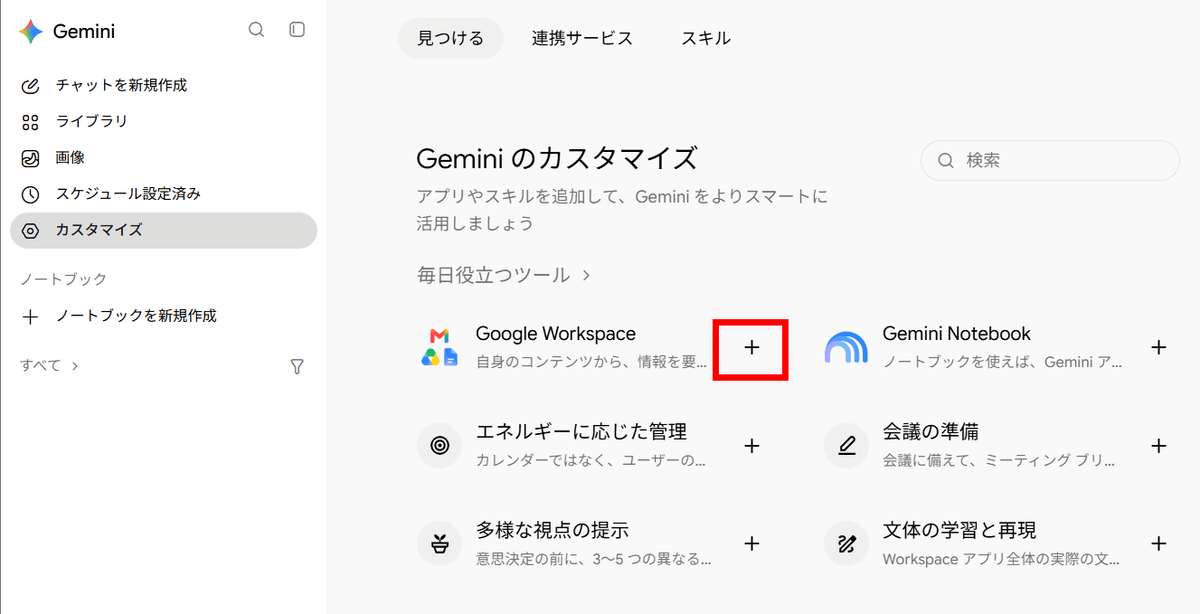
Gemini can be integrated with Google Workspace through “Customize Gemini.” Users can click the “+” icon to begin connecting an app, and they can also disconnect an app they have connected.
According to GitHub user thisisme6598, even when no explicit request is made, routine questions may trigger the retrieval of relevant emails and files through this Gemini and Google Workspace integration, and some of the data may be subject to human review.
According to thisisme6598, when Google released the Gemini Workspace extension in 2023, it made a clear promise that “personal content from Gmail, Docs, and Drive would not be seen by human reviewers.” However, this policy was later quietly rescinded. Google subsequently explicitly confirmed that connected Drive and Gmail data is routed through its human review pipeline and issued a clear warning that reviewers may see users’ emails or files: “If you have confidential information that you do not want reviewers to see, do not connect your apps to Gemini Apps.”
thisisme6598 therefore investigated Gemini’s data ingestion and reported the findings in a GitHub repository named “gemini_files.”
According to thisisme6598, when users chat with Gemini with app integrations enabled, a Workspace search is sometimes automatically performed in the background if personal topics such as travel or reservations are mentioned in the chat, even without an explicit instruction such as “Search for this information in Gmail.”
There are reportedly four types of Gemini response patterns: responding based solely on the model’s weights and past conversation history without invoking connected app tools; having Gemini retrieve emails or files and generate a summary such as, “There are three emails related to this”; having Gemini extract specific passages from emails or files; and retrieving the full text of an email or file. These occur probabilistically, and reportedly, even for the same question, whether information is retrieved and how much is retrieved varies each time.
thisisme6598 pointed out, “Even during a time when Google guaranteed that its Google Workspace integration features were completely isolated from human review, now that this isolation has been withdrawn, if Gemini is probabilistically ingesting entire files during everyday conversations, unintended personal information could end up being seen by others.” The repository’s supplementary explanation states that this investigation targets standard personal Google accounts, while human review and training on externally generated content are excluded by default for business accounts.

