Exam questions, tasks, and preparation notes. Files on the left, an overview with links to relevant topics on the right.
It was the icon that first caught my eye
I came across Obsidian by chance. I no longer remember exactly where I downloaded it, but I remember that the first thing I liked was the icon. I opened the app and started using it to write out the questions for my exam sessions. Of all the add-ons, I used the LaTeX plugin most often: it made it easier to format formulas in exam answers. I didn’t have any elaborate system for organizing my life back then—just subjects, notes, questions, and a few links.
If you’re not yet familiar with Obsidian, the basics are fairly simple.A vault is a folder on your computer, and the notes in it are regular Markdown files. To link entries, I write [[Note title]] directly in the text. In reading mode, this is a regular link: from an exam topic on derivatives, I go to an explanation of an extremum, and then return to the problem.
A few years later, I came across a video about someone using Obsidian to bring order to their learning and everyday thoughts. I wanted to use the app again. I started saving excerpts from articles I had read, sometimes entire pieces, and writing down my own ideas. Before long, I had accumulated enough text that I wanted to process it right in the editor, without constantly copying it to another chat and back.
I tried Copilot and discovered OpenRouter. I had long wanted to build something purely out of personal interest, so I decided to write my own plugin and learn TypeScript along the way, even though I had barely worked with it before.
The early versions of Veynrel processed the selected passage, appended the answer to the end of the note, and iterated over the files in a single folder. After my first article on Habr and the discussion beneath it, ideas began emerging for testing the vault and working with links. Several times, I thought the functionality was already complete. Once semantic search was added, that feeling disappeared.
Ask the way you remember
The built-in search helps when I remember an exact word from a note. As time passes, I am more likely to remember the content while the filename slips my mind. Then I have to sift through my notes and guess where I saved the explanation.
Before recording, I prepared three questions for the study set. The first one was: “Without the notes, I can’t explain the exam topic.How do you test yourself?” Veynrel put the note “Oral Answer Rehearsal” first. A snippet of the text was visible in the results, and I opened the result right from there.
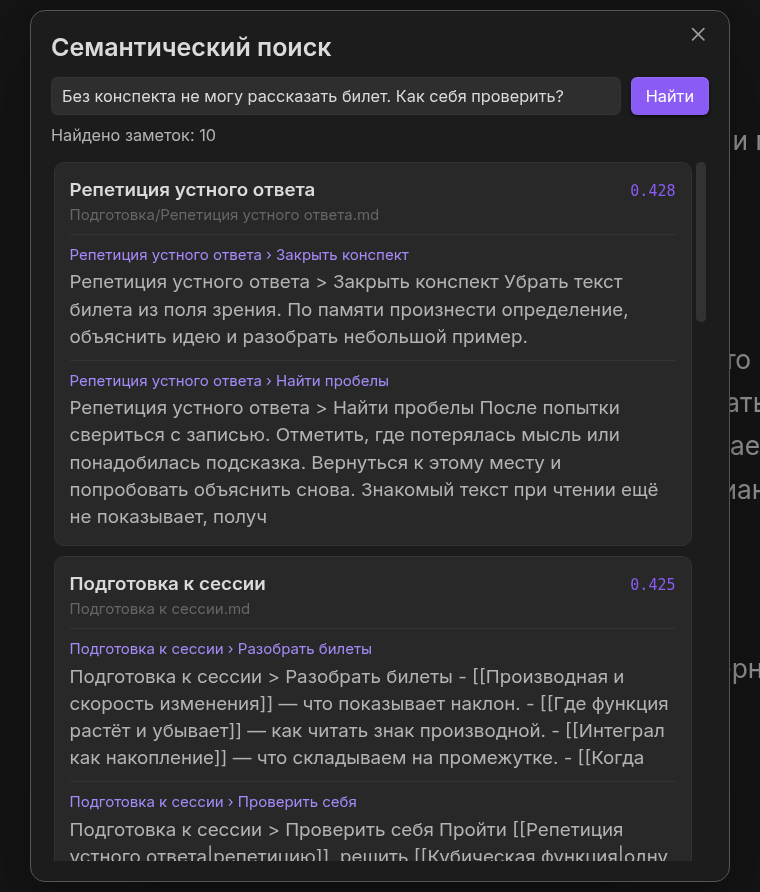
A question in your own words, real results. The first entry is “Oral Answer Rehearsal.”
Watch the 21-second recording of the search and opening of the note
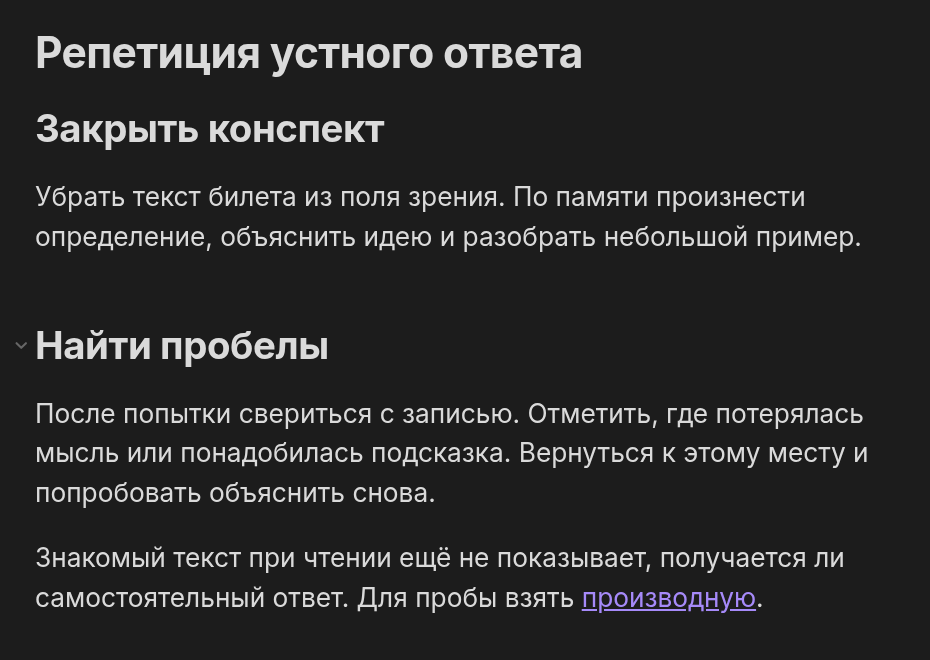
Here is where the search led: cover the text of the exam prompt, explain the topic, then identify the gaps. After that, it is just an ordinary Obsidian file.
Semantic search compares the query with the contents of notes using a prebuilt index. This uses embeddings—numerical representations of text. On my first try, I built an index of the study folder, entered a question, and opened a relevant fragment from the results.
Three questions produced different results.For comparison, I opened Obsidian’s built-in Search panel and entered two meaningful words from each question, without using hints from the retrieved answers.
I ran the questions through three configurations: local MiniLM (shown in the video above), BGE-M3 via the OpenRouter cloud, and BGE-M3 locally in Ollama.
What I wanted to find | Built-in Search | Local MiniLM | BGE-M3 OpenRouter | BGE-M3 via Ollama |
|---|---|---|---|---|
How can I test myself without the notes? | notes exam ticket: 2 files, the relevant one is there | №1 | №1 | №1 |
Where does the graph rise and fall? | graph rises: 0 files | №4 | №1 | №1 |
Why does the permutation change the password? | password permutation: 0 files | №1 | №1 | №1 |
The table shows where the relevant note is located.needed note.The built-in Search required both entered words to be in the same file; on the first query, it also found the right note.
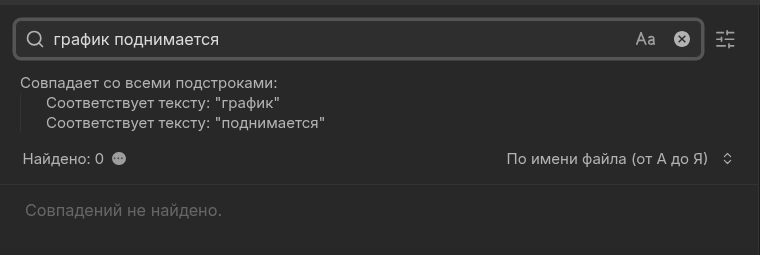
the graph is rising: the built-in search did not find any files matching both words simultaneously.
With MiniLM, the ticket about the growth of a function was preceded by a preparation overview, an oral-answer rehearsal, and a three-evening plan. Below is the same query after building a new index with the local bge-m3 in Ollama.
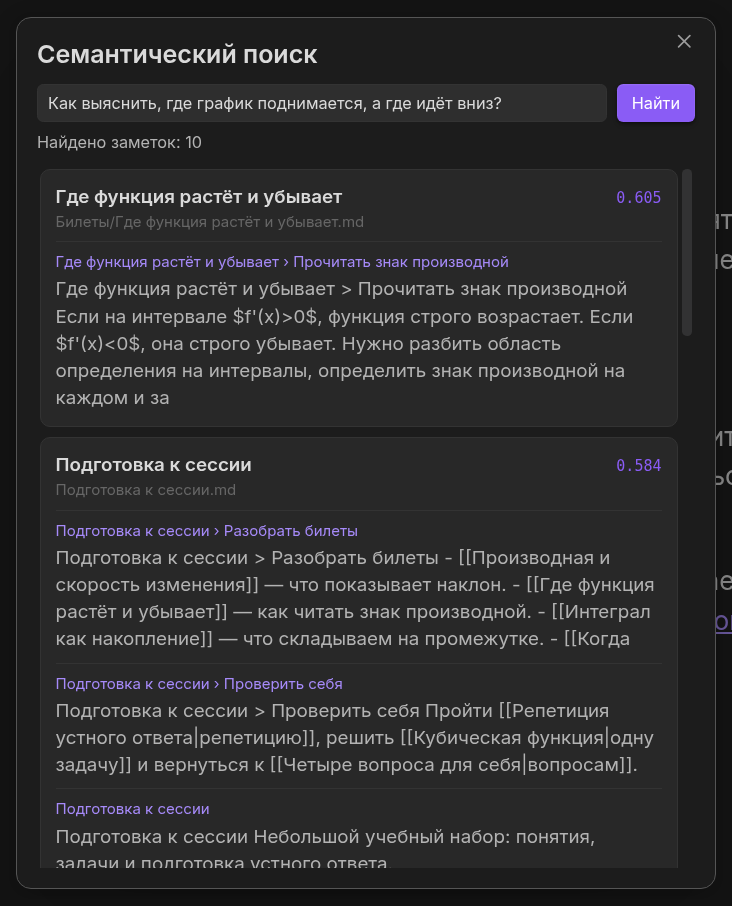
The ticket “Where the Function Increases and Decreases” came first in the local results. The OpenRouter key and Rerank were not used.
There is one more detail in the third case. The required ticket says that the positions of the characters affect the password, but the word “permutation” does not appear in it at all—not even by its stem. Therefore, the zero results from the regular search are explained by the text of the note itself, not by the query using a different form of the word.
There are only 16 study files and three queries here. This test does not show how the same models will perform on someone else’s vault.
The entire cloud-based run, including index building and the Rerank button, cost less than one hundredth of a cent. I’ve hidden the technical details, including the different models and Rerank, below so as not to turn the plugin walkthrough into an API report.
Found a note — checked the others
After several edits to the notes, unfinished transitions begin to remain in them. One ticket contains a link to an explanation that was supposed to be completed; another contains a full copy of an old note.This part of Veynrel includes Health — a local check for links, exact duplicates, and other file-structure issues.
In the sample set, I deliberately left two defects: a [[Second Derivative]] link in the “Checking an Extremum” card with no target file, and an exact copy of the note about the zero derivative. I ran Health—the actual check found both cases.
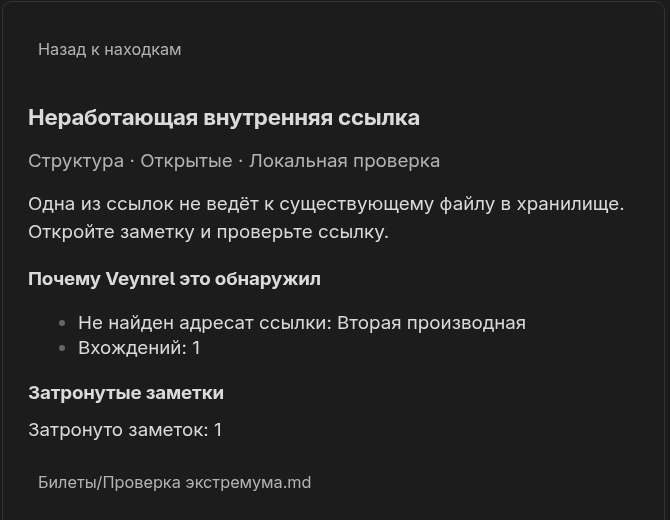
There is a link to “Second Derivative,” but the note itself does not exist. You can see which card it comes from.
I open the card and can see exactly what needs to be fixed. Perhaps an explanation needs to be added, or perhaps the link was left over from an old plan. Duplicate detection does not necessarily have to end in deletion either: two similar entries are sometimes needed for different purposes. The check itself runs locally, without a language model or API key.
Once you’ve read the notes
There is another familiar frustration with a quiz card: I read the answer and everything seems clear. I try to explain it aloud and suddenly forget the condition or the sign. That is why Veynrel has Recall — cards for review. The question and answer are written in Markdown, and the plugin finds them and creates a schedule.
For the demo folder, I used four pre-prepared cards. One of them asks what a positive derivative means. I expanded the answer and, after the recording, selected “Good.” The next review was indeed saved in the plugin’s data; the other cards were unchanged.
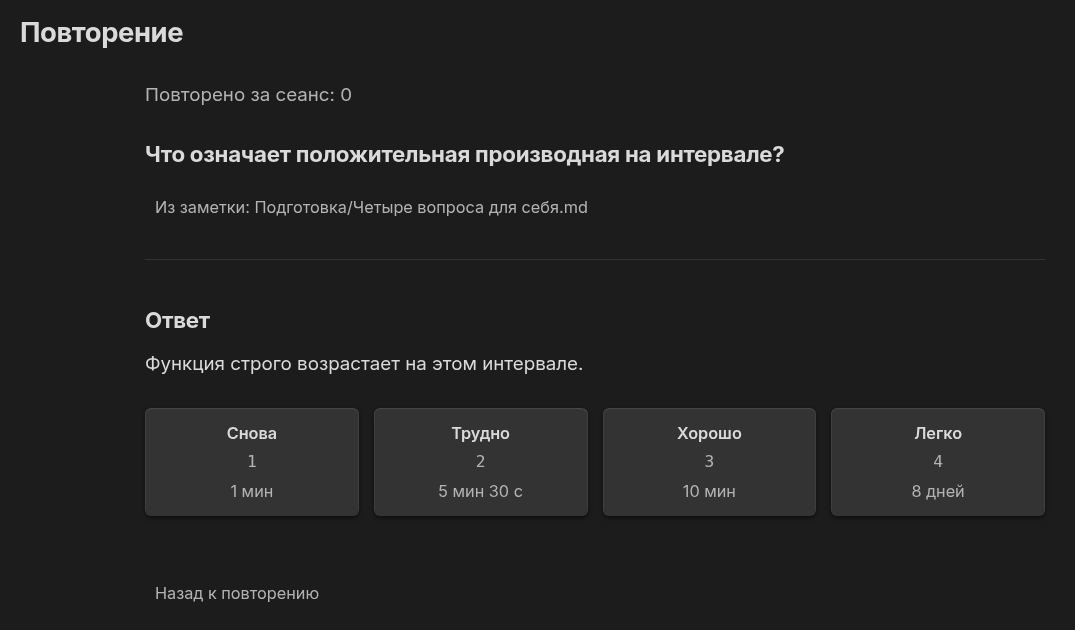
The expanded answer and rating options.The frame was captured before one card received a “Good.”
If I can’t recall the question, I go back to my notes and work through the example. Short questions help check which parts of the material I can already explain from memory. Recall also works locally in this mode.
What else is in Veynrel
The initial commands for working with text eventually evolved into Studio. It stores processing scenarios: formatting a note, creating a training log, or turning a long text into a clear structure. It can also create editable diagrams for Excalidraw. These tools require a configured model, and the result is previewed separately before being saved. I have already written in detail about how LLMs work and their mistakes in the article “How I Format Workouts and Nutrition in Obsidian with an LLM and What It Lost Along the Way.”
After the introduction of Studio, I also added Community Library, where users share their processing scenarios.
The discussions have already influenced development: in the comments under the first article, someone suggested an MCP integration—a way to give an AI agent access to notes. Integration via Veynrel Companion is already available in release 1.8.0: the agent reads synchronized copies of notes and suggests changes that I approve in Obsidian. In version 2.3.1, connecting and viewing suggestions are available in the Connect section; a Companion server must be running.
For those who need more details: models, Rerank, and pricingIn the recording, MiniLM was running paraphrase-multilingual-MiniLM-L12-v2 via ONNX CPU and an OpenAI-compatible server on the same computer. It was specifically a local server, not OpenRouter.In the cloud series, baai/bge-m3 was tested via OpenRouter. Veynrel built a new index for it; the system placed the three target files at 1 / 1 / 1, while MiniLM placed them at 1 / 4 / 1. Similarity scores cannot be directly compared between models.
Veynrel has Rerank — a “Refine results” button. On the second query via mongodb/rerank-3-lite, it reordered the 16 candidates, but the target ticket was already ranked first after BGE-M3 and remained first. In the previous benchmark of 24 question-and-answer pairs, nDCG@10 improved in 11 cases, remained unchanged in 11, and worsened in 2. This is a different dataset and a different evaluation.
The six paid requests in the cloud series cost  0.02 per million input tokens, while BGE-M3 cost $0.01 per million input tokens. This is the cost for a small synthetic corpus; the cost for a large data store will be different. OpenRouter pricing.
In the local Ollama series, Ollama 0.40.14 and bge-m3:latest ran in GGUF F16, digest 790764642607…, on the CPU. Veynrel’s built-in Ollama provider created a separate index of 19 vectors with 1024 components each. The target files ranked 1 / 1 / 1, without Rerank. During indexing and retrieval, the notes did not leave the computer; there were no cloud requests in this series. The local build and cloud configuration are not claimed to be identical: OpenRouter responses do not report the weights’ format or precision, and agreement among the three ranks is insufficient to support such a conclusion.
The methodology and raw files are saved in the original demo archive.Three questions and 16 specially prepared notes do not prove that one model is superior across all tasks.
How to try
If you do not have Obsidian yet, download it from the official website and create a folder with several notes on a single topic. Link a couple of files to each other. Veynrel is then installed via Settings → Community plugins → Browse. Search for Veynrel, install it, and enable it. The easiest way to start is with the local Health check: it works without a model.
For semantic search, there is a proven local option that requires no API key:
Install and run Ollama, then execute ollama pull bge-m3. The model occupies about 1.2 GB of disk space; before downloading, check the available disk space and memory.
In Veynrel’s embedding settings, select Ollama, the bge-m3 model, and the http://127.0.0.1:11434 address, without /v1. No API key is required.
Test the connection, build a new index for a small folder, and ask a question in your own words. A new configuration requires its own index, even if you previously used the cloud BGE-M3.
The proven cloud option remains a separate configuration: OpenRouter and baai/bge-m3. It requires a key, account credit, and a new index. With this connection, fragments of notes are sent to an external provider, so it is better to use non-sensitive notes for your first experience.Veynrel step-by-step documentation.
Results may differ in another folder.
Veynrel Repository · Release 2.3.1
What position was the desired note in when you first searched?