Everything is visible from the menu bar
Opening the menu bar reveals an island with a list of sessions. Each has a clear status: "writing code," "reading files," "waiting for you," "complete." If an agent is requesting permission for a command, the "Allow" and "Deny" buttons are right on the card: one click, and the agent proceeds, while you stay where you were. Questions with options can also be answered from the menu bar.
Lumio understands eleven agents: Claude Code, Codex, Gemini CLI, Qwen Code, Cline, Cursor, GitHub Copilot, Antigravity, OpenCode, Kilo, and Pi. They connect via the "Connect" button in settings, no need to edit anything manually.
New in 1.4: Qwen Code and Cline
Qwen Code has received full support: status in the menu bar and in the office, "Allow" and "Deny" from the menu bar, responses to its questions. Answering in Lumio — Qwen understood and continued, without re-asking the question in the terminal.
Cline — both a CLI and a VS Code extension — shows in the menu bar what it's doing while waiting for your answer (with the question text) and what it finished the task with. Cline's permissions are still confirmed within himself, and Lumio highlights that he is waiting for you so you don't miss the moment.
The office where agents are human beings
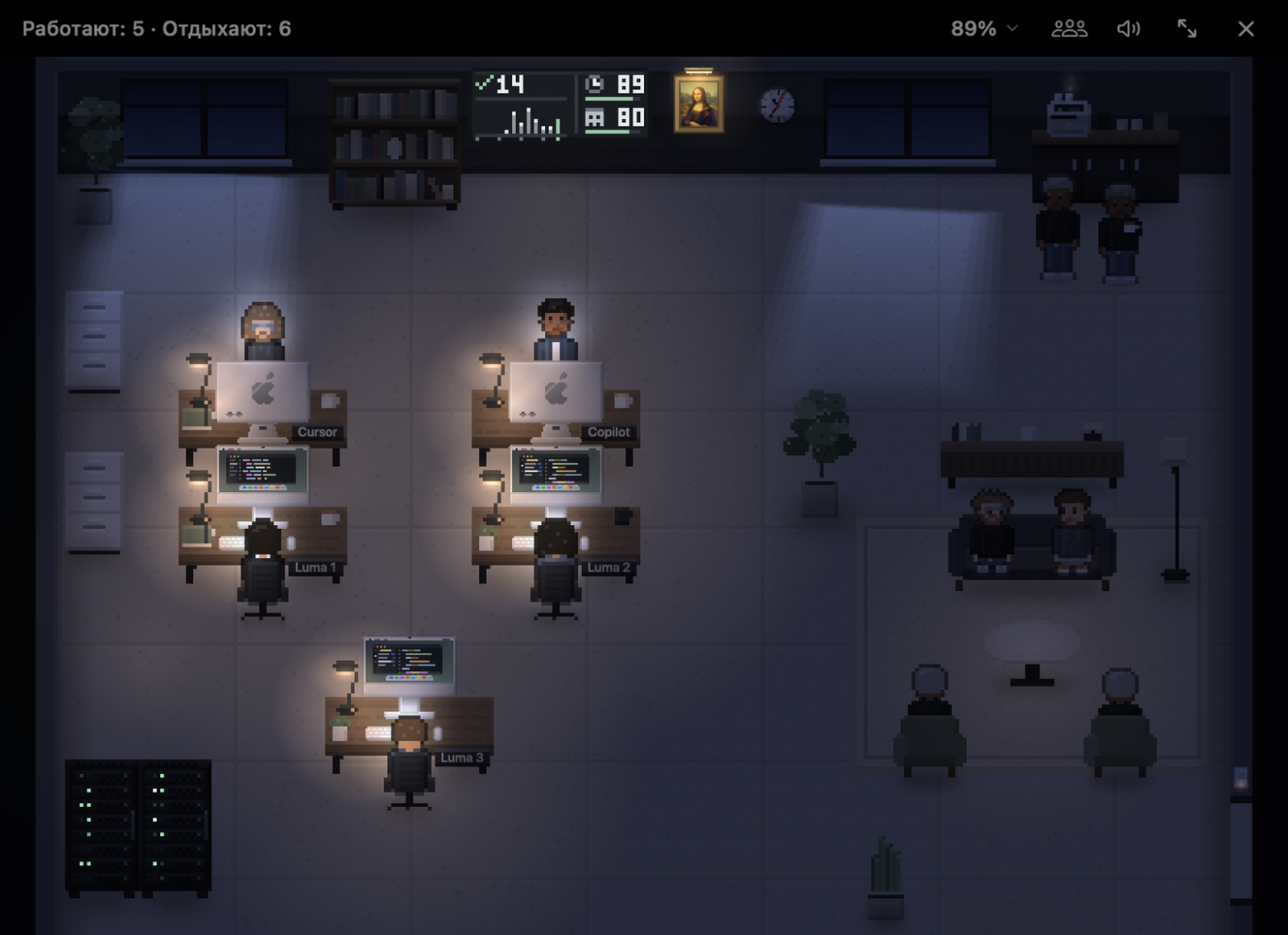
The office is what Lumio opens just for that. Each session is a human at their desk with a project label. They work — typing, code runs on the screen. They wait for you for two minutes — cross their arms. When they finish — they are happy, and after a long task, they look tired. In between, people go to the coffee machine, press the button, and wait for the coffee with steam to come out.
In the twilight, they turn on the desk lamps themselves, and at night, the light is only on for those who are working or waiting for you. It creates an honest picture: look at the dark office with one lamp — and immediately you can see who is still working.
You can click on the items. Turn off the lamp for the working agent — he'll say "Hey, it's dark again!" and turn it back on in a couple of seconds. Above their heads, only what requires your attention: "waiting for a response" and errors. No visual noise.
Daily and weekly summaries
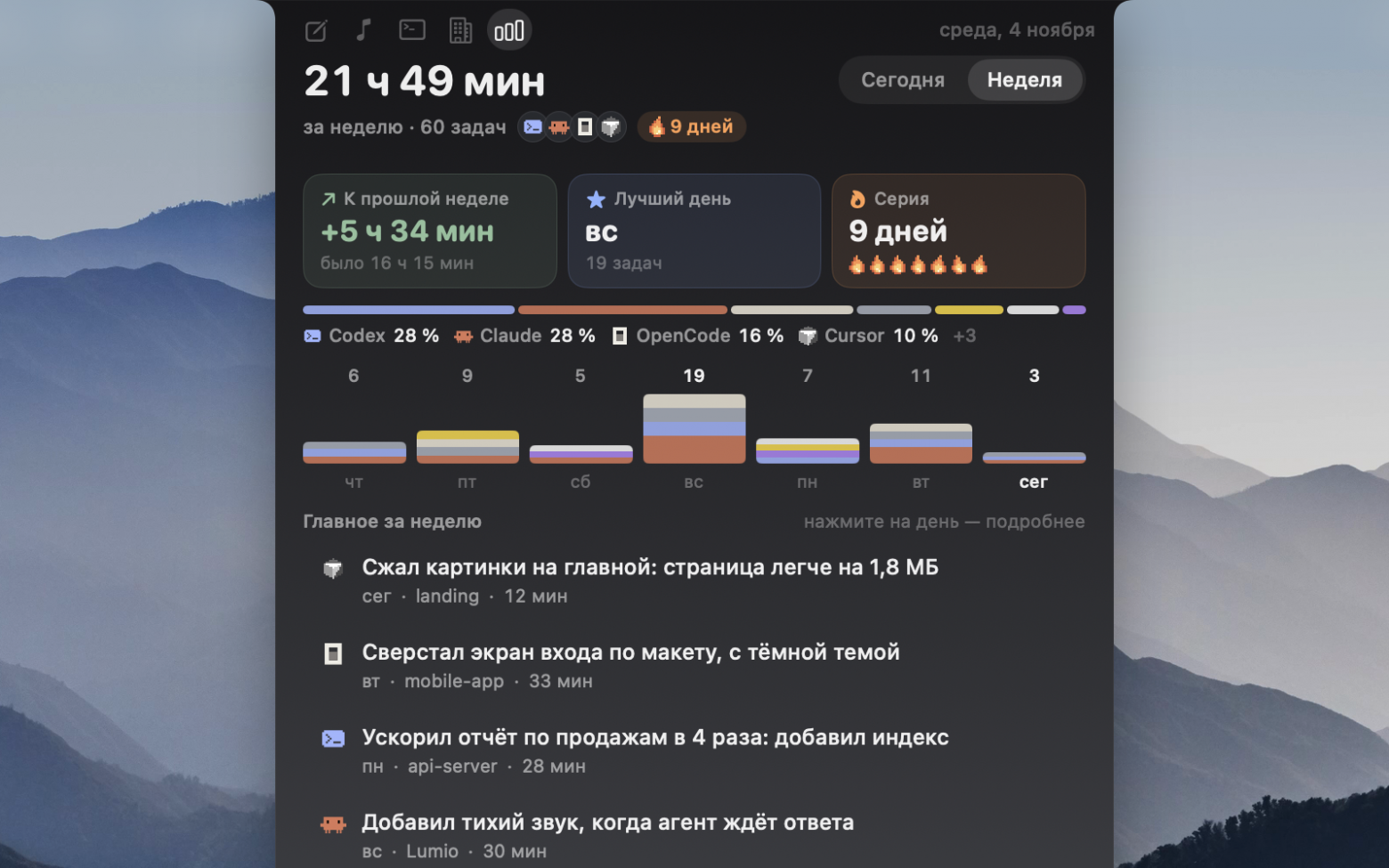
In the "Summaries" tab, you can see how much you've done with agents: time per day, tasks, streak of consecutive days. The weekly tiles are pressed: best day, comparison with the previous week. Each task has a card: what was asked, what the agent answered, which files were changed, and a "Continue in agent" button. The weekly report is copied with one button — convenient for standup meetings or for yourself on Fridays.
Notes with one key press
Press the right ⌥ — the island opens, you write your thought, press Enter. Notes are saved in Obsidian, either in your own folder or in the Lumio folder. @@TAGn@@Today · 3 Thoughts@@TAGn@@ with handwritten underline, below an ink wave.@@TAGn@@One engineering detail we're proud of. Many people store Obsidian in iCloud, and macOS likes to upload old files to the cloud. Lumio reads such notes in the background, so the island opens instantly with ⌥, even if half the storage is currently in the cloud. Today's notes are visible instantly, the rest load in sequence.@@TAGn@@Notes in Lumio Island@@TAGn@@ and @@TAGn@@Also some small details@@TAGn@@. Light theme for the island: "Like macOS", "Light" or "Dark".@@TAGn@@Music takes color from the cover, the record spins.@@TAGn@@Custom keys for notes and office: single press, double, or combination.@@TAGn@@Tour: a pixelated person walks across the screen to the island and shows each tab.@@TAGn@@The island opens and closes on a spring — the movement feels more alive.@@TAGn@@Lightweight all day@@TAGn@@. An app that sits in the island from morning to night shouldn't be noticeable. In idle, Lumio 1.4 uses about 2% of the processor. The office is rendered only while it's open, and session history loads in the background in small chunks without interfering with work.@@TAGn@@How to update@@TAGn@@. With 1.3, the update comes automatically. If it doesn't offer — install using the command below, settings and notes will be preserved.@@TAGn@@curl -fsSL https://lumiomac.com/install.sh | sh
We'll be happy to answer questions in the comments. Especially if you have an agent that Lumio doesn't know yet — write which one you use, let's see what we can do.