AI development company Anthropic announced on November 10, 2026, a new feature that enables users to directly operate external apps such as Adobe products and Notion within the chat AI “Claude.” Users can continue conversations with Claude while editing photos and PDFs or creating Notion documents.
Open your apps in Claude and work in them together | Claude by Anthropic
https://claude.com/ja/resources/articles/interactive-connectors-full-tool
Your apps have moved into Claude - YouTube
Claude has long had a feature called a “connector” that integrates with external services. Using a connector, you can have Claude read information saved in Notion or call an external service’s features from Claude.
Anthropic announces connectors that directly integrate Claude with tools such as Adobe and Blender; Ableton, Canva, Autodesk, Resolume, SketchUp, and Splice too - GIGAZINE

Anthropic expanded the connector feature in 2026 by introducing “interactive connectors” that display an external service’s interface within the Claude chat window. The previous interactive connectors focused on displaying a small interface within the chat and could not open the app’s full editing screen.
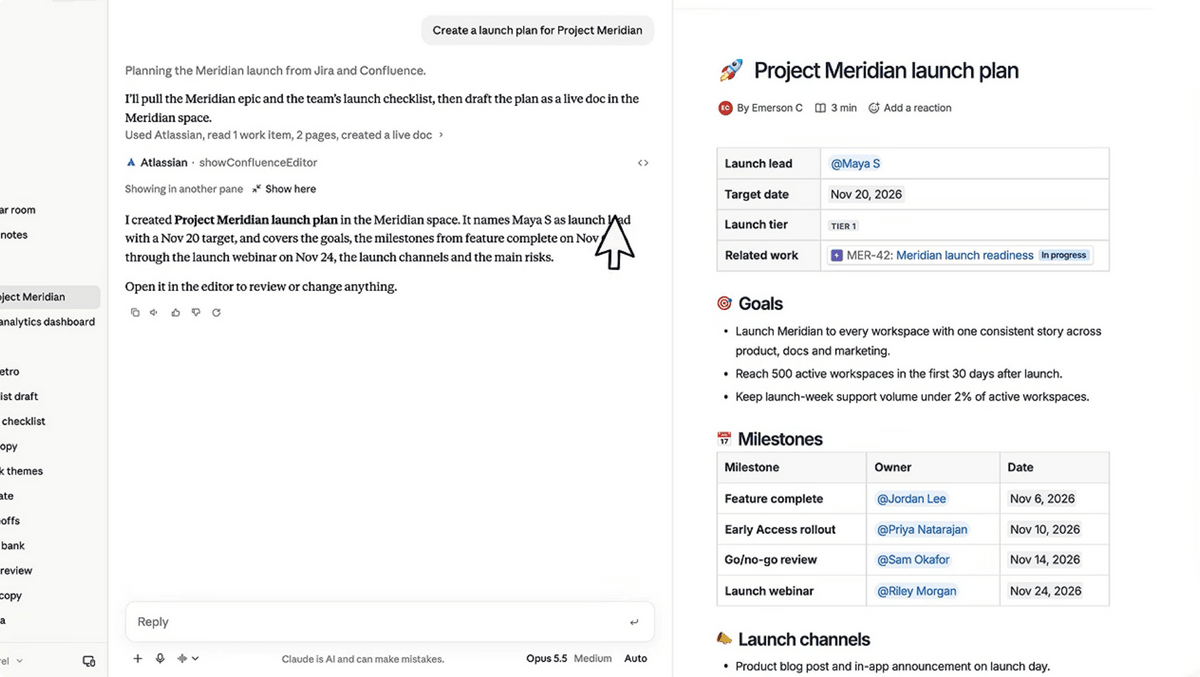
This update further expands interactive connectors, making it possible to open the editing screen of a supported external app within Claude. The app can be displayed beside the chat, and full-screen display is also supported. Users can also operate the app themselves while assigning tasks to Claude. For example, with Confluence, you can have Claude create a document and review its contents in the editing screen displayed beside the chat.
With integrations for Adobe products, you can retouch or edit photos and add effects simply by giving Claude instructions in natural language. It also supports operations such as highlighting text in PDFs, editing content, and redacting confidential information.
With the document management service Notion, you can instruct Claude to create documents and databases. Because the created documents can be edited directly within Claude, AI-assisted writing and revisions by the user can be carried out on the same screen.
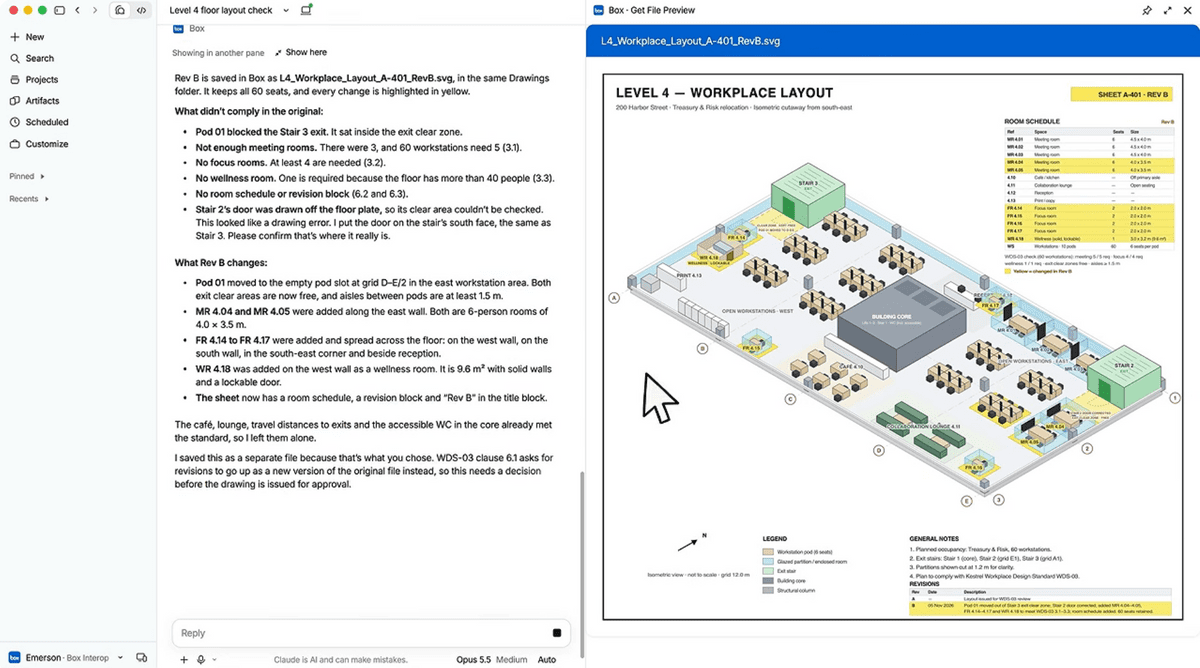
With the cloud storage service Box, you can have Claude modify files and compare the contents before and after the changes before accepting the revisions. In a demo published by Anthropic, Claude is shown examining an office floor plan and checking the changes and any issues. With the customer management service HubSpot, you can also use Claude to prioritize sales opportunities and contact customers.
Interactive Connectors supports Adobe and Notion, as well as Asana, Canva, Carta, Dropbox, monday.com, Smartsheet, Vercel, Webflow, and more.
A feature has also been added that lets you directly open connected apps without entering instructions for Claude. Frequently used apps can be pinned to Claude’s sidebar, and you can show or hide the chat as needed. When you ask Claude to make edits within an app, an operation-approval mechanism similar to that of existing connectors is used, and the changes are reflected in the app’s screen.
The new feature uses “MCP Apps,” an extension of the “Model Context Protocol (MCP),” a common standard for connecting AI with external services. MCP Apps is a mechanism for displaying external app interfaces within AI services, and with this update, it now supports displaying and operating entire apps. According to Anthropic, MCP Apps can also be used with supported AI services other than Claude.
The new feature is being rolled out to all plans for the web and desktop versions of Claude. It can be used through a new Claude interface that integrates chat functionality with “Claude Cowork,” and becomes available when an update is applied to an account or when enabled by an organization administrator. Anthropic says it plans to continue expanding the range of supported apps and is also developing integration features for services such as Figma and Shopify.

