The program listens for HTTP requests on 127.0.0.1:47821, and the hook simply sends it whatever it received on stdin.The || exit 0 part is needed so that, when the mascot isn’t running, the command exits silently with code 0: otherwise, Claude Code would show a hook error on every event. This command also works the same way in both bash and cmd.
The server rejects requests with an Origin header. This prevents an arbitrary web page in the browser from connecting to the local port and invoking the mascot. There’s nothing critical about this, but checking such things is never a bad habit.
Desktop Claude: events that aren’t emitted
The terminal version is straightforward. The desktop app (the Code tab) is trickier: when it requests permission for a tool or asks a question, it doesn’t send a Notification event. I didn’t learn this right away because everything worked in the terminal, while the mascot was silent on the desktop.
I had to add two more events. PermissionRequest catches permission requests, while PreToolUse with the matcher AskUserQuestion|ExitPlanMode catches tools that ask a question themselves or request approval of a plan. There’s also an optional Stop event; it fires after every response—someone needs it.
The mascot installs the hooks itself at startup. Before writing, it places a copy named settings.json.mascot-*.bak alongside the file (the five most recent copies are kept) and doesn’t modify hooks installed by others. Another nuance: already-open sessions may not pick up the new hooks until they’re restarted, so the desktop needs a second source of signals.
Windows notifications as the source of truth
The second source is the notifications themselves. Windows writes every toast notification to the SQLite database %LOCALAPPDATA%\Microsoft\Windows\Notifications\wpndatabase.db.It is enough to open it for reading once a second and check whether an entry with an application identifier such as `Claude_*!Claude` has appeared:
const { DatabaseSync } = require('node:sqlite'); const db = new DatabaseSync(DB, { readOnly: true }); const ids = db.prepare( "select PrimaryId as id from NotificationHandler where PrimaryId glob 'Claude_*!Claude'" ).all();The `node:sqlite` module is built into Node, so no native dependencies or build were required. This method also works with an already running Claude without injecting anything into it.
A window that is visible but does not interfere
This is the second half of the task. We need a window that:
is transparent and frameless;
stays above all windows, including fullscreen applications;
does not appear in the taskbar;
does not take focus (otherwise, input while typing would go to the mascot);
lets clicks pass through to everything except the mascot itself.
In Electron, most of this is handled by `BrowserWindow` settings:
win = new BrowserWindow({ frame: false, transparent: true, backgroundColor: '#00000000', hasShadow: false, skipTaskbar: true, alwaysOnTop: true, focusable: false, /* ... */ }); win.setAlwaysOnTop(true, 'screen-saver'); win.setIgnoreMouseEvents(true, { forward: true });The most interesting part is the last line. `setIgnoreMouseEvents(true, { forward: true })` makes the window “transparent” to clicks while continuing to forward mouse movement events to the page.Therefore, the page detects that the cursor is hovering over the mascot (the `mouseenter` event), and then click handling is enabled again; when the cursor leaves, it is disabled again. Without this, the window shape would have to be calculated manually.
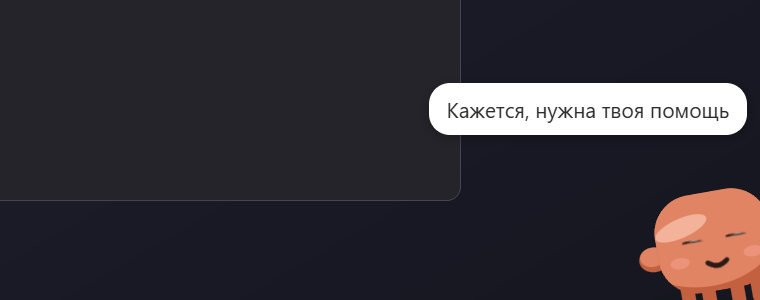
The window is stretched across the full width of the work area and is 190 pixels high above the taskbar. The mascot simply “stands” on the taskbar, while the animation of it stomping and steaming from the head is just regular SVG and CSS. The sound is lightweight too: “mumbling” is synthesized through WebAudio, and the mouth opens in time with the syllables. To let the sound play without a user gesture, `autoplayPolicy: 'no-user-gesture-required'` had to be enabled.
What koffi does
To determine whether the Claude window is active and bring it to the foreground on click, you need the WinAPI: `GetForegroundWindow`, finding the window, and `SetForegroundWindow`. I used koffi for this: it calls functions from `user32.dll` without native compilation or node-gyp. The “Claude is active” rule is simple: the `claude.exe` process or the word “claude” in the window title. If Claude is hidden in the tray, clicking launches `claude.exe` again, and the application brings the existing window back up.
The active window is polled every 300 ms. At this timer frequency, the overhead is imperceptible.
Windows notifications interfere with each other
If the mascot is displayed while Windows simultaneously renders the usual toast, you get two notifications at once, which is annoying. Therefore, there is a “Replace Claude toast with the mascot” option, enabled by default. It disables banners for Claude only. To do this, `ShowBanner = 0` is set in the registry at `HKCU\Software\Microsoft\Windows\CurrentVersion\Notifications\Settings\<AUMID>`.Notifications in the notification center remain in place, and the wpndatabase.db database continues to be populated, so the mascot can still see them.
Here, it is important to restore everything to how it was. The previous value (or the fact that there was no value) is saved in the config and restored when the option is turned off, on exit, when the Windows session ends, and on the next startup if the program crashed before then. I write directly to the registry via reg.exe, since it is simpler than adding another dependency.
Behavior
The scenario is taken from a small HTML demo that I made before the program itself, in order to fine-tune the personality:
There are three peeks from the corner, with three phrases during each peek and a 7-second pause between peeks. During the first two, the mascot is calm; on the third, it frowns.
Then it comes all the way out for 20 seconds: it turns red, walks along the bottom of the screen, stamps its feet, and shakes its fists.
It goes away and repeats everything from the start until the user responds.
As soon as the Claude window becomes active or you click the mascot, it runs away and the cycle resets.
The phrases are selected randomly, with no immediate repetitions.

Updates
The program is built with electron-builder into an NSIS installer and a portable file. The installer uses electron-updater with GitHub Releases: it checks 15 seconds after startup and then every 6 hours; a new version is downloaded in the background and installed on restart.Portable cannot replace itself (it is launched from a temporary extraction folder), so it only reports a new version and opens the release page.
Releases are created using a v
Autostart for the portable version also had a catch: `process.execPath` points to the temporary extraction folder, so the path is taken from the `PORTABLE_EXECUTABLE_FILE` variable and re-registered on every launch.
What’s in the menu
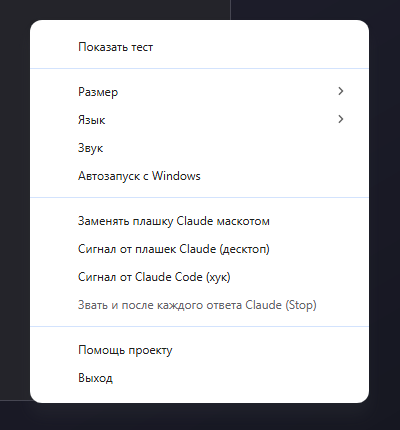
Size (1, 1.5, 2; 1.5 by default), sound, autostart, language (Russian, English, or the Windows default), all alarm toggles, and update checking. As a fallback, there is a “Show test” option.
Installation
You need to install either the installer or a single portable file. Both are available on the release page:
https://github.com/OlegChe77/claude-mascot/releases/latest
source code: https://github.com/OlegChe77/claude-mascot
The app is free and MIT-licensed.If you have ideas about which other Claude events to catch or what phrases to add, write in the comments or create an issue.