At the Context level, the system looks like this. The customer writes, and an operator sometimes steps in.Outside: a model provider, an order store, a delivery service, a payment system, and a knowledge base with articles.
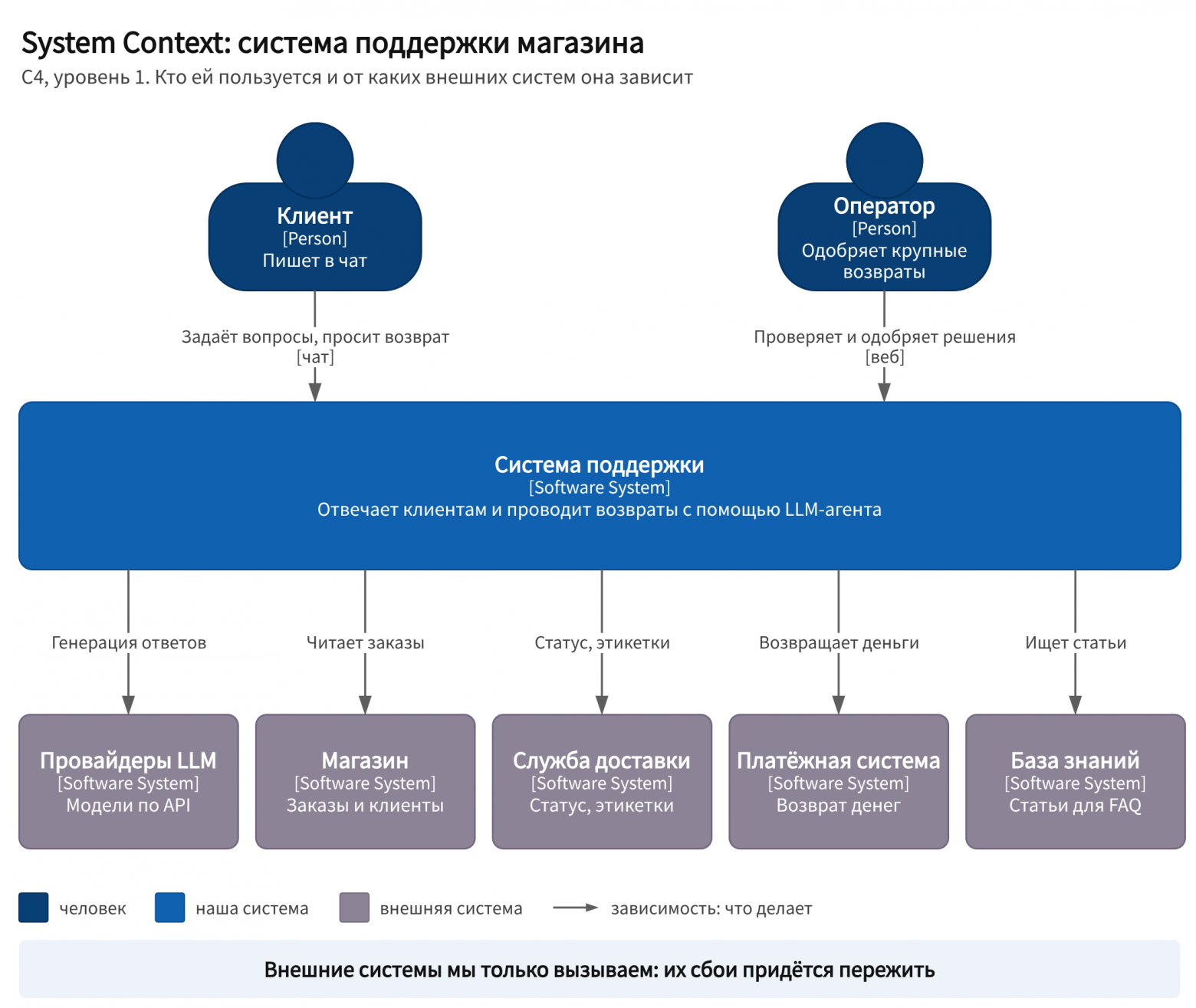
C4, level 1. The external systems are not ours; we only call them.
This works in the demo. Problems begin when there is more than one client. The history is kept in process memory, so any restart erases all conversations. The script handles one client at a time. And if the process crashes between refund_payment and the response to the client, no one knows whether the money was refunded or not.
Step 1. API and database
The first things we add are an entry point and memory. The script from step 0 did everything at once: it received a message, called the model, and waited for its response. We split it into two programs.
The API is a web service to which the chat sends the client’s message. It validates the request, saves the message in the database, creates a “process the conversation” task there, and immediately responds to the chat that the message has been received. The API does not call the model, so it responds in milliseconds.
The worker is a separate background process in which the agent itself runs, that is, the loop from step 0. The worker takes a task from the database, reads the conversation history, calls the model and tools, and writes the response to the database, where the chat retrieves it. Multiple workers are running, and each takes its own task. The worker does not communicate with the client directly.
The conversation history is now stored in the database and will survive any restart. The SDK provides ready-made history stores. In the OpenAI Agents SDK, these are sessions: SQLite, Redis, SQLAlchemy, MongoDB, and custom implementations.
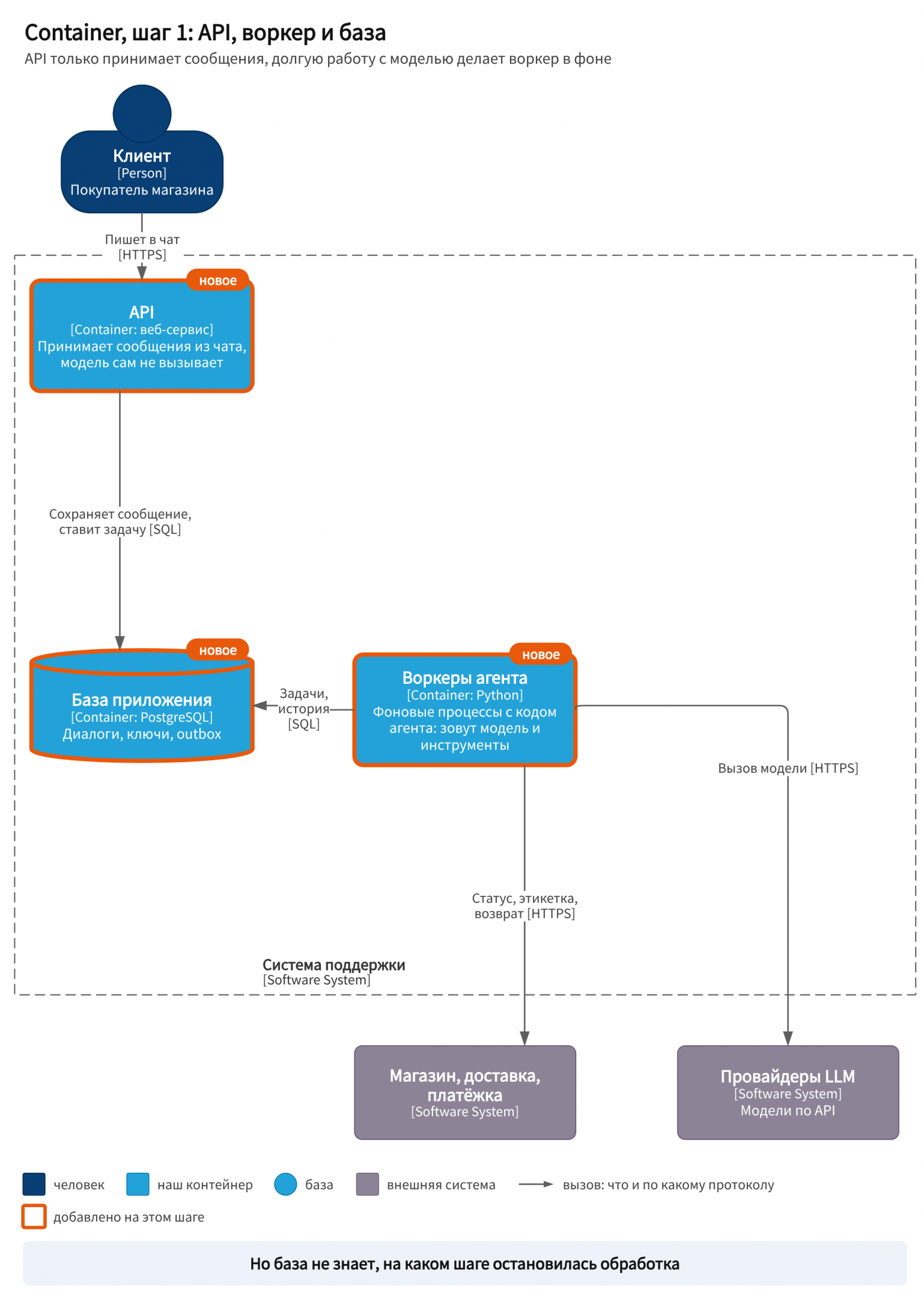
C4, level 2.What was added at this step is highlighted with an orange border.
Why split it up. An agent spends anywhere from seconds to a minute thinking through one request. If the API did this, every request would keep its connection open for that entire time. Long-running work is therefore handed off to workers: the API remains fast, and more workers are added under load.
But the main problem remains. A worker crashed halfway through processing a request. It managed to check the order status and call refund_payment, but did not receive a response in time. A new worker will pick up the request from the beginning. Call the refund again? If the first call succeeded, the customer will receive the money twice. Don’t call it? If it did not succeed, the customer will receive nothing. The database knows what the customer said, but does not know at which step processing stopped.
Step 2. Temporal: Every Request Is a Workflow
This requires durable execution, which we covered in the second part. Temporal records every step in its history. After a crash, another worker replays the history and continues from the same point. Completed steps are not executed again: their results are retrieved from the history.
It is important to understand what Temporal consists of physically, because this is where confusion most often arises. Temporal Service is a server plus its own database. Internally, the server is divided into four services. Frontend accepts calls, rate-limits them, and checks permissions. History stores the workflow state, Matching maintains task queues, and Worker performs internal background tasks. Temporal has its own database: PostgreSQL, MySQL, or Cassandra. It requires only this database to operate.
And Temporal does not execute your code. The documentation says so explicitly: workers live outside Temporal Service, and they are written and launched by the application’s command. A worker polls the task queue itself and takes a new task only when it is free.Thus, the load is distributed among workers without a load balancer. If a worker goes down, the task remains in the queue and waits for the next worker.
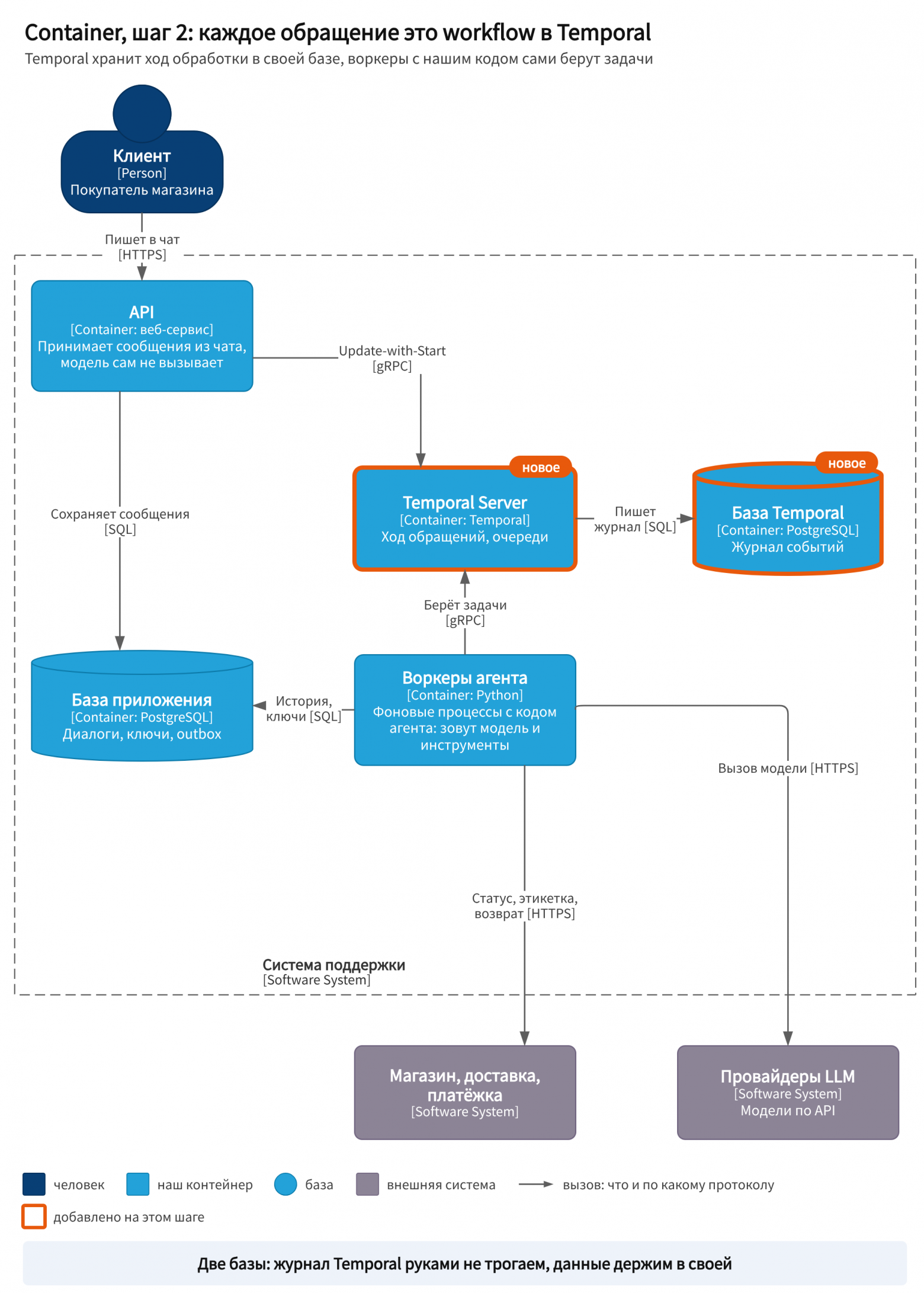
Temporal stores the progress of execution, while the application database stores the data.
The agent loop fits in as follows. The loop lives in the workflow, while the model call and each tool call become activities. This is how the official integration of Temporal with the OpenAI Agents SDK works: the loop, tool selection, and task handoff between agents run in the workflow, while model calls run as activities and are not repeated during recovery. According to Temporal itself, OpenAI’s Codex web agent runs on it. These are the vendor’s words; I have found no analysis from OpenAI.
How a request enters the workflow. You set the workflow ID, and it should carry business meaning, for example, an order number. Let’s use the conversation ID. Temporal guarantees that only one execution with such an ID can be open. If a client clicks “send” twice, the second start will not create a duplicate. Update-with-Start is even more convenient. This is a single API call: if the workflow for that conversation is already running, the new message is sent to it; if not, the workflow starts. This call must specify an ID conflict policy; here, it is Use Existing. The API can wait for a response in the meantime. The API no longer enqueues the task in the database: Temporal now maintains the task queue, while the application database stores only the messages themselves.
# Pseudocode: the API accepts a client message @post("/chat/{dialog_id}") def new_message(dialog_id, text): db.save_message(dialog_id, text) return temporal.update_with_start( workflow=support_case, workflow_id=f"dialog-{dialog_id}", id_conflict_policy=USE_EXISTING, # the workflow is already running: the message goes to it update="new_message", arg=text)There are three ways to write to a workflow. Signal is an asynchronous message with no response. Update is a synchronous write: the sender waits for a result or an error, and the workflow can check the request before accepting it. Query reads the current state and writes nothing to the history. A new client message is best sent with Update, an operator decision with Signal, and status for the interface should be read with Query.
And why not store everything in Temporal, since it already stores the history? The history of a single execution is limited to 51,200 events or 50 MB. After that, the execution is completed. For a long conversation, there is Continue-As-New: the workflow passes its state to a new execution with the same ID and a clean history. But keep client data, orders, and the correspondence history that the operator reads in the application database. Another reason is that the Workflow ID is stored in plaintext and is visible in the interface and logs, so it must not contain personal data.
Step 3. LLM gateway and circuit breaker
The model provider is down for half an hour. Temporal does what it should: it retries the activity with an increasing delay, by default with no limit on the number of attempts. A hundred workers with a thousand outstanding requests happily hammer the failed API. Each attempt waits for the timeout and holds the connection. When the provider comes back up, the entire queue will hit it all at once.
Retries are designed for a failure that will pass within seconds. For a prolonged outage, there is another pattern, a circuit breaker—an automatic switch. Martin Fowler describes it as follows. A wrapper around the call counts failures.After the threshold is reached, it opens, and subsequent calls immediately receive an error without reaching the service. After a while, the breaker allows a trial call through. If it succeeds, the breaker closes again.
Microsoft emphasizes the difference in its description of the pattern. A retry repeats the operation in expectation of success. A circuit breaker prevents an operation that is almost certain to fail from being executed. The two can be combined: the retry goes through the breaker. But the retry must recognize the breaker error and stop attempting if the failure is not temporary.
Where to place the breaker. There are many workers, each with its own memory. If the breaker lives in a worker’s memory, each worker will separately discover that the provider is down. Therefore, the breaker’s state must be shared. A convenient place is an LLM gateway, a separate service between the workers and providers. For example, LiteLLM does what is needed. It removes a model from rotation if it has failed more than a specified number of times within a short period (in the documentation example, more than three failures and the model “cools down” for 30 seconds), switches to a fallback model, and keeps this state in Redis, which is shared by all instances.
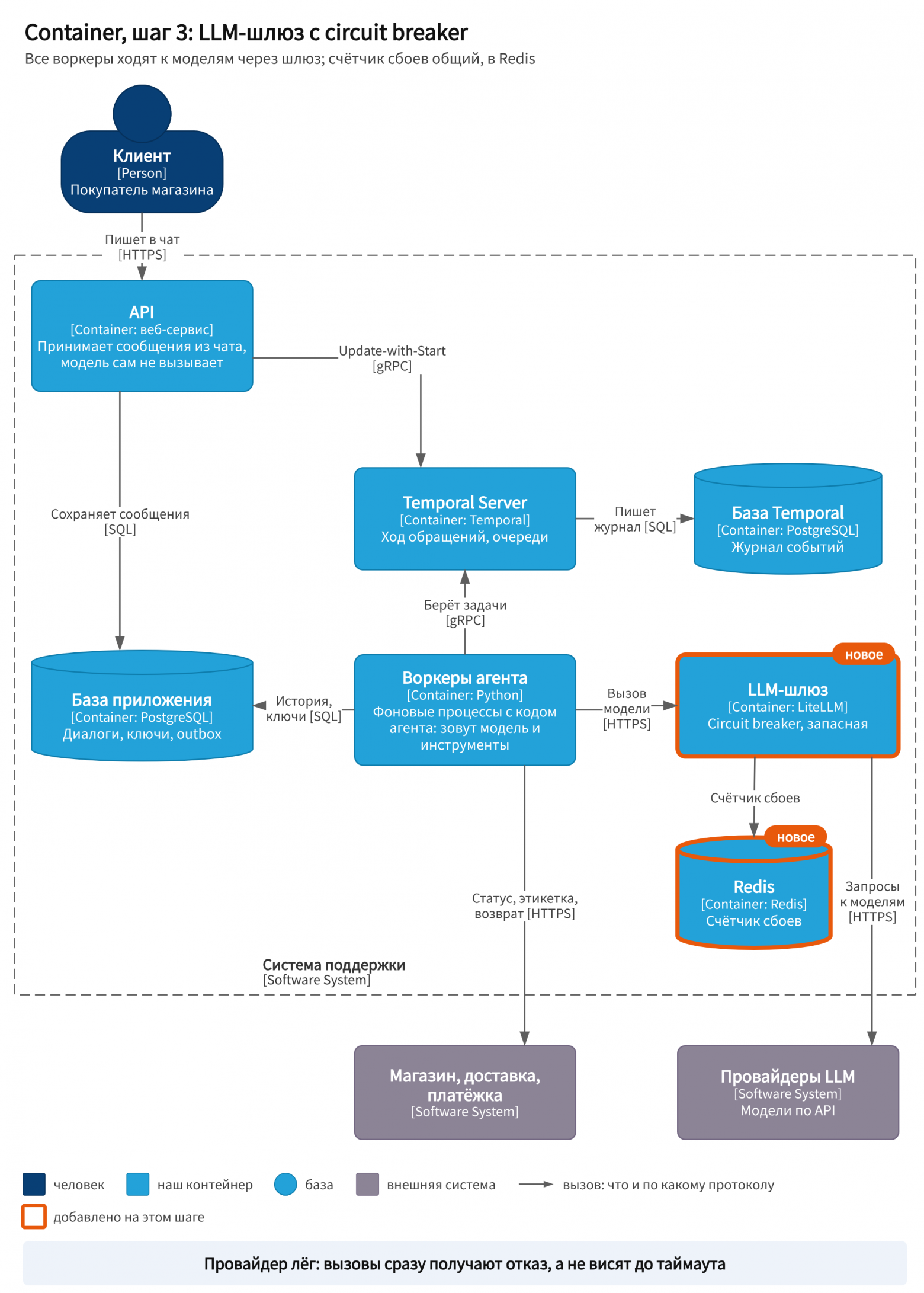
The breaker in the gateway is shared by all workers. The state is in Redis.
What follows is my advice, not a rule from the documentation. Let the model-call activity distinguish between two types of errors. A temporary error from the provider is retried according to the Temporal policy. A “breaker open” error means the provider is down, and the workflow decides what to do: switch to a fallback model, wait longer, or escalate the request to an operator.
# Pseudocode: calling a model through the gateway @activity def call_llm(history): response = gateway.chat(history, model="main", fallback="backup") if response.error == "all_models_cooling_down": raise NonRetryableError("providers are unavailable") # don't burn Temporal retries return response @workflow def support_case(...): try: response = activity(call_llm, history, retry=retry_policy) except NonRetryableError: return hand_off_to_operator("model is unavailable")The same circuit breakers are placed in front of any external API that might go down for an extended period: a delivery service or a payment gateway. The rule is simple: the circuit breaker's state is shared by all workers.
Step 4. Saga and operator confirmation
Now for the refund itself. It affects three systems. First, create a return label with the delivery service. Then refund the payment through the payment system. Then notify the customer and update the order in the store. There is no shared transaction across these systems. As explained in detail in the second part, this is how a saga handles the problem: every step has a predefined compensation, and if a step fails, the completed work is undone in reverse order.
Here I will add a concept that Microsoft calls a pivot transaction in its description of the pattern—the point of no return. Steps before it can be canceled. After it, there is nothing left to cancel, and the remaining steps must be carried through to completion, retrying as many times as necessary. In our case, the point of no return is the refund. The label can be canceled. Once the money has been sent, the customer must be emailed and the order updated, even if that takes a full day of retries.
# Pseudocode: refund as a saga inside a workflow def refund(decision): label = activity(create_return_label, decision.order, key=decision.id) try: activity(refund_payment, decision.amount, key=decision.id) # point of no return except PermanentError: activity(cancel_return_label, label) # compensation raise # from here on, only forward: retry until successful activity(notify_customer, decision, key=decision.id, retry=FOREVER) activity(update_order, decision, key=decision.id, retry=FOREVER)Every action receives an idempotency key: the decision ID. If Temporal retries the step after a failure, the payment system will return the previous response for the same key instead of charging the customer again. A saga in Temporal is written as ordinary code in a workflow. Microsoft calls this approach orchestration: a single coordinator knows all the steps and initiates compensations itself.
The model should not process a large refund on its own. The OpenAI guide explicitly lists order cancellation, large refunds, and payments as reasons to call in a human. The system gains an operator console. The workflow displays the decision to it and waits for a signal. The wait is recorded in the log, so the operator can respond an hour later, while the workers will have restarted in the meantime. How this works and the confirmation rules are covered in part two.
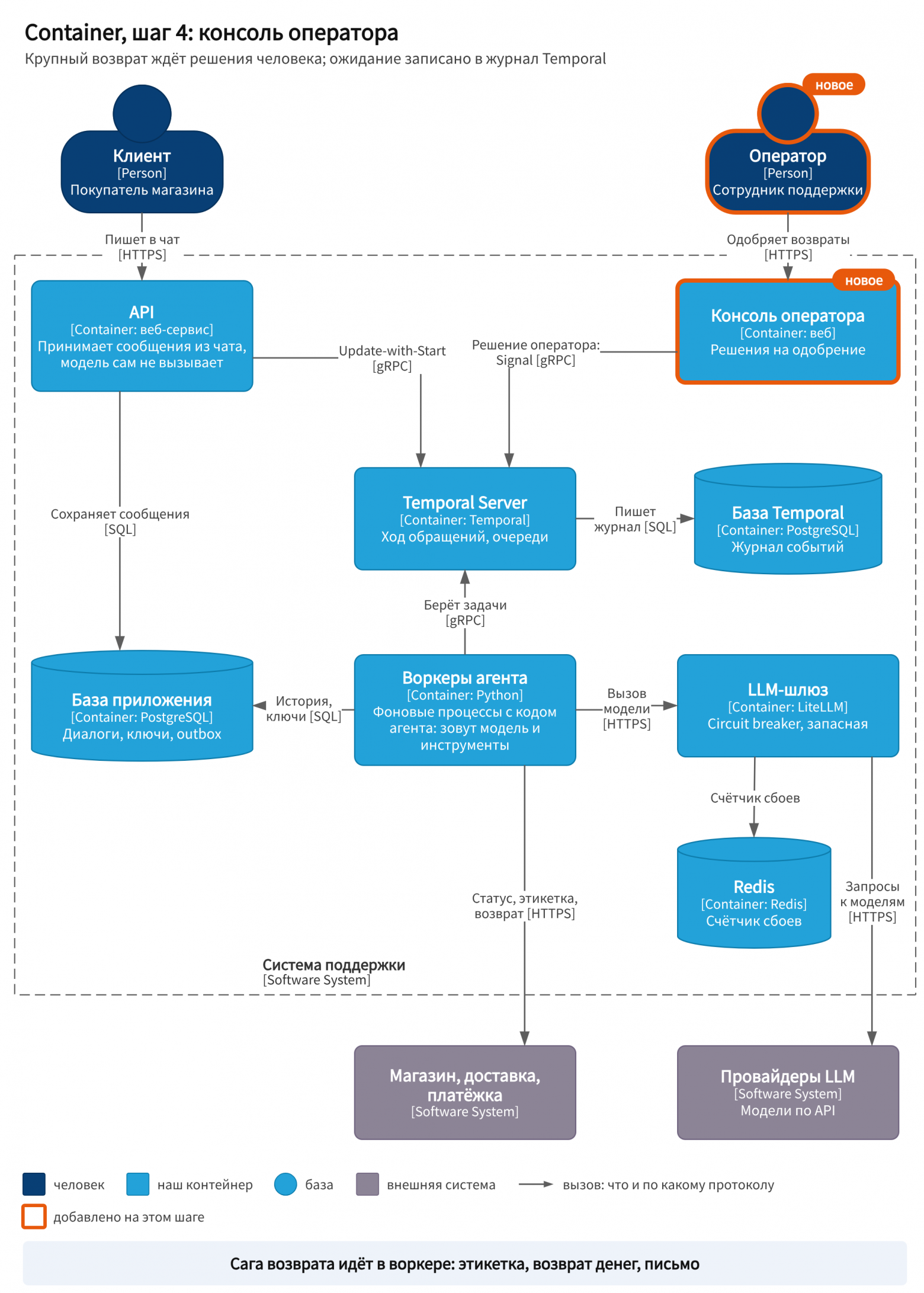
A waiting workflow does not occupy a worker: its state is kept in the log.
Step 5. Chain or agent
The system has become reliable, but expensive and slow. Every request goes through the full agentic cycle, even a question such as “How do I return an item?” that has an article in the knowledge base. Yet requests come in three types. A question from the knowledge base requires only one model call with search. “Where is my order?” is handled by a chain: retrieve the order number, call track_order_status, and write the response.And only a disputed return requires judgment: the order may have arrived at the pickup point, the customer may not have picked it up in time, and the rules for different products vary.
A workflow (workflow, agents chain) is a system in which the steps are specified in code in advance. A system in which the model itself decides what step to take next is called an agent (AgentsLLM). This is how Anthropic, OpenAI, and LangGraph distinguish them. Microsoft adds a ladder of complexity: a direct model call, a single agent with tools, and multiple agents. Their advice is simple: choose the lowest level that reliably solves the task. If a good prompt is sufficient, you do not need an agent.
Anthropic describes separation by request type as a “routing” pattern and gives customer support as a specific example: general questions, returns, and technical support go to different processes with their own prompts and tools. A router is not yet an agent in its own right. The model makes a single decision there and does not loop at all.
Several components are now visible inside the worker. This is the Component level in C4.
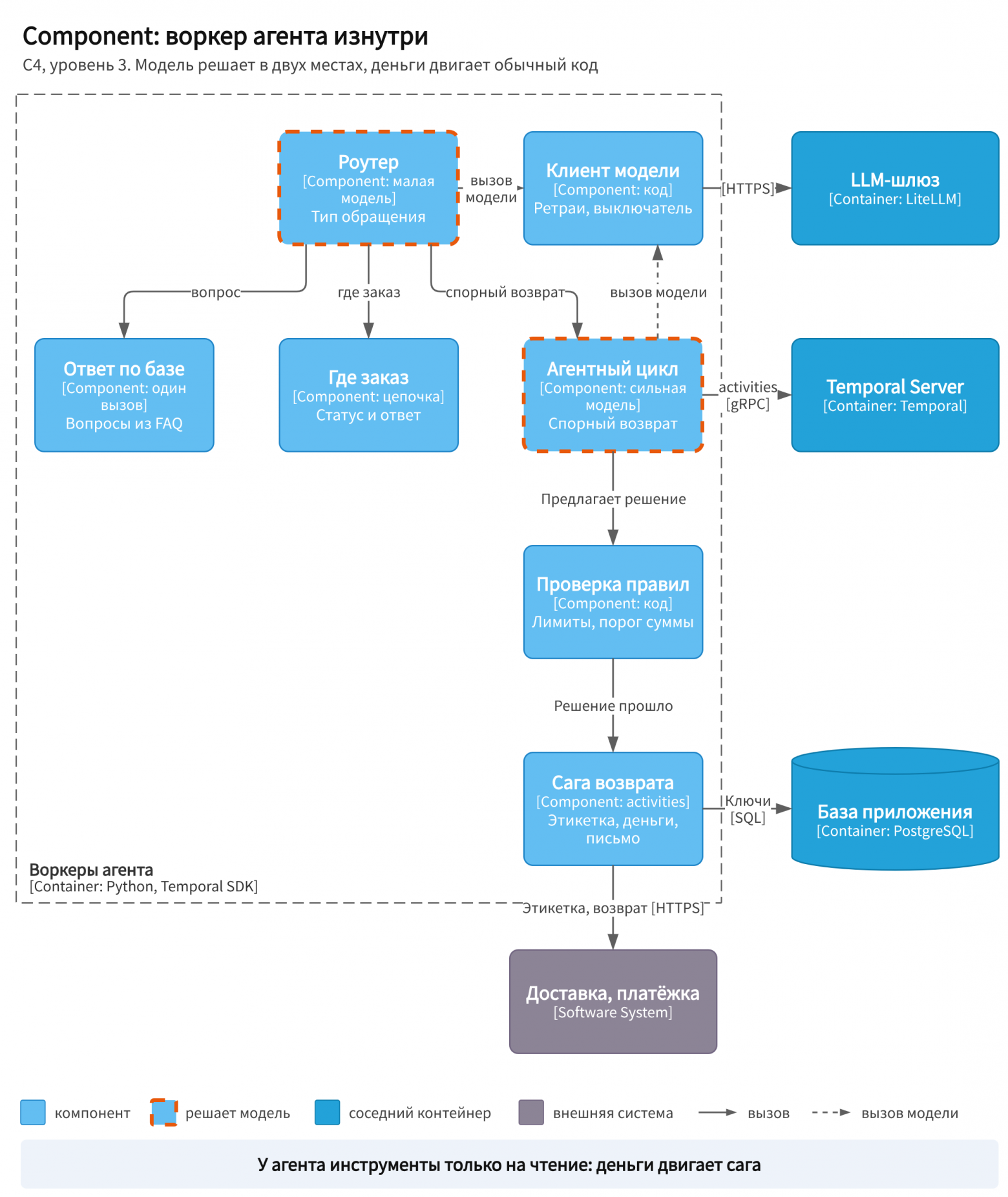 TAG161@@Component level: what is inside the agent worker