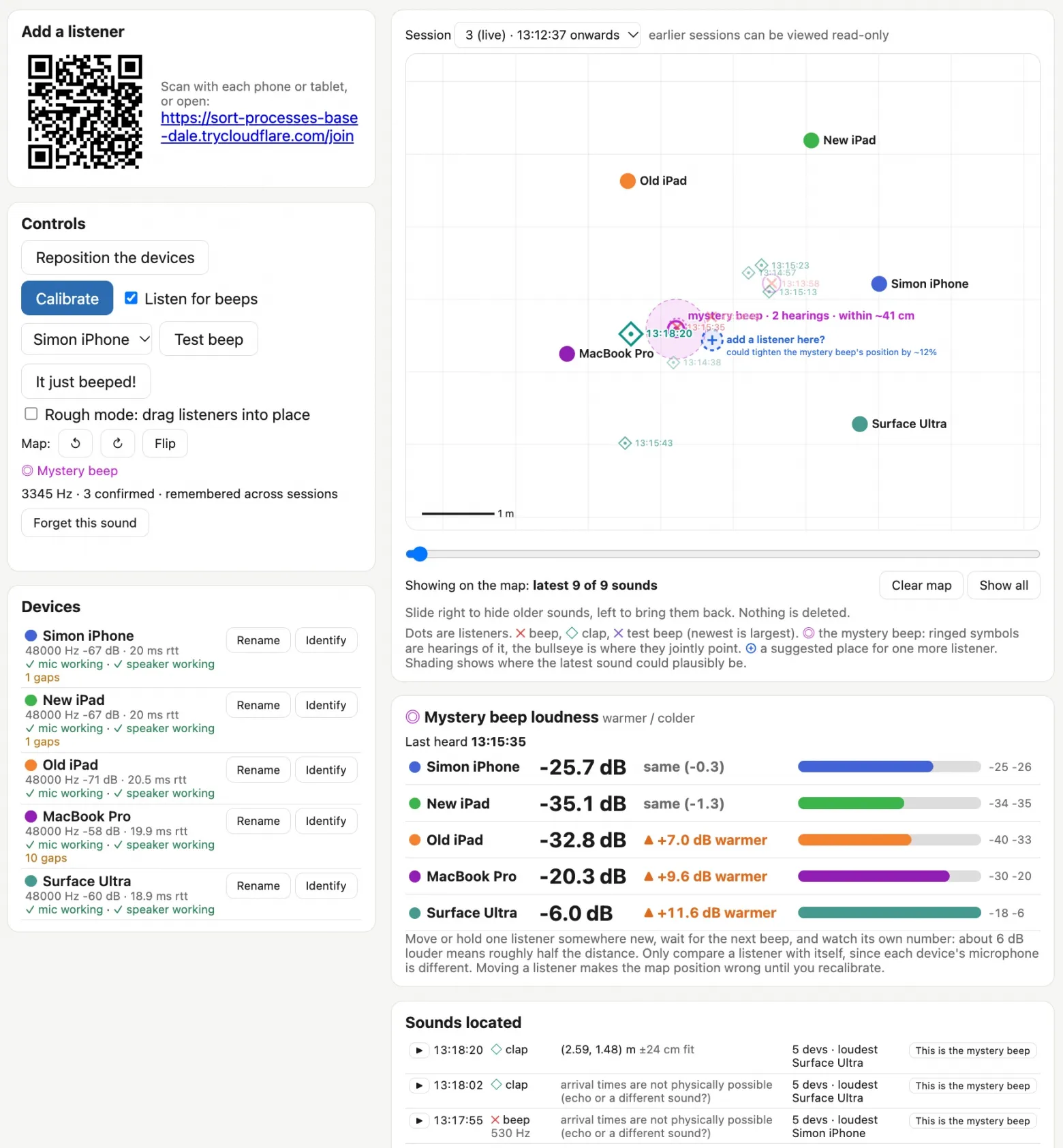
You run a Python web server that displays the main interface, and then connect as many devices as you like as listeners using a QR code or link. In my case, they were two iPads, a phone, a MacBook Pro, and a Surface Ultra.
The devices then play sounds to one another to determine where each one is located.It did not work very well, so I added a “coarse mode”: you can drag the device icons on the map to roughly where they are, and the system then refines their positions using the same sounds.
After setup, all the devices listen for a beep.
I also added a clap mode to test the system: clap your hands in different parts of the room, and the claps appear on the map as diamonds. This gave me confidence that it knew how to locate sound.
Each beep is displayed on the map with a cross and an entry in the log of detected sounds. You can replay each one (in turn from each device) to make sure it is the very beep in question, and then click “This is the mysterious beep” to label it.
Once the frequency of the mysterious beep has been confirmed, the system tracks that specific frequency, measures the interval between beeps, and uses the calculated points to narrow down the most likely location on the map.
Everything worked as intended. The system pinpointed the beep to within about 40 cm; I searched through exactly that stack of boxes and found an ancient carbon monoxide detector that was desperately in need of new batteries.
How It Works
When I started working through the problem with Claude, he quickly dug up a 2007 paper, BeepBeep: A High-Accuracy Acoustic-Based System for Ranging and Localization Using COTS Devices (by Chunyi Peng, Guobin Shen, Yongguang Zhang, Yanlin Li, and Kun Tan). Here is its abstract:
We describe the design, implementation, and evaluation of BeepBeep, a high-accuracy system that measures distance using sound. It operates on the fly, without any pre-deployed infrastructure, directly between devices.This is a purely software solution that requires only the most basic set of standard hardware: a speaker, a microphone, and some kind of communication channel between devices. Therefore, it is applicable to numerous inexpensive sensing platforms and most mass-produced mobile devices, such as cell phones and PDAs. High accuracy is achieved by combining three techniques: bidirectional measurements, recording one's own signal, and counting samples.
It sounded exactly like what we needed to build!
The main work in Beep Locator is done by a Python web application. Listening devices connect to it via WebSocket and display an interface that asks the browser for microphone access. The listeners’ main task is to keep a buffer of the last 60 seconds of audio in memory. They also run a simple beep detector (see detector.js): a fast Fourier transform plus a high-frequency filter isolate possible beeps, and the listener reports every such event to the server.
When a beep message arrives, the server asks one of the devices (the one with the shortest response time to the server) to play a short chirp and then requests a recording segment from each listener: approximately from 0.6 seconds before the beep to 0.8 seconds after the chirp. The chirp is used to align the segments relative to one another, which is the key step in locating the beep.
How I Put It Together
I started with Claude Code Cloud on an iPhone, using the Opus 5.5 model in extended-thinking (Extra) mode. Here is public access to that starting session.It started with the following prompt in a newly created empty repository on GitHub:
And so problem.md was created. While Claude was writing it, it found and read an article about BeepBeep, which described it.Write a problem.md file describing the problem we want to solve.
Some device in the room is beeping, and I can’t find it.
I want to place several devices around the room (laptops, phones, iPads) so that they all listen simultaneously and help triangulate where the beeping is coming from.
I need a web application in Python that coordinates everything: one device displays the application page, while the others open it via a link and become listeners. Everything through WebAudio in the browser and a WebSocket connection to a Python server.
Ideally, I wouldn’t want to manually enter the relative positions of the devices. It would be awesome if they could play sounds for one another and thereby determine where each one is standing in the plane. But is that even possible?
The research looked sound, so I wrote:
At this point, most of the system had been written, but no one had tried running it yet.Okay, try building it. Add a mechanism through which new code can be sent to the listeners, and they will execute it immediately. Then I’ll arrange everything in the room and leave you to keep hacking and experimenting while I do other things.
I cloned the new repository onto a laptop and launched Claude Code… and then Fable 5.2 came out.The project seemed like an excellent opportunity to put it to the test.
I asked Claude Code on the laptop to launch the server and made sure it could both see what was happening, and modify the program on the fly.
This was already built into the system: Opus 5.5 had written an installModule() method for the listeners, which was invoked via WebSocket. In other words, the server administrator could execute arbitrary new code on any client.
On some devices, the page listening to the microphone asks for permission again after every reload. Hot-swapping modules made it possible to roll out new code without manually visiting each device.
From then on, my involvement mostly consisted of sitting at the laptop, discussing what was happening with Fable 5.2, and occasionally asking for new features. Here are some of those prompts:
I think we need to make it so that objects can be dragged around the map in “rough mode.”My task is simply to place them roughly where they are standing, and then I turn off coarse mode, and the system tries to refine the location.
This gave me the ability to drag listeners around the map.
I wonder how to test this? Maybe it could listen for claps: I clap, and the system determines where the clap occurred? […]
Claps should be marked on the map with a different icon from the one used for beeps.
Hence the very feature: every clap I made appeared on the map with an icon different from those for beeps.
Every icon on the map should have an HH:MM:SS timestamp.
This made it easier to understand which icon most likely corresponds to which actual sound.
The log should contain beeps and claps with timestamps and a small playback button. When clicked, it plays the recorded sound from each listener in turn (with a clear on-screen indication of which listener recorded which clip) and disables microphone recording for the duration of the playback.
Now I could listen to the sounds again, and finding that mysterious beep among the recordings became much easier.
There should be a “This is the mysterious beep” button next to each recording: I click playback, listen, and confirm that it is the beep if I am looking for that specific one.
Then the system will be able to classify sounds, determine whether they resemble the same mysterious beep, and use this data to pinpoint its location more accurately.
By that point, I was already close: I had a pretty good idea of where the beep was coming from.But wouldn't it be great to reposition the listeners around this point and refine the location even further?
I want a feature for this. I don't want to restart every listening device and so on. I want to press a “Rearrange Devices” button, which switches to rearrangement mode, and then press “Rearranged,” and the system puts me into coarse mode and asks me to roughly indicate where they are now. I do that, press it, and everything starts up again. The previous session can be viewed in the app in read-only mode.
Since I still had one unused device, I added:
Add a feature that marks on the map a location where it would be useful to place another listener, based on the data already collected.
Giving Claude Code ears
The most interesting thing about this project is that it demonstrated that Claude Code can be given ears.
Claude has no audio input of its own (yet), but it can run JavaScript and Python code that analyzes sound from a microphone.
I asked it to start a web server with WebSocket connections to several listener devices, enable their microphones via WebAudio, and link everything together so that fresh JavaScript could be sent to them for execution over the same WebSocket.
After that, I could essentially leave Claude to work on his own: he would work through the problem, examine the sound logs, and adjust his ears to solve it.
This reminded me of a similar trick I had heard about at GitHub Universe a few weeks ago.Martin Woodward shared how he debugged the computers on GitHub Universe badges: he connected them to a computer via USB-C and pointed a webcam at their screens so the coding agent could see for itself whether the updates had worked.
Figuring out how to let coding agents perceive the surrounding world is a lot of fun.