AI_API_URL is set to https://ai.api.cloud.yandex.net/v1.The Yandex API supports OpenAI-compatible calls, so we use the `openai` library while specifying the Yandex service endpoint. Requests are sent to the selected models in Yandex’s cloud.
With this setup, we do not need to deploy the models on our own server. However, operation depends on the availability of the external service, and requests require an API key and cloud environment settings.
The model URLs use `latest` rather than a pinned version. This is important when repeating experiments: the same code and prompt do not guarantee the same behavior after a model update.
Prompts are kept separate from the code
The model instructions are stored in separate files. System and user prompts are provided for recipe recognition and generation:
prompts/ pin.json recognize/v1/system.md recognize/v1/user.md recipes/v1/system.md recipes/v1/user.mdThe system prompt defines the general rules, while the user prompt contains the specific request. However, in the current generation template, the product list is also substituted into the system instruction. Therefore, merely separating the content into two files does not yet ensure separation between rules and user data. This area requires separate review: which data enters the instruction and how the model responds to unrelated instructions within it.
The selected prompt versions are specified in `pin.json`:
{ "recognize": "v1", "recipes": "v1" }The loader reads the required files and substitutes data for expressions such as `{{ products }}`. It uses simple template replacement. There are no Jinja conditional constructs here.If the required file or substitution value is missing, the loader throws an error.
This makes it possible to edit instructions without rewriting the function that calls the model, and to independently select versions for recognition and recipes.
Switching has one caveat: the contents of pin.json are cached in the process memory. After changing the pointer, the running process must be restarted or the cache-clearing function must be called. The prompt texts themselves are read each time the loader is called.
The endpoint of the model being called and the prompt version are recorded in the log. This helps investigate requests, although a complete description of the conditions of a specific run also requires the input data, settings, and exact model version.
Storing prompts separately does not mean they can be changed without considering the backend. For example, you can refine the wording of a recipe step while preserving the previous response structure. However, if you ask the model to return different fields, you need to check whether the code can handle them.Therefore, after changing the prompt, it is important to check not only the model’s response, but also how the application handles it.
What we ask the model
The generation prompt specifies several requirements:
suggest two or three simple recipes;
use primarily the provided ingredients;
explicitly specify basic additions—salt, oil, and water;
include the cooking time, temperature, or a visual sign of doneness in the steps;
respond in Russian and return JSON without Markdown wrappers.
The wording “use primarily the provided ingredients” gives the model some freedom. This is not a strict prohibition on additional ingredients. When evaluating recipes, you need to consider which additions are permissible and how to notify the user about them.
What the backend checks in the model’s response
For recipe generation, JSON is requested not only through the prompt text but also through an API parameter:
response_format=ResponseFormatJSONObject(type="json_object")The backend then parses the response using json.loads and calls model_validate, checking that it matches the expected data structure.
This section of the code does not remove explanations before the first and after the last curly brace. If a response containing recipes cannot be parsed as JSON, an error occurs.
During recognition, it is also checked whether a non-empty list of ingredients was received. Separate error types are provided for the absence of ingredients and for the unavailability of an external AI service.At the moment, however, some causes are grouped together: a JSON parsing error during recognition is turned into a “products not found” exception. It is impossible to use this exception to determine whether the list is actually empty or the response arrived in an incorrect format.
These checks have specific limitations:
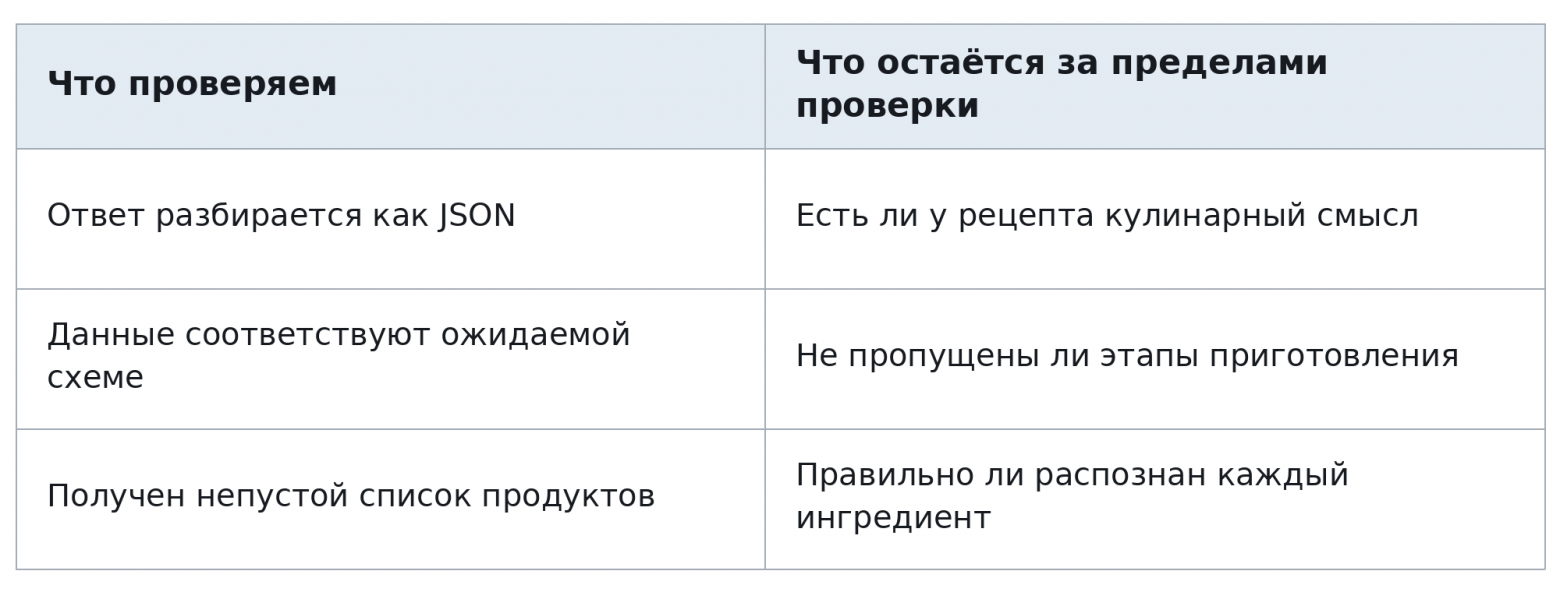
A recipe can pass the technical check and still turn out to be unsuccessful. The feedback about raw potato and eggplant was specifically related to the content of the instructions.
How to test the application without generation
The AI module provides a stub mode. When AI_MODE=stub is configured, implementations with fixed responses are used instead of calling models: a test product list and pre-recorded recipes.
This mode allows you to test the application with prepared data without making requests to cloud models. It is not intended to evaluate generation quality—the recipes are already hard-coded.
The README describes how to run the application locally using Docker Compose. The setup includes the backend, bot, PostgreSQL, Redis, nginx, and frontend. Running the bot requires a Telegram token, while making actual requests to models requires Yandex access settings.
Ten scenarios, but no overall metric yet
The repository contains a set of ten test scenarios. These include a regular product list, empty input, a single ingredient, fractional quantities, and ambiguous text that mixes available products with shopping requests.
The test scenario documentation describes adding missing ingredients, vague cooking steps, the loss of fractional quantities during normalization, and extra text around JSON.Responses were saved for some of the examples.
For now, this set does not provide a reliable overall quality metric. The results require verification, and the comparison includes changes to several parts of the system at once: prompts, generation settings, and response processing. Therefore, we do not report a percentage improvement and do not consider the listed issues fully resolved.
To make the evaluation comparable, it is necessary to record the input, prompt version, model, and settings; preserve the responses; and apply the same criteria to each run.
What changed after the feedback
After the release, we shared links to the app and the bot, collected feedback, and used the service ourselves.
After a report about a salad made from raw potatoes and eggplant, we began refining the prompt so that the model would account for the need to cook the ingredients. A team member responsible for prompts took on this task. The original response was not saved, so we cannot show a verifiable before-and-after comparison. The work is ongoing.
A separate task is editing the list after photo recognition. Users should be able to remove an incorrectly recognized product or add a missing one before recipes are generated. This fixes a limitation of the first interface, although by itself it does not solve the problem of instruction quality.
We also plan to analyze the user journey: at which stage the person stops, whether they reach the dish options, and whether they open the steps. There are no finalized results from this analysis yet.Exiting the scenario by itself does not explain the reason: the user may have encountered a technical error, failed to find a suitable recipe, or simply closed the app.
What can be taken from the repository
The main repository is published under the GNU AGPL v3.0. The code can be used, modified, and distributed under the terms of this license; the full text is provided in LICENSE.
For a similar application with cloud models, you can explore the following here:
loading system and user prompts from files;
independent selection of versions for recognition and generation;
parsing and validation of the response structure;
a mode with fixed responses instead of model calls.
These components are implemented for AI Sous-chef and are not packaged as a separate general-purpose library. When adapting them, you need to account for the application’s data structures, caching of the version pointer, and external API settings.
The repository license does not provide access to cloud models: actual generation still requires Yandex credentials and compliance with the terms of the service being used. The mobile application code is hosted in a separate repository. The license specified here applies to the main teamsync-labs/ai-sous-chef repository.
AI Sous-chef is currently available in RuStore and Telegram. The next enhancement will be editing and adding ingredients after taking a photo.In parallel, we continue working on the prompts: the app already provides step-by-step instructions, but we still need to achieve a more reliable result for the person who will use them to cook.
Backend and prompts
Main repository license
Mobile app
Android app on RuStore
Telegram bot
The material was prepared with the active participation of the AI Sous-chef team and Natalia Josan — the author of the idea and a junior Python developer.


