An agent completes a task in 30 steps: it calls the model, searches, writes to the database, and calls the model again. Suppose each step fails once in a hundred: the network flickered, the API returned “overloaded.” Then the task will run to completion in 74% of cases. One in four will fail. With a 3% failure rate per step, only 40% will run to completion.
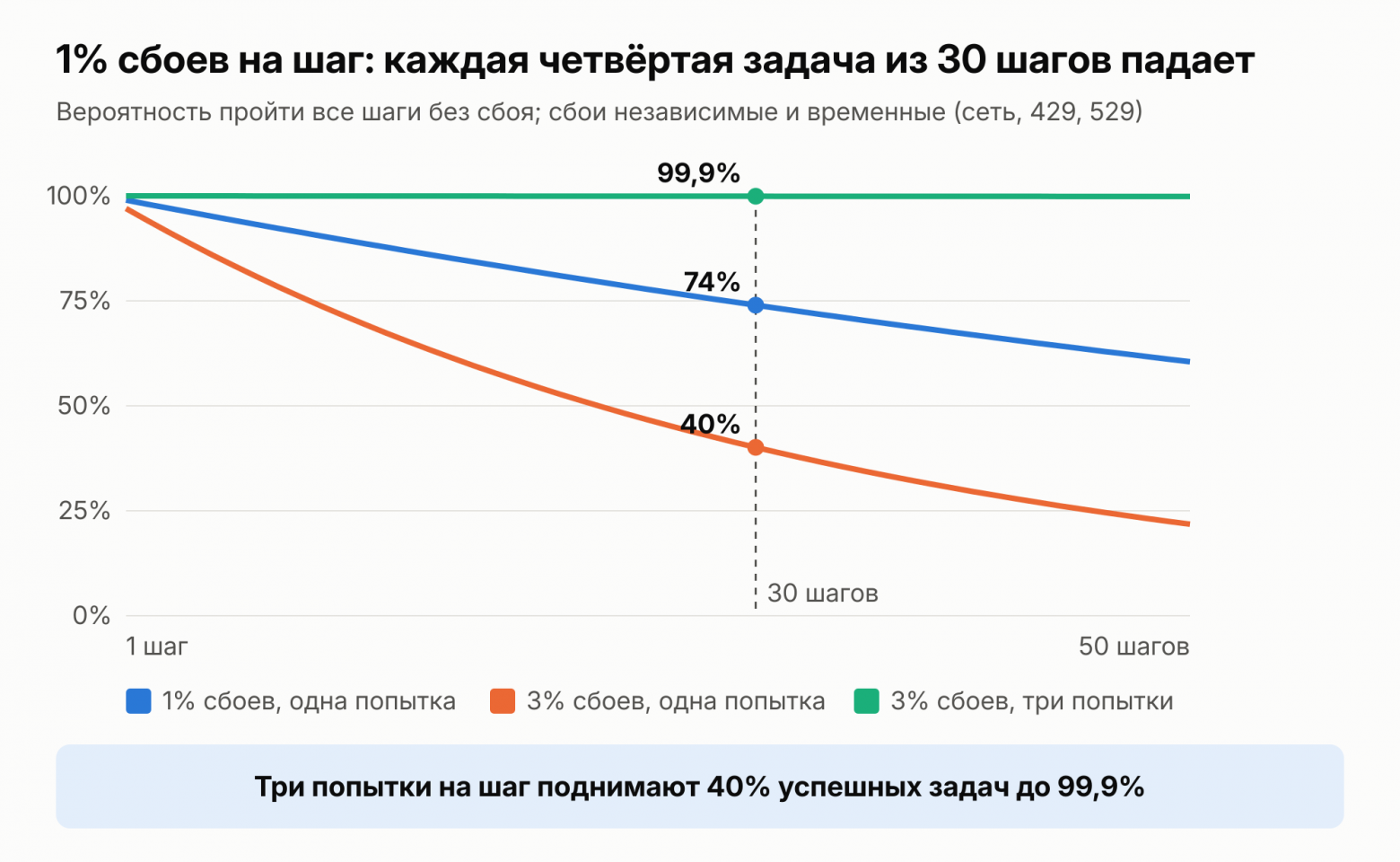
In the demo, the agent completes 10 steps out of 10. In production, it runs thousands of tasks, and all the problems surface at once. The model confuses tools, the context is cluttered with junk, and search fails to find what it needs. The process breaks halfway through, and tweaking the prompt breaks what was working.
This is the second part of the series. In the first, we explained how the agent loop works and what it costs. Here, we’ve gathered practices that separate a demo from production: tools, context, RAG, loop control, reliability, observability, testing, and safeguards. Reliability will take up the most space. Nearly everything in it is familiar from backend development, but agents have a sharper trap than usual. The danger is not failure, but repetition.
TL;DR
Use fewer tools, but make them more capable. Keep responses short, and write error messages so that the model can correct them.
Keep only what is needed in the context: load information as needed, compress the history, and delegate large chunks to subagents.A knowledge base under 200,000 tokens fits entirely in the prompt. If it is larger, use semantic and keyword search and rerank the results: at Anthropic, this reduced search failures from 5.7% to 1.9%.
Start with a chain, not an agent.Set a turn limit, a dollar budget, and a plan B for the agent: an agent stuck for 100 turns costs 5.3 times more than a normal task.
Retry transient errors, but only retry idempotent actions. Store progress outside the process (Temporal and similar systems), and write sagas for rollback.
Require human approval for sending, payments, and deletion. Keep response waits in Temporal, not in process memory.
Log a trace for every step and calculate the cost of a successful task, not a single call. Run checks for every prompt change.
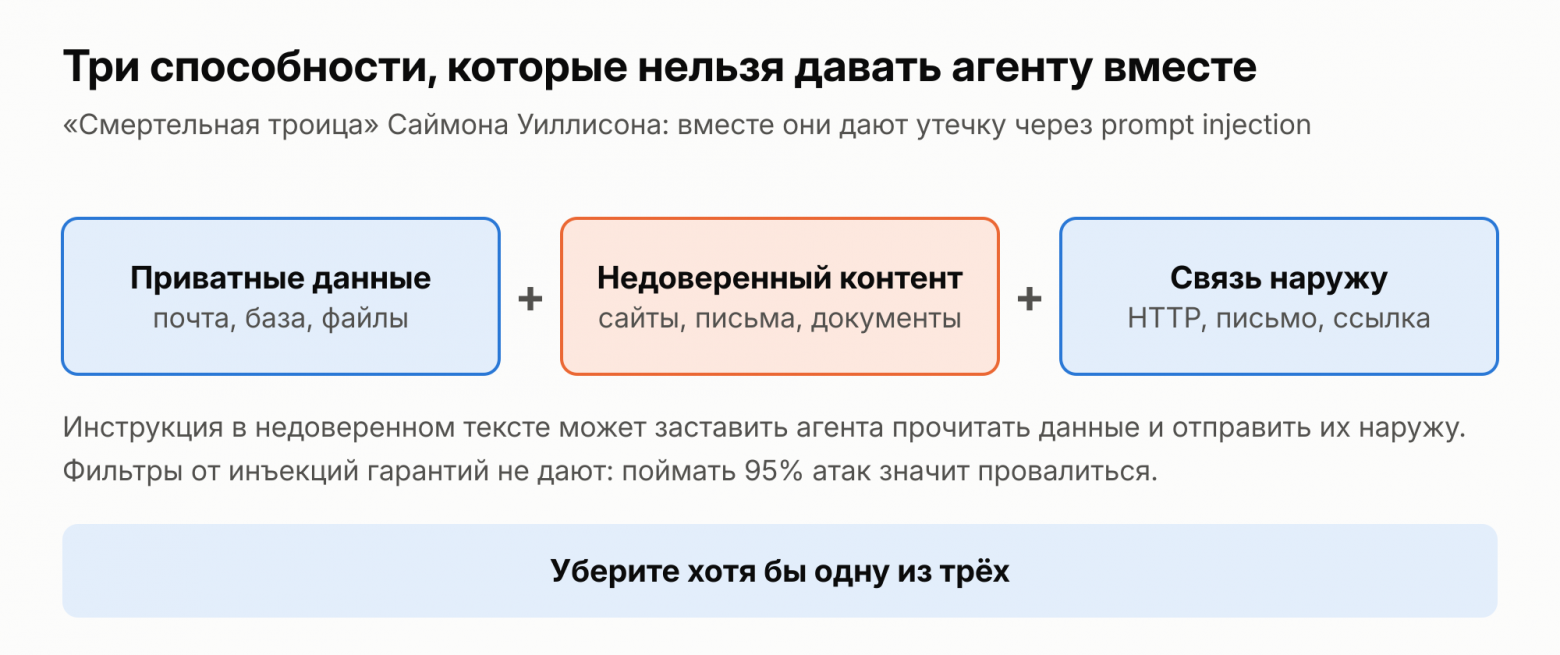
Don't expose the agent to private data, untrusted content, and outbound access all at once.
Tools: fewer, but more capable
The model knows only a tool's name, description, parameter schema, and what it returned. Based on these, it decides what to call and with which parameters. This is why a tool for an agent is written differently from an API for a programmer. Anthropic compiled the guidelines in the article “Writing effective tools for agents.”
Don't create a separate tool for every endpoint. Instead of list_users, list_events, and create_event, it's better to have one schedule_event that finds available time itself and creates the meeting. The model will make one call instead of three, and no extra lists will enter the context. The more similar tools there are, the more likely the model is to confuse them.
Keep tool responses short. Return names rather than internal UUIDs. Paginate and filter long lists. A response format parameter also helps. In Anthropic's example, the Slack tool in concise mode returned 72 tokens instead of 206. By default, Claude Code truncates the response from any tool to 25,000 tokens.Every token of the response will enter the history and, as we calculated in Part 1, will be paid for on every subsequent turn.
The tool also writes errors for the model. A stack trace or a bare 400 status code will tell it nothing. The model will fix the message “the date must be in the 2026-11-09 format, but 09.11 was received” itself on the next turn. And give parameters unambiguous names: user_id is clearer than user.
A tool call is structured model output: JSON according to a schema. Validate it against the schema before execution, just like any user input.
Context: fewer tokens, more signal
The context window is finite, and the fuller it is, the worse the model performs with each token. In Anthropic’s article on context engineering, the goal is formulated as follows: find the smallest set of tokens that most effectively helps solve the task. In Part 1, we calculated how much an extra token costs. But extra tokens also get in the model’s way of thinking.
Three techniques help. The first is loading on demand. Don’t put everything into the prompt upfront. Keep references in it (file paths, document IDs) and provide a tool that loads what is needed. Claude Code works this way: CLAUDE.md is in the context from the start, while the agent finds everything else through glob and grep.
The second is compression. When the history grows too large, it gets summarized. In Claude Code, compression preserves decisions, open bugs, and implementation details, while old tool outputs are discarded. The third is notes. The agent maintains a file such as NOTES.md outside the context and rereads it when needed.
For large tasks, there are subagents. Each handles its own part in its own context and returns a summary of 1,000–2,000 tokens.
RAG and search
RAG (retrieval-augmented generation) means: before answering, find the necessary pieces of information and put them into the context. First decide whether you need it at all. Anthropic’s threshold is as follows. If the knowledge base is smaller than 200,000 tokens (about 500 pages), it can be placed in the prompt in its entirety and cached. Search is unnecessary.
If the knowledge base is larger, the classic approach is as follows. Documents are split into chunks of several hundred tokens. Each chunk is converted into an embedding—a semantic vector—and stored in a vector database. For a question, the closest chunks are retrieved and passed to the model. But an extracted chunk loses context. The phrase “revenue grew by 3% compared to the previous quarter” is useless without the company name and the quarter.
According to Anthropic’s measurements in the Contextual Retrieval article, the following helps:
Semantic search is supplemented with keyword search (BM25). Embeddings capture meaning well, but they may miss an exact string such as the error code TS-999.
Before indexing, the model adds 50–100 tokens of context to each chunk: which document it came from and what it is about. With prompt caching, this costs about one dollar per million document tokens.
The retrieved results are reranked by a separate model, and the model receives the 20 best chunks.
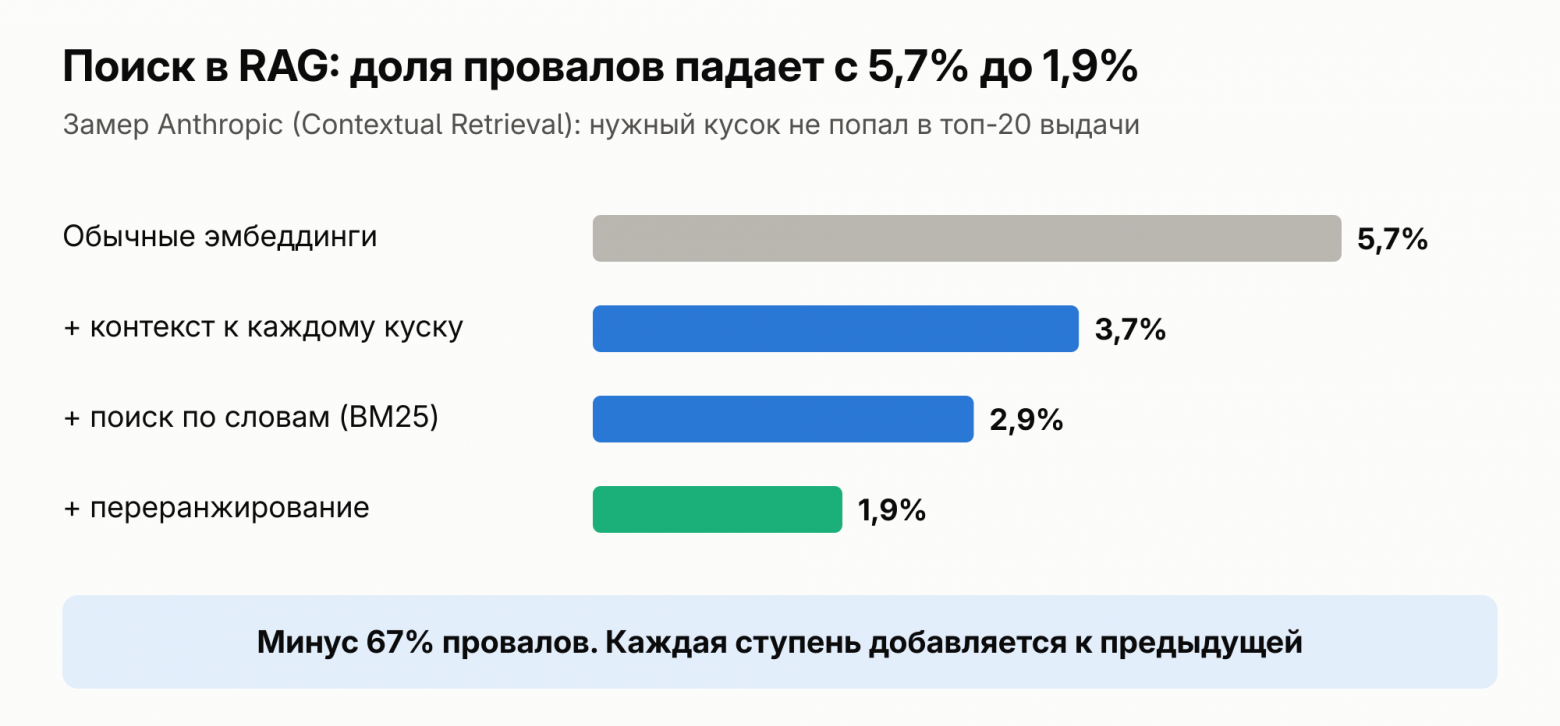
Test retrieval separately from the answer. If the answer is poor, determine who is responsible: retrieval failed to find the relevant chunk, or the model used it poorly. Create a set of questions for which you know where the answer is located, and measure how often the relevant chunk appears in the results.Anthropic used this metric to measure its 5.7% and 1.9%.
An index is not always necessary. Early versions of Claude Code used RAG with a local vector database. The team switched to agentic search: the model searches for files itself using glob and grep. According to Boris Cherny, this works better and eliminates problems with outdated indexes, privacy, and security. But this is experience with code, where text has names and structure. For a document base in ordinary language, classic RAG is still appropriate, and opinions differ on this.
Keeping the loop and costs under control
Agents are often built where a chain would suffice. In its article “Building effective agents,” Anthropic advises starting with the simplest solution. Often, a single model call with search and examples is enough. The agent chooses the steps itself and pays for this with latency and money. 12-Factor Agents puts it more bluntly: most agents in production are essentially ordinary code, with the model called at several points. It also advises creating small agents with 3–10 steps.
If an agent really is needed, constrain it. The main reason is cost. Each turn rereads the entire history, so the cost grows faster than the number of turns. The task from part 1 costs $0.51 for 30 turns. An agent that gets stuck and takes 100 turns will cost $2.68. That is 3.3 times as many turns and 5.3 times as much money. On the final turn, it reads almost 300,000 tokens.
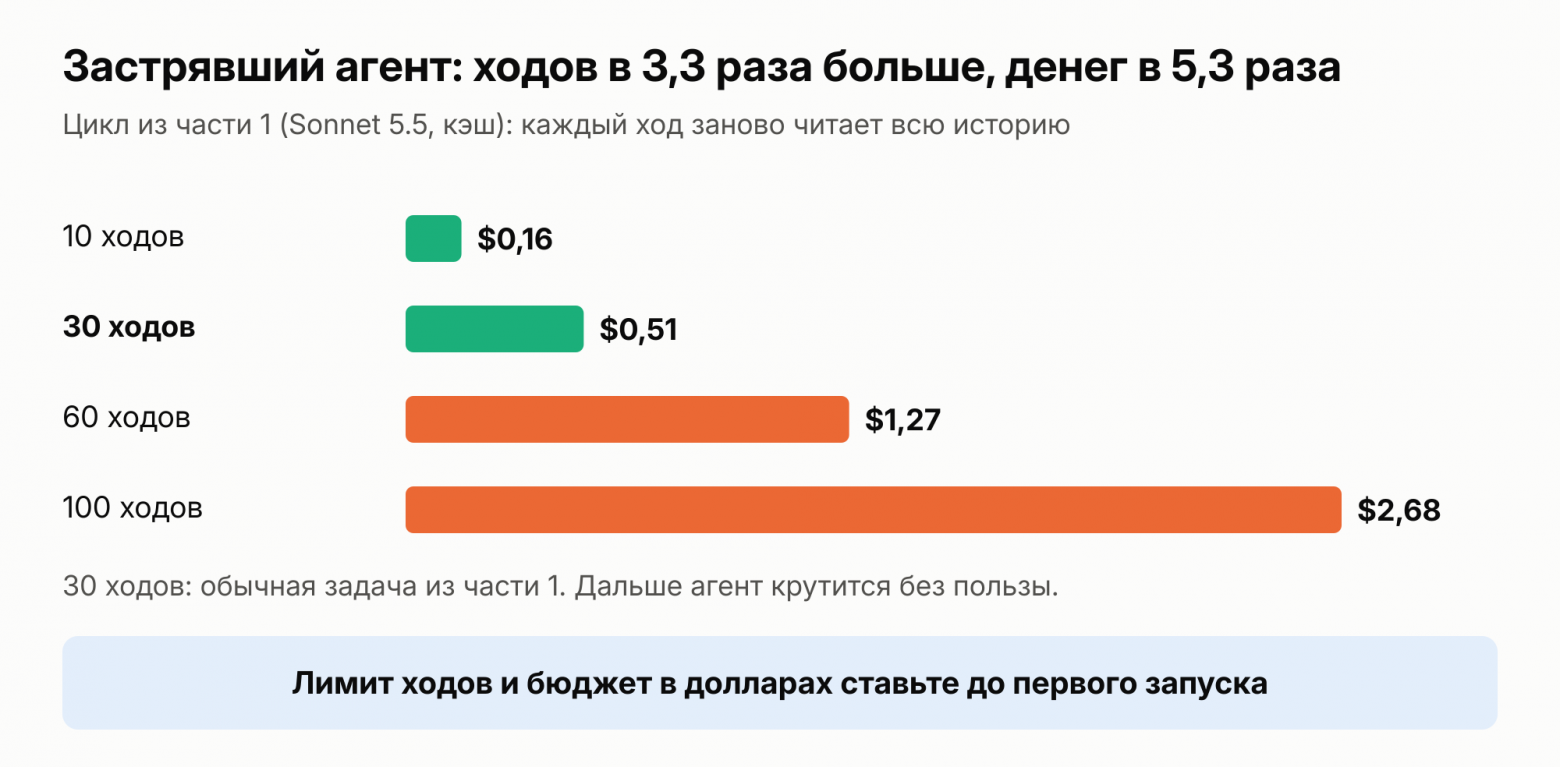
There are three constraints:
Turn limit. In the OpenAI Agents SDK, the default is 10 turns, after which a MaxTurnsExceeded exception is raised.There is no default limit in the Claude Agent SDK; it is set with the max_turns parameter.
Dollar budget. In the Claude Agent SDK, this is max_budget_usd: when the estimated spending reaches the threshold, the task stops with error_max_budget_usd. The estimate is calculated client-side and may slightly exceed the threshold, so the documentation recommends leaving some headroom.
A timeout for the entire task, not just for a single call.
Take the values from real tasks: see how many turns and how much money a typical task uses, and allow some margin. In the OWASP risk list, unbounded resource consumption is listed as a separate item.
Return tool errors to the model as results rather than crashing the loop. The model will often correct the parameters itself or choose a different path. According to Anthropic's experience, this works surprisingly well. But count consecutive errors: if the model keeps repeating the same failed call, stop.
Also decide in advance where the task goes when attempts, turns, or budget run out. Options include a fallback model or provider, a simple non-agent chain, or a human.
Reliability: why agents fail more often than conventional services
A typical backend request makes one or two external calls. An agent runs longer and makes more calls. The loop in part 1 had 30 turns, with nearly two calls in each: the model and the tool. Anthropic discusses this in an article about its research system: agents run for a long time and maintain state across many calls. A minor failure that a service would simply return to the user can derail the entire task for an agent.
The model call itself is also unreliable.Claude API responds with errors, like any external service:
429: you have hit the limit;
529: the API is overloaded by overall traffic;
500: internal error;
504: the request timed out.
It gets trickier. During streaming, an error may arrive midway through the response, after the server has already returned 200.
The third reason is that an agent has state. Simply surviving the error is not enough; you must not lose the work already done. Starting over was rejected at Anthropic because it is expensive and annoys users. Their agents continue from the point of failure.
Retries: what to retry and what not
Only transient failures should be retried. A permanent error will recur unchanged.
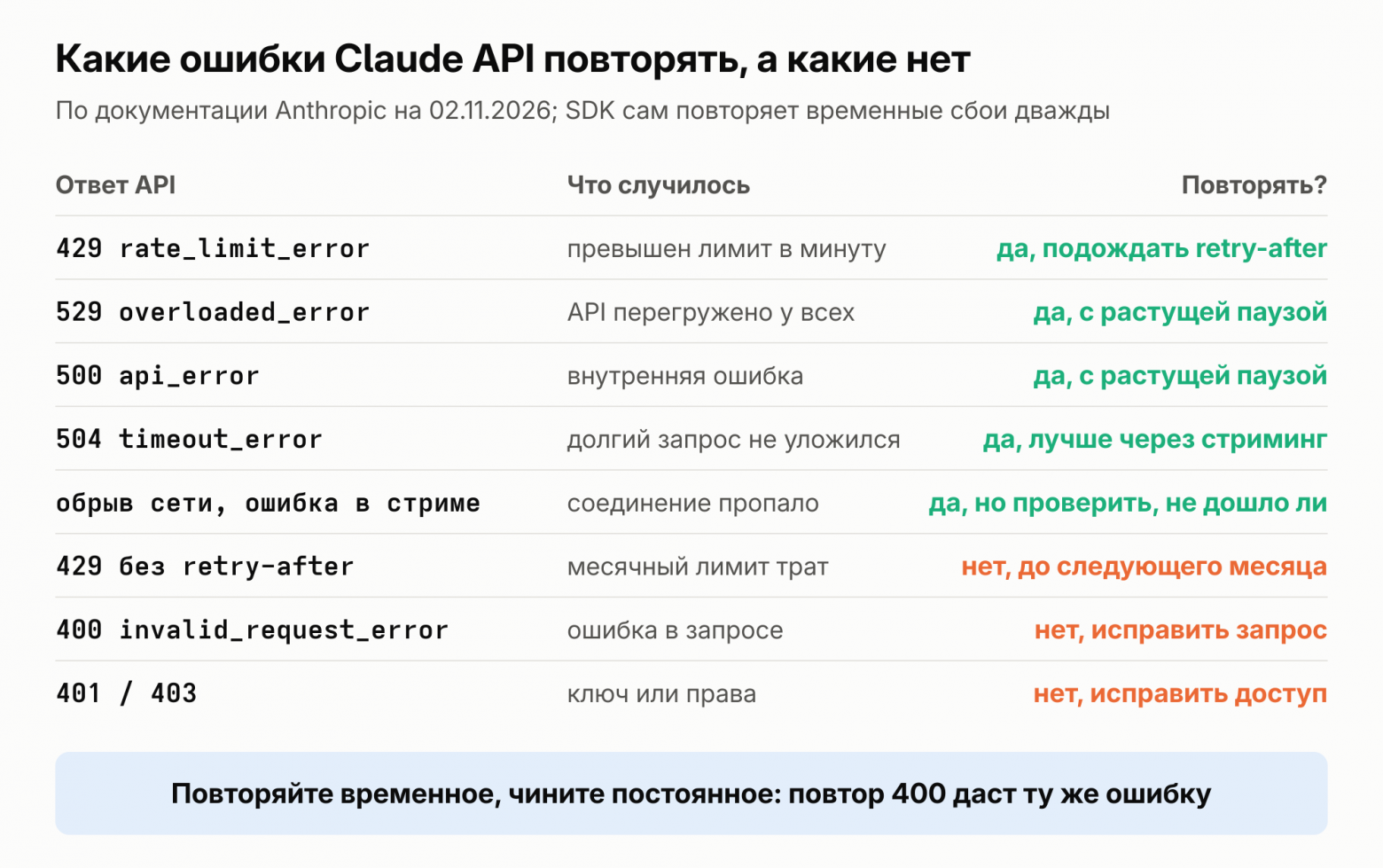
There is a subtlety with 429. Usually, this is a per-minute limit, and the response includes a retry-after header indicating how many seconds to wait. But 429 also occurs when the monthly spending cap has been exhausted. Such a response has no retry-after header, and the error body contains the code enforced_spend_limit_reached. Retrying is pointless until the next month. A retry that cannot tell the difference will hammer the API for hours.
The delay between attempts should increase. Otherwise, retries will only add load to an already overloaded API. Usually, the delay is doubled: 1, 2, 4, 8 seconds, and so on up to the cap. This is how Temporal works by default, as discussed below: starting at one second, a multiplier of 2, and a cap of 100 seconds. Ten retries will take about seven minutes.
The official Anthropic SDK already retries transient failures automatically: twice by default, with an increasing delay and with retry-after taken into account.This is sufficient for a single call. For an agent with 30 steps, decide for yourself how many attempts to make per step and what to do when they run out.
# Pseudocode: retrying the model call TRANSIENT = {429, 500, 504, 529} def call_model(request, attempts=5): delay = 1 for attempt in range(attempts): response = api.messages(request) if response.ok: return response if response.code not in TRANSIENT or no_retry_after_for_429(response): raise PermanentError(response) # fix it, don't retry sleep(response.retry_after or delay) delay = min(delay * 2, 100) raise AttemptsExhausted()The calculation from the beginning of the article has a weak point: failures are not always independent. If the provider is completely down, three quick retries will not help. You need a longer delay or a fallback provider.
And the connection to Part 1. Claude API limits are measured in tokens per minute. Cached tokens do not count toward the input limit for most models. The documentation includes an example. With a limit of 2 million tokens per minute and an 80% cache hit rate, 10 million can be processed. Caching reduces both the bill and the number of 429 errors.
The main danger: repeating an action
Consider the send_email tool. The email was sent, but the response was lost in transit. The wrapper retries the call, and the client receives a second email. With charge_card, the customer will be charged twice. Retries save you from failures, but they create errors themselves if an action cannot be safely repeated.
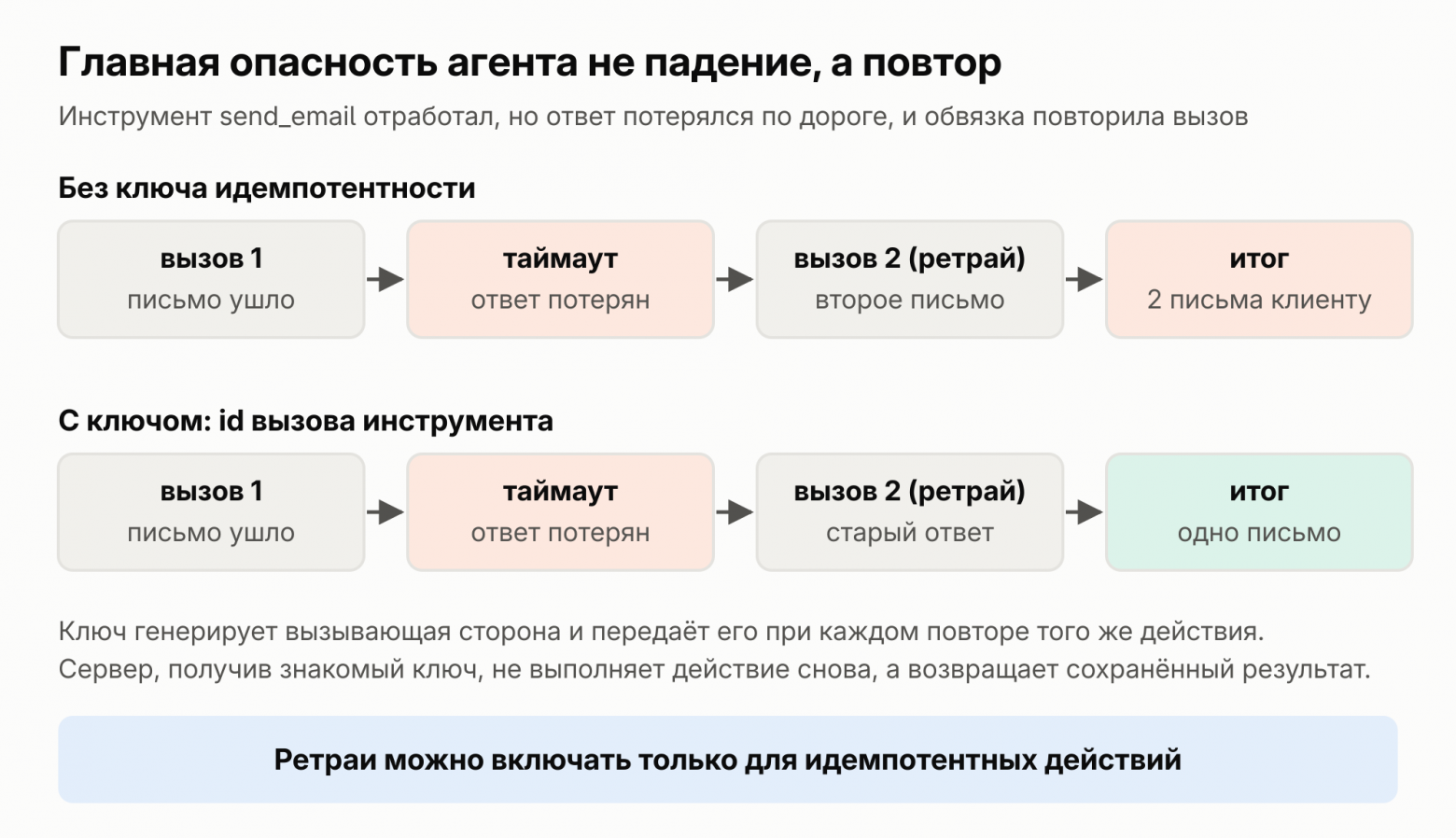 The same failure without an idempotency key and with one.The property that “a repeat does not change the result” is called idempotency. A read is inherently idempotent. An action with side effects is made idempotent using a key. This is how the Stripe API works.The client creates a unique key and sends it with the request. The server stores the response to the first request with that key. On a retry, it returns the stored response and does not perform the operation a second time. If the key is the same but the parameters differ, Stripe will return an error.
For an agent, the key already exists. Each tool call comes from the model with its own `id`, and it does not change on retry. My advice, not a rule from the documentation: pass this `id` as the idempotency key to the tool and onward to the external system.
# Pseudocode: an idempotent tool def send_email(recipient, body, key): if already_done(key): # we have already performed this call return saved_result(key) result = mail.send(recipient, body, idempotency_key=key) save(key, result) return result send_email(email.recipient, email.body, key=call.id)This check has a gap. If the process crashes between sending the email and the `save` line, it will not catch a duplicate. The most reliable option is when the external system itself understands the key, as Stripe does. If it does not, such an action is better handed to a human for approval.
Durable execution and Temporal: don’t lose completed work
A retry rescues a single step. But if the agent process itself crashes, there is nothing to retry. The history, step number, and tool results were in memory and were lost. Progress must be stored outside the process. This approach is called durable execution, or fault-tolerant execution. Let’s examine it using Temporal.
In Temporal, the code is divided into two parts. A Workflow is the logic: the agent loop, branching, and waits. Activities are everything that touches the external world: making API calls, writing to a database, sending an email, and charging money. Every event is written to the event history.If a worker crashes, another worker takes the history, replays the workflow code, and resumes from the point of failure. Completed steps are not executed a second time: their results are taken from the history.
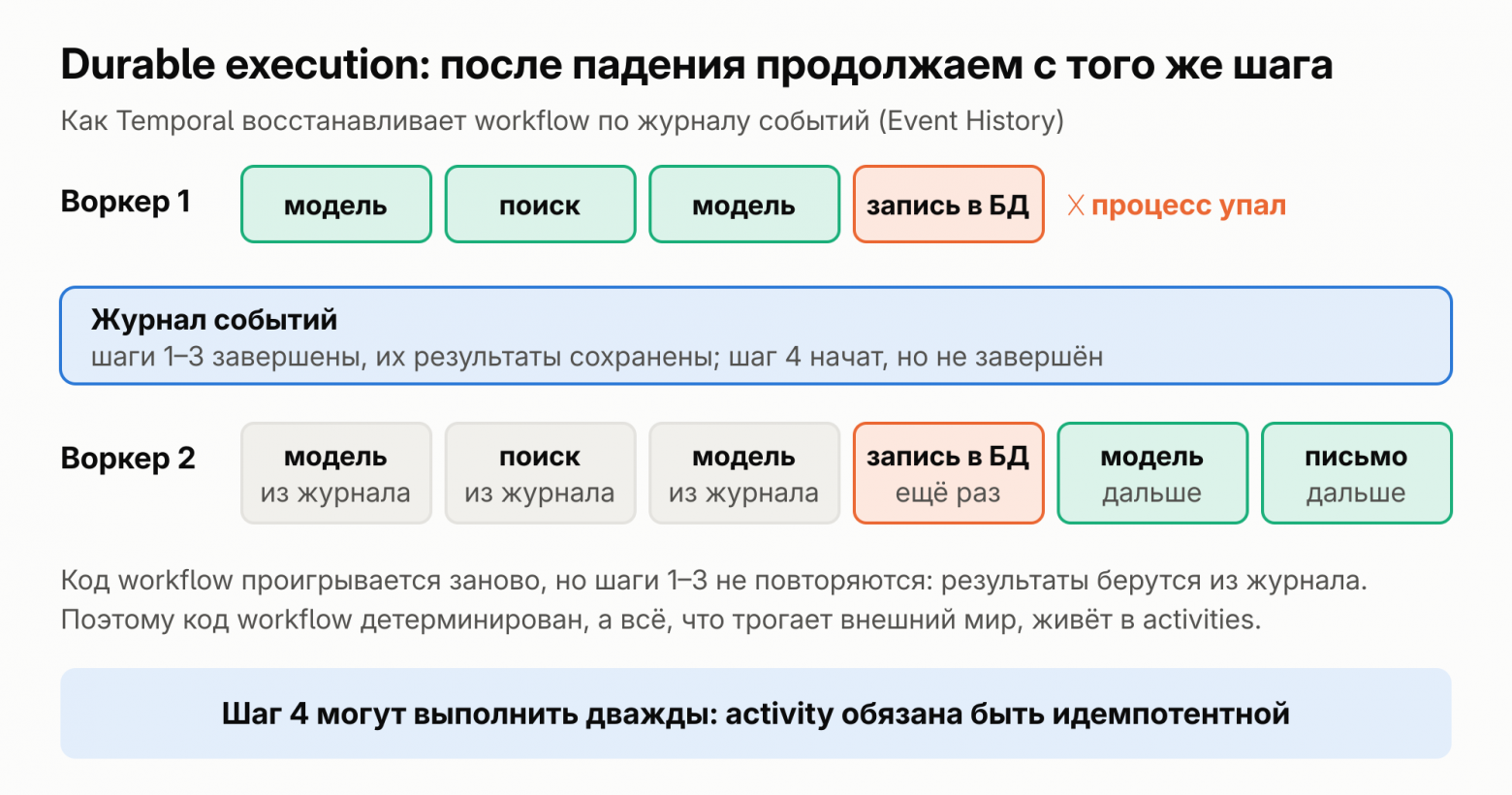
This gives rise to two requirements. The workflow code must be deterministic because Temporal replays it. Random values, the current time, and network requests belong only in activities. Activities must also be idempotent: the step at which everything crashed will be run again. By default, Temporal retries activities indefinitely.
An agent fits naturally into this pattern. The loop lives in the workflow. The model invocation and each tool invocation become activities with their own retry policies.
# Pseudocode: an agent loop as a workflow @workflow def agent(task): history = [task] while True: response = activity(call_model, history, retries=model_policy) history.append(response) if response.stop_reason != "tool_use": return response for call in response.calls: result = activity(execute_tool, call, key=call.id) history.append(result)Now, the cost. The loop from Part 1 costs $0.51 with caching. If the process crashed on turn 25 and the task is started from scratch, it will cost $0.93, 81% more.
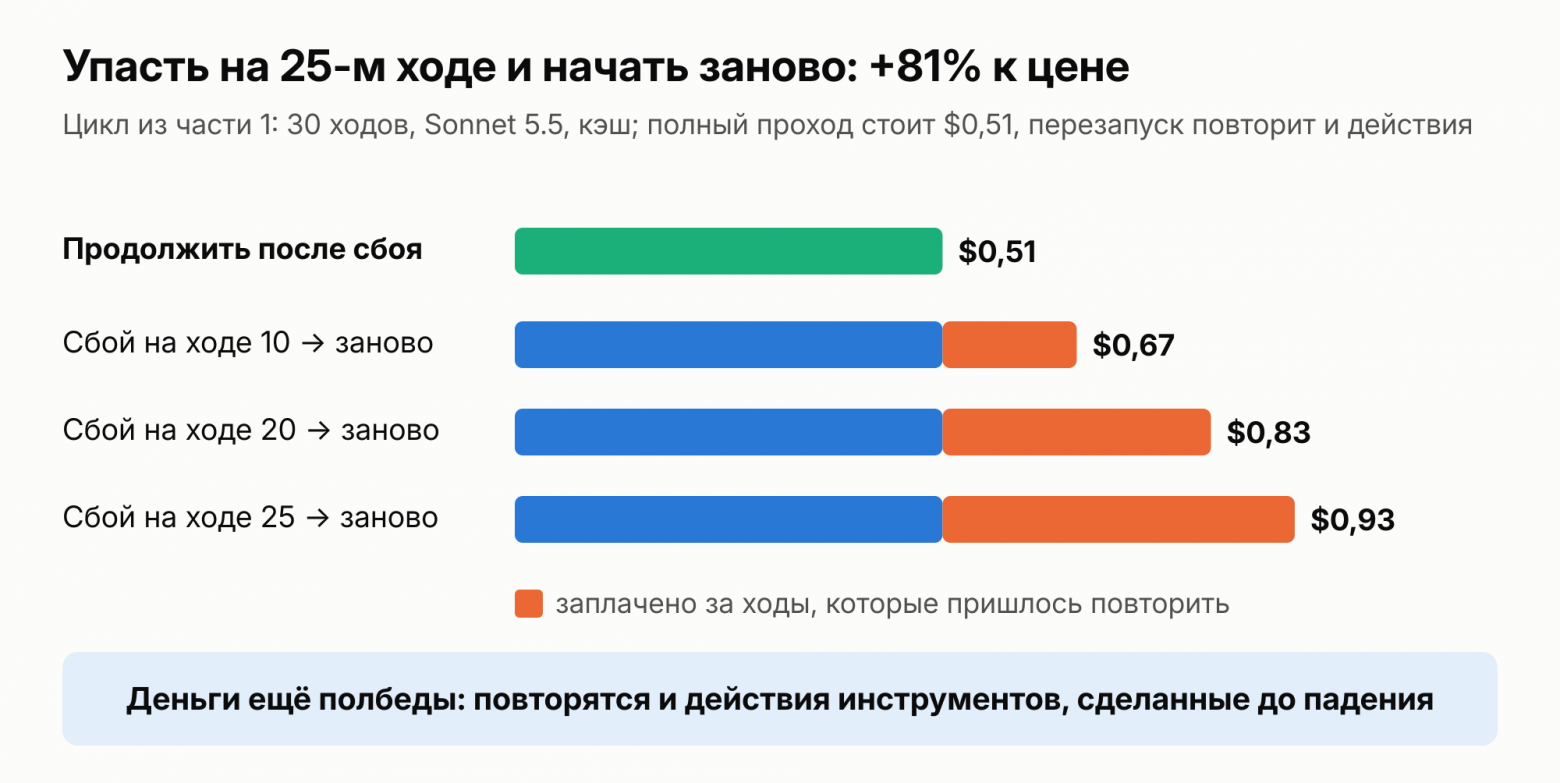
Cost is only half the problem. On restart, the 25 actions already performed will be performed again, and each non-idempotent one will produce a duplicate.
That’s how Yandex handled it in production.Their “Research” agent in Alice AI runs for up to 20 minutes and browses dozens of websites. In the first version, the state was stored locally: the process would crash, and everything would start over, along with the tokens already burned. The team switched to Temporal to recover from the event history. They immediately ran into the same issue mentioned in the section above: Temporal may rerun an activity, so side effects must be idempotent.
Temporal is not the only option. LangGraph has its own mechanism: it saves the state at every step and, after a crash, resumes from the last checkpoint. There are other engines as well: Restate, DBOS, Inngest. I have not compared them. And keep in mind that most of the texts about durable execution for agents are written by the engine authors themselves, Temporal included.
Sagas: rolling back what has already been done
Durable execution carries a process to completion even if it crashes along the way. But the ending can be a failure. An agent has booked a hotel and bought a ticket, but the card payment was declined. There is no single transaction spanning the hotel, airline, and bank. A single ROLLBACK cannot undo everything.
This is what sagas are for. The pattern was described by Garcia-Molina and Salem back in 1987. A long-running process is divided into steps, and a compensation is defined in advance for each one. If something breaks, the system undoes the completed actions in reverse order. A compensation does not erase history. It cancels the operation in business terms: return the ticket, cancel the reservation, refund the money.
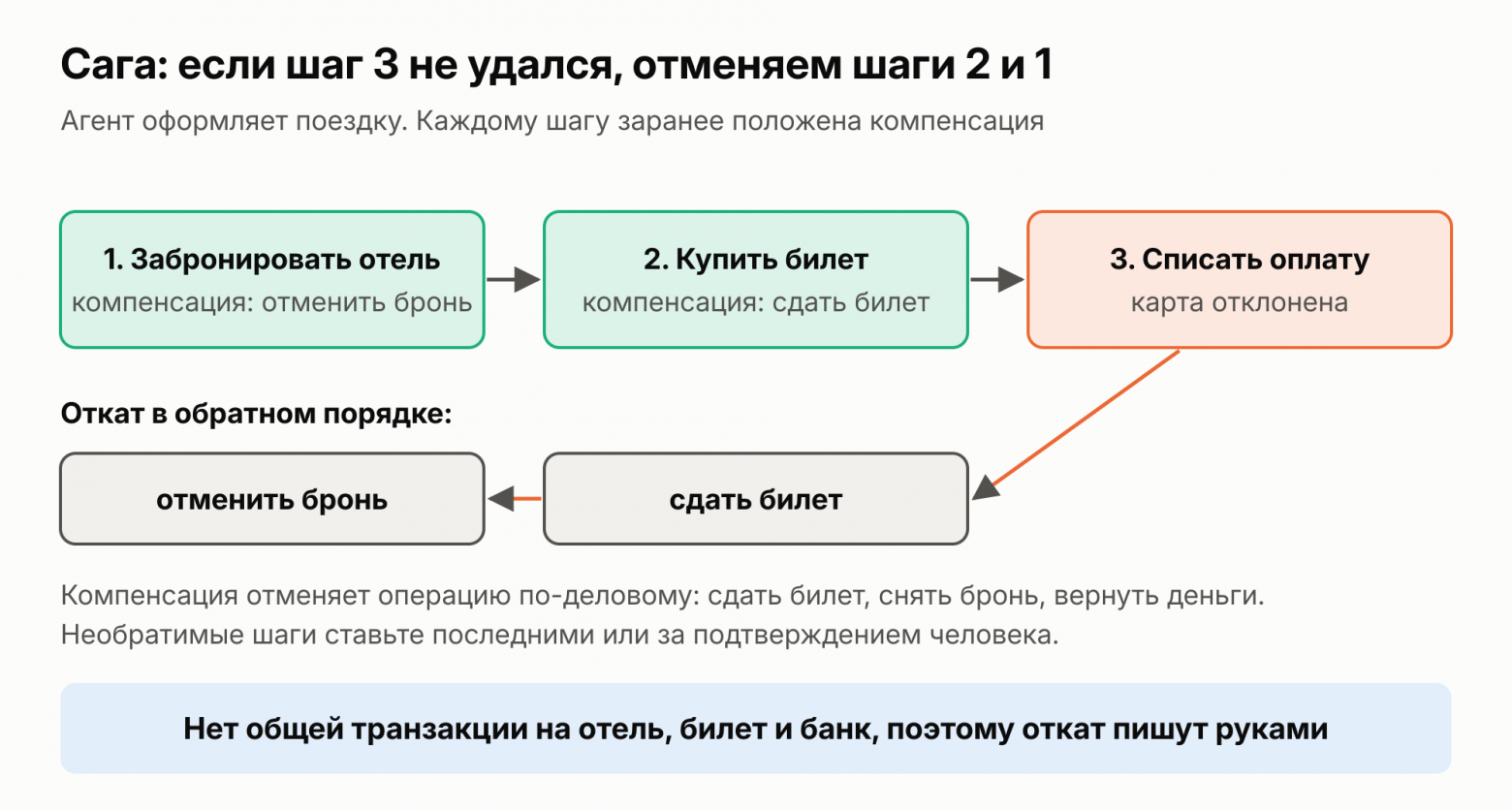
You cannot unsend an email that has already been sent. Put such actions last, once everything else has succeeded, or hand them to a human for confirmation. The next section covers this.
Human Confirmation of Actions
An agent should not perform some actions silently: sending an email to a customer, charging money, deleting data, or deploying code. OWASP identifies the opposite situation as a separate risk, Excessive Agency: the agent has more permissions and autonomy than the task requires.
Two questions determine what should be confirmed: whether the action can be undone and how costly an error is. Reading and drafting do not require confirmation. Sending, payment, and deletion do.
12-Factor Agents recommends using the same mechanism to ask for human input as for tools. The model invokes a tool such as request_approval with a description of the action, while the code pauses the task and waits for a response. The Claude Agent SDK provides the can_use_tool callback for this purpose (canUseTool in TypeScript). The SDK invokes it for every tool call that the rules have neither allowed nor disallowed in advance. The callback presents the action to the human and returns “allow” or “deny.” If denied, the model sees the reason and can choose another path. Rules are specified as lists: allowed_tools lets calls through without asking, while disallowed_tools always blocks them. For an agent with no human nearby, there is a dontAsk mode: anything that would require a question is immediately denied.
A human may take minutes, hours, or even overnight to respond. The SDK callback can wait indefinitely, but the process must remain alive throughout that time.The documentation explicitly recommends deferring the call via a hook for long waits, letting the process finish, and resuming the saved session later. Keeping the process in memory for hours is dangerous: a deployment will restart it, or a crash will bring it down. Temporal comes to the rescue here again. A workflow waits for a signal—an asynchronous message sent to an already-running workflow. The wait is recorded in the journal and survives crashes and deployments. The wait has a timeout. The Temporal Agent Harness works the same way: an agent pauses until a human makes a decision and resumes even if the response arrives several hours later.
# Pseudocode: human approval in Temporal @workflow class SendInvoice: decision = None @signal def human_decision(self, response): # comes from the interface when the person clicks the button self.decision = response @run def run(self, customer, amount): email = activity(prepare_email, customer, amount) activity(show_to_human, email) # recipient, amount, and full text decision_received = wait_condition(lambda: self.decision, timeout=one_day) if not decision_received or self.decision != "approve": return "not sent" # do nothing without a response return activity(send_email, email, key=email.id)Three rules. Show the human exactly what will actually be executed: the recipient, amount, and text—not the model’s paraphrase. If there is no response before the timeout, the action is not performed. Also make the execution after “yes” idempotent, because the button may be clicked twice.
Deployment in the middle of a task
The last source of failures is one you create yourself: rolling out a new version while agents are still running. Anthropic rolls out its own system gradually; this is called rainbow deployments.The new version runs alongside the old one, while agents that are already running finish on the old one. Temporal has its own constraint. The new workflow code must replay old steps in exactly the same way as the old code; otherwise, recovery will break. Therefore, the workflow logic for tasks that are still in progress is changed carefully.
Observability: see every step
The agent crashed on turn 17. Without a trace, you will only know that the task did not complete. A trace shows every step: what was sent to the model, what it replied, which tool was called, how long it took, and what it cost.
There is no need to invent a format. OpenTelemetry has conventions for GenAI: separate spans for the model call, the agent (invoke_agent), and the tool (execute_tool), as well as attributes for the model and tokens. Their status is still Development, so they may still change. By default, prompt and response texts are recorded only when explicitly enabled: they may contain personal data.
What to measure in terms of cost:
The cost of the entire task, not a single call. Claude Agent SDK returns it in the final message: total_cost_usd and num_turns. This is a client-side estimate, not an invoice.
The cost of a successful task. Failed tasks cost money too: the steps before the failure have already been paid for. With a 1% failure rate per step and no retries, a successful task costs $0.60 instead of $0.51. At 3%, it costs $0.84, 63% more. Compare this figure with the cost of manual work.
- Cache ratio. Look at cache_read_input_tokens in usage.If the value there is almost always zero, caching is not working, and in the example from Part 1, it made the task 6.6 times cheaper.
Moves and retries per task. Tasks with a much higher-than-usual number of moves are the first candidates for getting stuck in a loop.
Share of tasks that have fallen back to Plan B.
Store prompts in Git and record their version in the trajectory. Otherwise, you will not understand which change caused the quality to drop.
Evaluations: tests for nondeterministic code
You change a word in a prompt or tool description, and the agent starts making mistakes elsewhere more often. Such issues are caught with evaluations (evals). Anthropic’s guide to agent evaluations advises against waiting for the perfect set: 20–50 simple tasks based on real failures are already a good starting point. Take them from the bug tracker and support requests.
Evaluation can be done with code (the answer matches, the test passes), a model (an LLM judges according to criteria), or a human. Code is fast and unambiguous, a model is more flexible, and a human is more accurate but more expensive. Since the model is nondeterministic, a single attempt proves nothing. You need two metrics: pass@k, where at least one of the k attempts succeeds, and pass^k, where all k attempts succeed. The second is important for an agent that acts autonomously.
Run evaluations in CI for every change to a prompt, tool, or model, just like unit tests. Add every production failure to the set. Also, read the transcripts regularly: this is the only way to see that an evaluation measures what it is supposed to measure.
Security: the agent will follow someone else’s instructions
A model cannot reliably distinguish your instructions from text it encountered along the way. Prompt injection ranks first in the OWASP Top 10 for LLM Applications 2025.The most dangerous is indirect injection: the instruction comes not from the user but from the tool's response. It could be a website page, an email, or a document from RAG.
MCP has its own version of the attack. Invariant Labs demonstrated tool poisoning: an instruction is hidden in the description of an MCP tool, which the model sees but the user does not. In their demo, a harmless addition tool asked the model to read ~/.ssh/id_rsa and pass the contents in a parameter. The description can also change after you have already approved the server.
Filters against injections provide no guarantees. Simon Willison writes that catching 95% of attacks in security means failing. He proposes the "deadly trinity" rule. An agent is dangerous when it has all three things at once: access to private data, untrusted content, and the ability to send data out.
The rest is familiar from the backend. Give tools minimal permissions: if read access is enough, don't grant write. Run the code the agent writes in a sandbox. Check the model's output before passing it to SQL, shell, or a browser. Don't write secrets and personal data into logs and traces. Hand irreversible actions over to a human, as in the section on confirmation.
Checklist: from demo agent to prod
Design
First try a chain or a single call with search. Use an agent only where you can't do without it.
Tools should be large, with no overlap. Responses short, errors suggesting how to fix the call.
If the knowledge base is less than 200 thousand tokens, put it in the prompt with caching.If there are more, search by meaning and by keywords, rerank them, and test search separately.
A limit on turns, a budget in dollars, and a per-task timeout, with some headroom over a regular task. Decide where the task goes when these are exhausted.
Reliability
Retry only transient errors: 429 with Retry-After, 529, 500, 504, and network errors. Increase the backoff.
Decide for each tool whether it can be retried. Pass the idempotency key (call ID) through to the outermost system.
Store progress outside the process: durable execution, checkpoints, or at least a step log. In workflows, use only deterministic logic.
For actions spanning multiple systems, write compensating actions in advance. Put irreversible actions last.
Gate sending, payment, and deletion behind human confirmation: show the exact action and do nothing without a response until the timeout.
Operations
A trace of every step, with the prompt version in it. Cost per task, cost per successful task, cache hit rate, and turns per task.
Run 20–50 tasks from real failures in CI for every change to a prompt, tool, or model.
Do not expose the agent to private data, untrusted content, and outbound connectivity all at once.Least privilege, sandboxing, no secrets in logs.
Enable prompt caching: it reduces both the bill and the number of 429 errors.
An agent that completes 10 out of 10 steps in a demo performs thousands of 30-step tasks in production. The arithmetic from the beginning of the article applies here: a 1% failure rate per step means that, without retries, every fourth task fails to reach the end. Retries fix exactly this. The other practices determine what a task costs and what the agent manages to break along the way.
Which of these practices did you adopt only after getting burned?
The “AI Engineering for Those Who Are Diving In” series
This is a three-article series.
“AI Engineering for Those Who Are Diving In: Agents, MCP, Tokens, and Caching—with Numbers”
“An AI Agent in Production for Those Who Are Diving In: Tools, RAG, Reliability, and Checks” (you are reading it now)
“An Agentic System for Those Who Are Diving In: Building a Support Agent from a Single File to Temporal, Sagas, and a Circuit Breaker”